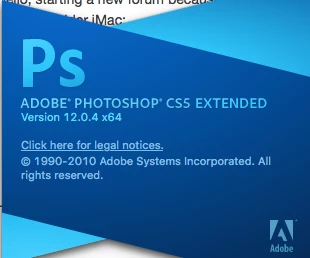
Curtis Larson
Participating Frequently
April 29, 2019
Question

CS5 Lighting Effects stopped working

  • April 29, 2019
  • 3 replies
  • 1351 views

Hello, starting a new forum because the older one (2012- 2017?) yielded no solution.

Yes, I have an older iMac: 
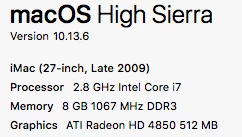
Lighting Effects just stopped working / is greyed out. Not positive when last used this filter - maybe 6 most?, but I do use Photoshop almost daily, and everything else still works. Have a project I can't do without Lighting Effects, so am in a bind now. Yes, I tried everything in the prior forum on this and it did not work, and yes, I have the most current video card driver.

Would appreciate some help. Thanks.

Curt

    This topic has been closed for replies.

    3 replies

    Jeff Arola
    Community Expert
    Community Expert
    April 29, 2019

    You need to run photoshop cs5 in 32 bit mode in order to use Filter>Render>Lighting Effects.

    Switching Photoshop CS5 64 bit to 32 bit on a Mac - YouTube

    Curtis Larson
    Participating Frequently
    April 30, 2019

    OK, thanks Jeff. Tried changing to 32 bit mode couple times.

    First, PS asks if you want to flatten the image file, but you don’t have to. But if you do say yes, an interesting dialogue box pops up called HDR Toning….. the picture changes and the box allows for all kinds of interesting adjustments to be made further. Interesting possibilities there.

    However, if you change to either 16 or 32 bit mode, more than half of the filters become grayed out (see pic), AND THERE IS STILL NO LIGHTING EFFECTS FILTER

    So this still isn’t working.

    To be clear, the Lighting Effects filter has been working in my CS5 for years without issue. Suddenly, it was gone, and I think it was within the last 6 months, but I could be wrong as I don’t use it a whole lot - but it’s really useful when you need it.

    Any other ideas?

    Curt

    Jeff Arola
    Community Expert
    Community Expert
    April 30, 2019

    No, you need to change in what mode photoshop cs5 opens by selecting Open in 32 bit mode in the

    File Info dialog as per the video link i provided. Watch the below video for instructions.

    Switching Photoshop CS5 64 bit to 32 bit on a Mac - YouTube

    melissapiccone
    Community Expert
    Community Expert
    April 29, 2019

    There were a few years where the filter just didn't work at all and I'm thinking it was CS5. It was just broken so, that might be the problem. For what it's worth, has been working perfectly the last few years and is fine in CC 2019.

    Melissa Piccone | Adobe Trainer | Online Courses Author | Fine Artist
    Curtis Larson
    Participating Frequently
    April 30, 2019

    Well, thanks for the reply…. Unfortunately you may be right in that sometimes, things just break (for any number of reasons), and there is no fix. Don’t like that answer.

    So far, not found a solution, but still looking. I’ve got someone from Adobe attempting…..

    Akash Sharma
    Legend
    April 29, 2019

    Hi Curt,

    Sorry that the Lightning effects filter is grayed out in Photoshop CS5.

    Check that in the Preferences > Performance > Advanced menu, the Drawing Mode is set to  Basic or Normal and then restart Photoshop.

    If your system has automatic GPU switching, you may want to disable that in Energy Saving under your Mac System Preferences.

    Also, see this similar discussion: lighting effects grayed out

    Let us know how it goes.

    Thanks,

    Akash

    Curtis Larson
    Participating Frequently
    April 29, 2019

    I reset to Normal and restarted. Actually, there is not Lighting Effect filter any longer displayed at all. I said greyed-out because that is what I’d recalled. Now there is nothing. Even more curious.

    Curt