Exit
  • Global community
    • Language:
      • Deutsch
      • English
      • Español
      • Français
      • Português
  • 日本語コミュニティ
  • 한국 커뮤니티
0

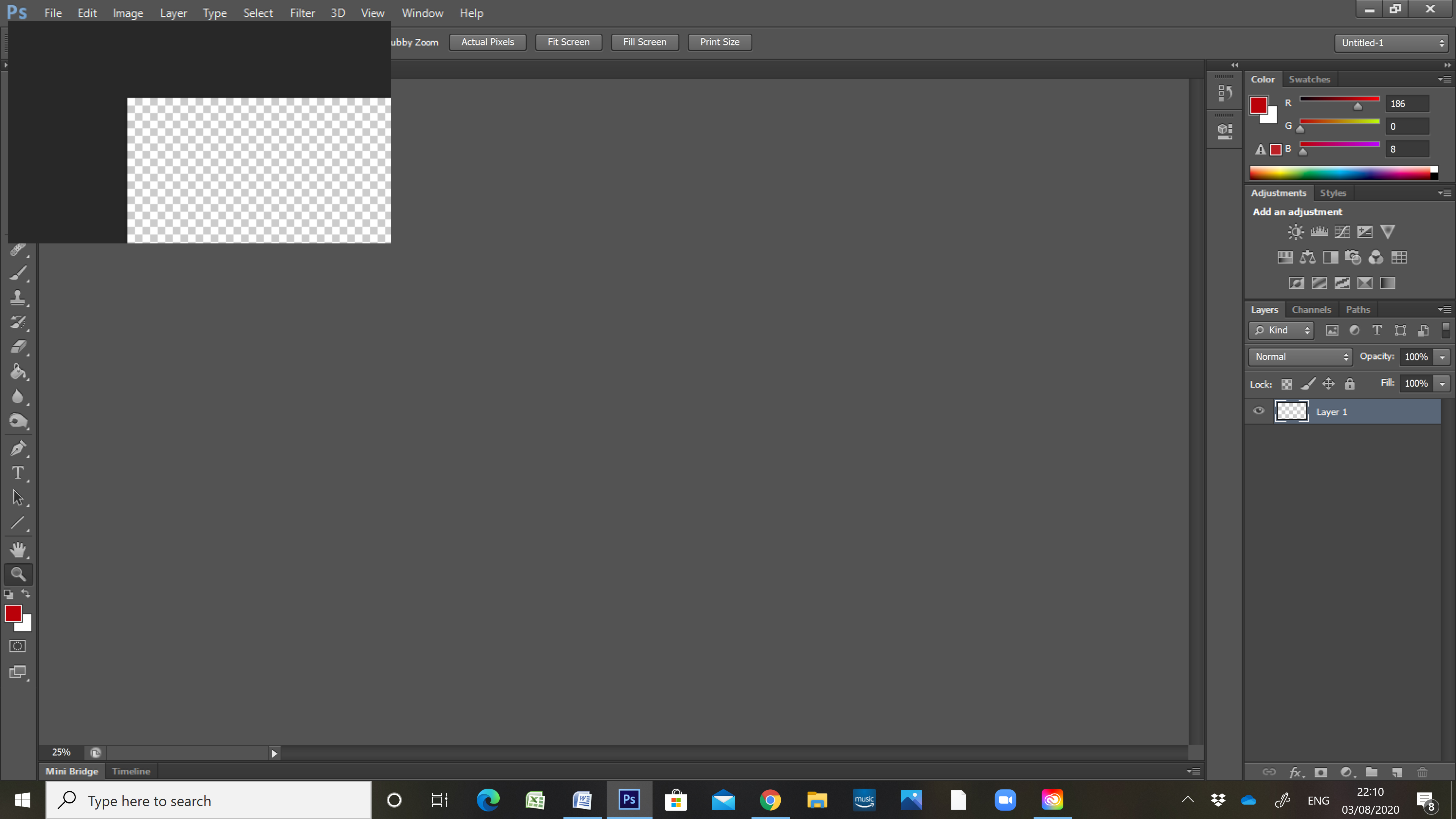
CS6 - image in small rectangle at top of screen

New Here ,
Aug 03, 2020 Aug 03, 2020

Since the last Windows 10 update, my images appear in small black windows at top left of Photoshop screen. They can't be dragged or resized, so I am unable to edit them. Any ideas on how to fix the problem?

633
Translate
Report
Community guidelines
Be kind and respectful, give credit to the original source of content, and search for duplicates before posting. Learn more
community guidelines
Adobe
Community Expert ,
Aug 03, 2020 Aug 03, 2020

Have you tried resetting all Photoshop tools and if that does not fix try resetting you Photoshop preferences 

JJMack
Translate
Report
Community guidelines
Be kind and respectful, give credit to the original source of content, and search for duplicates before posting. Learn more
community guidelines
New Here ,
Aug 03, 2020 Aug 03, 2020

How do you reset Photoshop tools and preferences?


Translate
Report
Community guidelines
Be kind and respectful, give credit to the original source of content, and search for duplicates before posting. Learn more
community guidelines
New Here ,
Aug 03, 2020 Aug 03, 2020

I have relaunched Photoshop while holding down Ctrl Alt Shift, but this made no difference - image still appears as thumbnail which can't be dragged or enlarged

Translate
Report
Community guidelines
Be kind and respectful, give credit to the original source of content, and search for duplicates before posting. Learn more
community guidelines
Community Expert ,
Aug 03, 2020 Aug 03, 2020

Did you get the dialog that ask if you want to delete your Preferences. If you did not get that prompt and reply yes the you did not reset your preferences.  You need to start Photoshop then immediately press and hold Ctrl+Alt+Shift  if done quickly in time you shot get that dialog to delete your preferences.

JJMack
Translate
Report
Community guidelines
Be kind and respectful, give credit to the original source of content, and search for duplicates before posting. Learn more
community guidelines
Community Beginner ,
Jun 03, 2021 Jun 03, 2021

Has anyone figured out this problem?  I'm experiencing the same thing over here....

Translate
Report
Community guidelines
Be kind and respectful, give credit to the original source of content, and search for duplicates before posting. Learn more
community guidelines
Community Expert ,
Jun 03, 2021 Jun 03, 2021
LATEST

Did you try resetting your CS6 Preferences?

JJMack
Translate
Report
Community guidelines
Be kind and respectful, give credit to the original source of content, and search for duplicates before posting. Learn more
community guidelines