Participant
April 10, 2018
Answered

Ctrl+Alt+Z opens Notepad?

  • April 10, 2018
  • 2 replies
  • 1088 views

Instead of Step Backward, ctrl+alt+z open Notepad. It doesn't seem to matter what program I'm in; it always opens Notepad. As far as I can tell, everything else seems to work. Has anyone had a similar issue?

This topic has been closed for replies.
Correct answer Jeff Arola

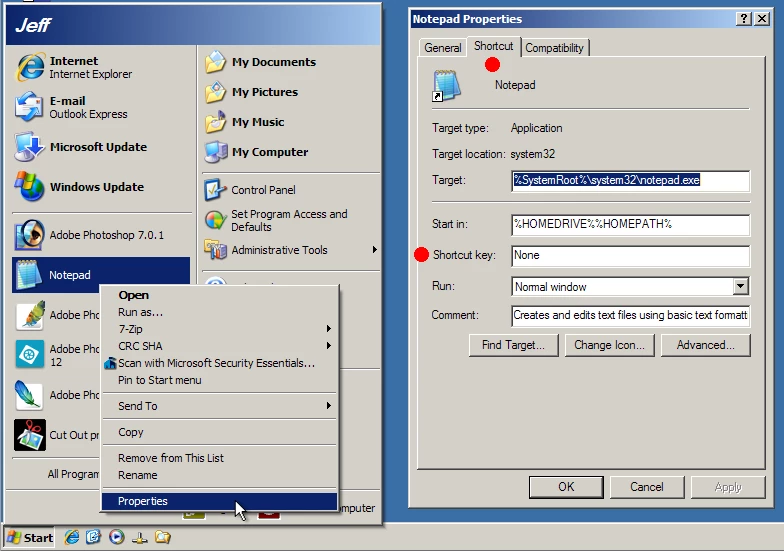
Right click on the Notepad shortcut, then Properties and Shortcut and see if a Shortcut key is set.
2 replies

Jeff Arola
Community Expert
Jeff ArolaCommunity ExpertCorrect answer
Community Expert
April 10, 2018

Right click on the Notepad shortcut, then Properties and Shortcut and see if a Shortcut key is set.

Nikk_UMDAuthor
Participant
April 10, 2018

That did it! I'd been looking for something like that, but didn't know there was an option like that. Thank you.

JJMack
Community Expert
Community Expert
April 10, 2018

Have you added anything into Windows the may do that?  If Notepads starts in All Applications it is not Photoshop the woul be doing that.  It would more likely something like a Windows device driver.  Have you installed any special gamming keyboard software?

JJMack
Nikk_UMDAuthor
Participant
April 10, 2018

I had considered that. I have Logitech Options, but I can't find anything that would set keyboard shortcuts.

JJMack
Community Expert
Community Expert
April 10, 2018

I have Logictech Gaming software and use it for my Logictech G13 keyboard and g502 mouse.  The G13 is a gamming keypad not anything like a normal keyboard.   If you have a Logictech Gaming keyboard the look like a regular keyboard I would think the Logictech gamming software would display the way you have keys mapped.   On my g13 and G502 that is the case and I may make a keys to multiple keys but multiple keys I do not map to a Photoshop.  Make sure you have not mapped a normal key like Alt, Crtl or Z to something else.

JJMack