gregjobes_lhh
Known Participant
October 18, 2017
Answered

Curvature Pen Tool is missing ...

  • October 18, 2017
  • 6 replies
  • 6819 views

The ONLY interesting feature in the new Photoshop October 2017 release is not there.  Lovely.  I tried to reset all tools, but it's still not there. 

Anyone else having this problem?

Thanks

MacOS high Sierra, MacBook Pro 2016
This topic has been closed for replies.
Correct answer davescm

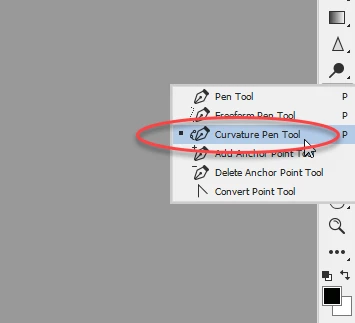
Have you tried clicking and holding on the pen tool in the toolbar

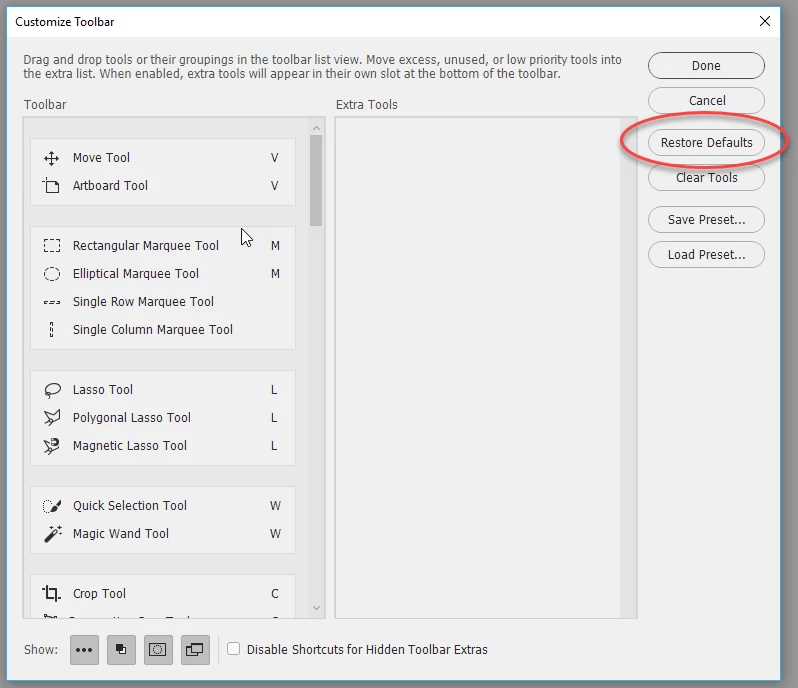
If it still does not appear - try resetting the toolbar

Dave

6 replies

Participant
November 2, 2017

none of these things are working for me. 2017 CC on  a mac.

tried all work spaces and edit tool bar (nothing shows up to load)

can't update to 2018 other wise I will be stuck in Adobe Hell having incompatibility issues and eventually having to update EVERYTHiNG... just for the want of one freaking tool. 

Suggestions welcome. 

davescm
Community Expert
Community Expert
November 2, 2017

caryf14828537  wrote

2017 CC on  a mac...............

................can't update to 2018 other wise I will be stuck in Adobe Hell

The curvature is in CC2018 - if you don't want that version - then no curvature tool

Dave

caseyv.com.au
Known Participant
October 19, 2017

Mine is also hidden away under the Extra Tools.

Windows 10 Pro.

Participant
October 18, 2017

Worked, thank you c.pfaffenbichler Had the same issue, Windows 10, Upgrade from the previous version of Ps, found in Extra Tools.

SG...
Adobe Employee
Adobe Employee
October 19, 2017

Hi,

I'm going to ask further internally, but my suspicion is that you all have custom workspaces defined from previous major versions. Those workspaces have been migrated to the the new major update version and the new tool is not part of those custom defined sets.

If you select the Essentials workspace, does the new tool show up in the tool slot?

regards,

steve

Participant
October 19, 2017

That's 100% correct in my case, I had a custom space defined. And by the way - the Curvature Pen, I love it

gregjobes_lhh
Known Participant
October 18, 2017

Found ... it was tucked away in the Extra Tools for some reason. See screenshot ... baffling.

c.pfaffenbichler
Community Expert
Community Expert
October 18, 2017

Use Edit > Toolbar to set your Toolbar up according to your needs/taste.

davescm
Community Expert
davescmCommunity ExpertCorrect answer
Community Expert
October 18, 2017

Have you tried clicking and holding on the pen tool in the toolbar

If it still does not appear - try resetting the toolbar

Dave

Tryam
Participant
October 18, 2017

Windows 10....Problem resolved...thank you

c.pfaffenbichler
Community Expert
Community Expert
October 18, 2017

Please post a meaningful screenshot to illustrate your claim.

Your claim that this is the only interesting improvement with this Photoshop release makes it seem dubious whether you are being serious, though.

gregjobes_lhh
Known Participant
October 18, 2017

Wow, really?  Here is a screenshot

And yes, I clicked and held down the Pen Tool for the options AND reset all the tools ... it's just not there

c.pfaffenbichler
Community Expert
Community Expert
October 18, 2017

What about Edit > Toolbar/Customize Toolbar?

Could the Tool have been hidden because it was not part of an old Preset?

Wow, really?

Really what?