
Participant
June 25, 2023
해결됨

Custom Brush Sets Foreground Color to a Predetermined Color

  • June 25, 2023
  • 1 답변
  • 474 조회

Hello,


I downloaded a custom brush that looks fine and all, but it automatically sets my foreground color to black every time I choose it, which is extremely annoying because I've now lost whatever color I was using. How do I edit the brush to remove this? Ideally, please also teach me how brush makers even set a tool and color for their brushes so I know how to get around this.


Here's how it looks in the Brushes panel. The black square under the brush icon indicates it has a default color.
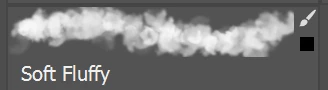
 

I am using Photoshop 24.5.0

이 주제는 답변이 닫혔습니다.
최고의 답변: Michael Bullo

Select a brush which will change all the settings. Then create a new brush while making sure the "Include Color" option is not active.

1 답변

Michael Bullo
Community Expert
Community Expert
June 25, 2023

When you create a brush in Photoshop you have the option to include the color.

kpliang작성자
Participant
June 26, 2023

Can this color be removed after the fact?

Michael Bullo
Community Expert
Community Expert
June 26, 2023

Select a brush which will change all the settings. Then create a new brush while making sure the "Include Color" option is not active.