
Participant
June 25, 2023
Answered

Custom Brush Sets Foreground Color to a Predetermined Color

  • June 25, 2023
  • 1 reply
  • 474 views

Hello,


I downloaded a custom brush that looks fine and all, but it automatically sets my foreground color to black every time I choose it, which is extremely annoying because I've now lost whatever color I was using. How do I edit the brush to remove this? Ideally, please also teach me how brush makers even set a tool and color for their brushes so I know how to get around this.


Here's how it looks in the Brushes panel. The black square under the brush icon indicates it has a default color.
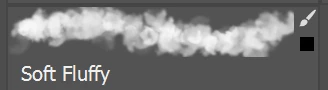
 

I am using Photoshop 24.5.0

This topic has been closed for replies.
Correct answer Michael Bullo

Select a brush which will change all the settings. Then create a new brush while making sure the "Include Color" option is not active.

1 reply

Michael Bullo
Community Expert
Community Expert
June 25, 2023

When you create a brush in Photoshop you have the option to include the color.

kpliangAuthor
Participant
June 26, 2023

Can this color be removed after the fact?

kpliangAuthor
Participant
June 26, 2023

Select a brush which will change all the settings. Then create a new brush while making sure the "Include Color" option is not active.


Thank you.