RRowe
Inspiring
January 17, 2023
Answered

Custom script for renaming artboards, with multiple elements

  • January 17, 2023
  • 4 replies
  • 5812 views

I've read many of the posts already with similar questions and help, but I'm not finding what I ultimately need, and first probably need to know if it is even possible. 


I have PSD with many artboards. Each artboard has a single layer where an image will be place. I need a script, or script/action combo, to rename each artboard to a name that contains 3 elements:

1- Web## (this will be consistent through every PSD I have and the artboards will already have this element in the name. Ex: Web01, Web02, Web03
2- The next element (xx) will be the same for each artboard within the PSD, but different for each of the other PSDs. Ex: Keyword_Size_SKU
This could be a single step of bringing the name string into each document and putting it somewhere for a script to access, perhaps the name of a dummy artboard at the top of the stack.
3- The last element (yy) would be unique for each artboard. This last part of the Artboard's name (aside from the exporting filetype) would be the exact same as the single layer's name that is on that artboard.

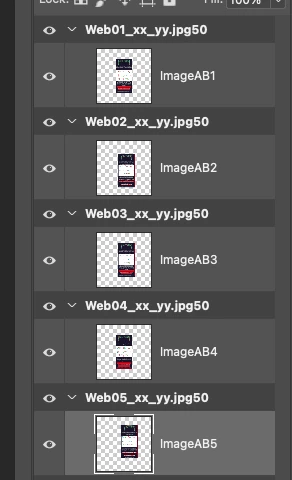
With the attached example, the resulting artboard names would be:
1- Web01_Keyword_Size_SKU_ImageAB1.jpg
2- Web02_Keyword_Size_SKU_ImageAB2.jpg
3- Web03_Keyword_Size_SKU_ImageAB3.jpg
4- Web04_Keyword_Size_SKU_ImageAB4.jpg
5- Web05_Keyword_Size_SKU_ImageAB5.jpg


Does this even sound possible?
Thank you, all!

This topic has been closed for replies.
Correct answer Stephen Marsh

An updated 1.3 version using the code from @jazz-y  to reverse the parent layerSet child layers array.


/*
Rename Artboards Using A Specific Text Pattern.jsx
https://community.adobe.com/t5/photoshop-ecosystem-discussions/custom-script-for-renaming-artboards-with-multiple-elements/td-p/13498536
v1.3, 22nd January 2023, Stephen Marsh
*/

#target photoshop

  (function () {

    // Check for open doc
    if (app.documents.length > 0) {

      // Set the Keyword_Size_SKU naming variable
      var B = prompt("Enter the Keyword_Size_SKU info:", "Keyword_Size_SKU");
      // Test if cancel returns null, then terminate the script
      if (B === null) {
        //alert('Script cancelled!');
        return;
      }

      // Main script function for single history step
      function main() {

        // Set the initial layer visibility
        var currentLayersState = getLayersVisiblity();

        // Loop forwards over top level layer sets
        for (var i = 0; i < activeDocument.layerSets.length; i++) {
          // Loop backwards over top level layer sets
          // for (var i = activeDocument.layerSets.length - 1; i >= 0; i--) {

          // Set the for loop variable as the active layer
          activeDocument.activeLayer = activeDocument.layerSets[i];

          // Conditional (redundant) check that the active layer is a layer set
          if (activeDocument.activeLayer.typename === "LayerSet") {

            // Set the remaining naming variables
            var A = activeDocument.activeLayer.name.replace(/(^.+?)(_.+)/, "$1");
            var C = [].slice.call(activeDocument.activeLayer.layers).reverse()[0].toString().replace(/(^\[.+ )(.+)(\]$)/, "$2");
            var D = activeDocument.activeLayer.name.replace(/(^.+?)(\.[^\.]+$)/, "$2");

            // Rename the layer set
            activeDocument.activeLayer.name = A + "_" + B + "_" + C + D;
          }
        }

        // Restore the initial layer visibility
        setLayersVisiblity(currentLayersState);


        // Functions

        function getLayersVisiblity() {
          // by jazz-y
          var s2t = stringIDToTypeID,
            t2s = typeIDToStringID;
          (r = new ActionReference()).putProperty(s2t('property'), p = s2t('targetLayersIDs'));
          r.putEnumerated(s2t('document'), s2t('ordinal'), s2t('targetEnum'));
          var targetLayers = executeActionGet(r).getList(p),
            seletion = [],
            visiblity = {};
          for (var i = 0; i < targetLayers.count; i++) seletion.push(targetLayers.getReference(i).getIdentifier());
          (r = new ActionReference()).putProperty(s2t('property'), p = s2t('numberOfLayers'));
          r.putEnumerated(s2t('document'), s2t('ordinal'), s2t('targetEnum'));
          var len = executeActionGet(r).getInteger(p);
          for (var i = 1; i <= len; i++) {
            (r = new ActionReference()).putProperty(s2t('property'), p = s2t('layerSection'));
            r.putIndex(s2t('layer'), i);
            if (t2s(executeActionGet(r).getEnumerationValue(p)) == 'layerSectionEnd') continue;
            (r = new ActionReference()).putProperty(s2t('property'), p = s2t('layerID'));
            r.putIndex(s2t('layer'), i);
            var id = executeActionGet(r).getInteger(p);
            (r = new ActionReference()).putProperty(s2t('property'), p = s2t('visible'));
            r.putIndex(s2t('layer'), i);
            var visible = executeActionGet(r).getBoolean(p);
            visiblity[id] = visible;
          }
          return {
            selection: seletion,
            visiblity: visiblity
          }
        }

        function setLayersVisiblity(layersStateObject) {
          // by jazz-y
          var s2t = stringIDToTypeID;
          for (var a in layersStateObject.visiblity) {
            makeVisible = layersStateObject.visiblity[a] ? "show" : "hide";
            (r = new ActionReference()).putIdentifier(s2t('layer'), a);
            (d = new ActionDescriptor()).putReference(s2t('target'), r);
            executeAction(s2t(makeVisible), d, DialogModes.NO);
          }
          if (layersStateObject.selection.length) {
            var r = new ActionReference()
            for (var i = 0; i < layersStateObject.selection.length; i++)
              r.putIdentifier(s2t("layer"), layersStateObject.selection[i]);
            (d = new ActionDescriptor()).putReference(s2t("target"), r);
            d.putBoolean(s2t("makeVisible"), false);
            executeAction(s2t("select"), d, DialogModes.NO);
          } else {
            (r = new ActionReference()).putEnumerated(s2t("layer"), s2t('ordinal'), s2t('targetEnum'));
            (d = new ActionDescriptor()).putReference(s2t('target'), r);
            executeAction(s2t('selectNoLayers'), d, DialogModes.NO);
          }
        }

      }

    } else {
      alert('A document must be open to use this script!');
    }

    // Single history step
    activeDocument.suspendHistory("Rename Layer Groups", "main()");

  }());


4 replies

Stephen Marsh
Community Expert
Stephen MarshCommunity ExpertCorrect answer
Community Expert
January 22, 2023

An updated 1.3 version using the code from @jazz-y  to reverse the parent layerSet child layers array.


/*
Rename Artboards Using A Specific Text Pattern.jsx
https://community.adobe.com/t5/photoshop-ecosystem-discussions/custom-script-for-renaming-artboards-with-multiple-elements/td-p/13498536
v1.3, 22nd January 2023, Stephen Marsh
*/

#target photoshop

  (function () {

    // Check for open doc
    if (app.documents.length > 0) {

      // Set the Keyword_Size_SKU naming variable
      var B = prompt("Enter the Keyword_Size_SKU info:", "Keyword_Size_SKU");
      // Test if cancel returns null, then terminate the script
      if (B === null) {
        //alert('Script cancelled!');
        return;
      }

      // Main script function for single history step
      function main() {

        // Set the initial layer visibility
        var currentLayersState = getLayersVisiblity();

        // Loop forwards over top level layer sets
        for (var i = 0; i < activeDocument.layerSets.length; i++) {
          // Loop backwards over top level layer sets
          // for (var i = activeDocument.layerSets.length - 1; i >= 0; i--) {

          // Set the for loop variable as the active layer
          activeDocument.activeLayer = activeDocument.layerSets[i];

          // Conditional (redundant) check that the active layer is a layer set
          if (activeDocument.activeLayer.typename === "LayerSet") {

            // Set the remaining naming variables
            var A = activeDocument.activeLayer.name.replace(/(^.+?)(_.+)/, "$1");
            var C = [].slice.call(activeDocument.activeLayer.layers).reverse()[0].toString().replace(/(^\[.+ )(.+)(\]$)/, "$2");
            var D = activeDocument.activeLayer.name.replace(/(^.+?)(\.[^\.]+$)/, "$2");

            // Rename the layer set
            activeDocument.activeLayer.name = A + "_" + B + "_" + C + D;
          }
        }

        // Restore the initial layer visibility
        setLayersVisiblity(currentLayersState);


        // Functions

        function getLayersVisiblity() {
          // by jazz-y
          var s2t = stringIDToTypeID,
            t2s = typeIDToStringID;
          (r = new ActionReference()).putProperty(s2t('property'), p = s2t('targetLayersIDs'));
          r.putEnumerated(s2t('document'), s2t('ordinal'), s2t('targetEnum'));
          var targetLayers = executeActionGet(r).getList(p),
            seletion = [],
            visiblity = {};
          for (var i = 0; i < targetLayers.count; i++) seletion.push(targetLayers.getReference(i).getIdentifier());
          (r = new ActionReference()).putProperty(s2t('property'), p = s2t('numberOfLayers'));
          r.putEnumerated(s2t('document'), s2t('ordinal'), s2t('targetEnum'));
          var len = executeActionGet(r).getInteger(p);
          for (var i = 1; i <= len; i++) {
            (r = new ActionReference()).putProperty(s2t('property'), p = s2t('layerSection'));
            r.putIndex(s2t('layer'), i);
            if (t2s(executeActionGet(r).getEnumerationValue(p)) == 'layerSectionEnd') continue;
            (r = new ActionReference()).putProperty(s2t('property'), p = s2t('layerID'));
            r.putIndex(s2t('layer'), i);
            var id = executeActionGet(r).getInteger(p);
            (r = new ActionReference()).putProperty(s2t('property'), p = s2t('visible'));
            r.putIndex(s2t('layer'), i);
            var visible = executeActionGet(r).getBoolean(p);
            visiblity[id] = visible;
          }
          return {
            selection: seletion,
            visiblity: visiblity
          }
        }

        function setLayersVisiblity(layersStateObject) {
          // by jazz-y
          var s2t = stringIDToTypeID;
          for (var a in layersStateObject.visiblity) {
            makeVisible = layersStateObject.visiblity[a] ? "show" : "hide";
            (r = new ActionReference()).putIdentifier(s2t('layer'), a);
            (d = new ActionDescriptor()).putReference(s2t('target'), r);
            executeAction(s2t(makeVisible), d, DialogModes.NO);
          }
          if (layersStateObject.selection.length) {
            var r = new ActionReference()
            for (var i = 0; i < layersStateObject.selection.length; i++)
              r.putIdentifier(s2t("layer"), layersStateObject.selection[i]);
            (d = new ActionDescriptor()).putReference(s2t("target"), r);
            d.putBoolean(s2t("makeVisible"), false);
            executeAction(s2t("select"), d, DialogModes.NO);
          } else {
            (r = new ActionReference()).putEnumerated(s2t("layer"), s2t('ordinal'), s2t('targetEnum'));
            (d = new ActionDescriptor()).putReference(s2t('target'), r);
            executeAction(s2t('selectNoLayers'), d, DialogModes.NO);
          }
        }

      }

    } else {
      alert('A document must be open to use this script!');
    }

    // Single history step
    activeDocument.suspendHistory("Rename Layer Groups", "main()");

  }());
RRowe
RRoweAuthor
Inspiring
January 24, 2023

Stephen,

I just got back into town and ran this new script. It's great! I really appreciate the help with getting this locked in. It's already blown my office away with time this is saving us.

Thank you again.

Reed

Stephen Marsh
Community Expert
Community Expert
January 19, 2023

@RRowe – Try this updated 1.2 version:


* Extension for use with Generator/Image Assets is extracted from the original artboard name (not thoroughly tested)


* The back/last layer name of the layer within the parent artboard is now used rather than the first layer name


/*
Rename Artboards Using A Specific Text Pattern.jsx
https://community.adobe.com/t5/photoshop-ecosystem-discussions/custom-script-for-renaming-artboards-with-multiple-elements/td-p/13498536
v1.2, 20th January 2023, Stephen Marsh
*/

#target photoshop

  (function () {

    // Check for open doc
    if (app.documents.length > 0) {

      // Set the Keyword_Size_SKU naming variable
      var B = prompt("Enter the Keyword_Size_SKU info:", "Keyword_Size_SKU");
      // Test if cancel returns null, then terminate the script
      if (B === null) {
        //alert('Script cancelled!');
        return;
      }

      // Main script function for single history step
      function main() {

        // Set the initial layer visibility
        var currentLayersState = getLayersVisiblity();

        // Loop forwards over top level layer sets
        for (var i = 0; i < activeDocument.layerSets.length; i++) {
          // Loop backwards over top level layer sets
          // for (var i = activeDocument.layerSets.length - 1; i >= 0; i--) {

          // Set the for loop variable as the active layer
          activeDocument.activeLayer = activeDocument.layerSets[i];

          // Conditional (redundant) check that the active layer is a layer set
          if (activeDocument.activeLayer.typename === "LayerSet") {

            // Set the remaining naming variables
            var A = activeDocument.activeLayer.name.replace(/(^.+?)(_.+)/, "$1");
            if (activeDocument.activeLayer.typename === "LayerSet") {
              activeDocument.activeLayer = activeDocument.activeLayer.layers[activeDocument.activeLayer.layers.length - 1];
              var backLayerName = activeDocument.activeLayer.name;
              activeDocument.activeLayer = activeDocument.activeLayer.parent;
            }
            var C = backLayerName;
            var D = activeDocument.activeLayer.name.replace(/(^.+?)(\.[^\.]+$)/, "$2");

            // Rename the layer set
            activeDocument.activeLayer.name = A + "_" + B + "_" + C + D;
          }
        }

        // Restore the initial layer visibility
        setLayersVisiblity(currentLayersState);


        // Functions

        function getLayersVisiblity() {
          // by jazz-y
          var s2t = stringIDToTypeID,
            t2s = typeIDToStringID;
          (r = new ActionReference()).putProperty(s2t('property'), p = s2t('targetLayersIDs'));
          r.putEnumerated(s2t('document'), s2t('ordinal'), s2t('targetEnum'));
          var targetLayers = executeActionGet(r).getList(p),
            seletion = [],
            visiblity = {};
          for (var i = 0; i < targetLayers.count; i++) seletion.push(targetLayers.getReference(i).getIdentifier());
          (r = new ActionReference()).putProperty(s2t('property'), p = s2t('numberOfLayers'));
          r.putEnumerated(s2t('document'), s2t('ordinal'), s2t('targetEnum'));
          var len = executeActionGet(r).getInteger(p);
          for (var i = 1; i <= len; i++) {
            (r = new ActionReference()).putProperty(s2t('property'), p = s2t('layerSection'));
            r.putIndex(s2t('layer'), i);
            if (t2s(executeActionGet(r).getEnumerationValue(p)) == 'layerSectionEnd') continue;
            (r = new ActionReference()).putProperty(s2t('property'), p = s2t('layerID'));
            r.putIndex(s2t('layer'), i);
            var id = executeActionGet(r).getInteger(p);
            (r = new ActionReference()).putProperty(s2t('property'), p = s2t('visible'));
            r.putIndex(s2t('layer'), i);
            var visible = executeActionGet(r).getBoolean(p);
            visiblity[id] = visible;
          }
          return {
            selection: seletion,
            visiblity: visiblity
          }
        }

        function setLayersVisiblity(layersStateObject) {
          // by jazz-y
          var s2t = stringIDToTypeID;
          for (var a in layersStateObject.visiblity) {
            makeVisible = layersStateObject.visiblity[a] ? "show" : "hide";
            (r = new ActionReference()).putIdentifier(s2t('layer'), a);
            (d = new ActionDescriptor()).putReference(s2t('target'), r);
            executeAction(s2t(makeVisible), d, DialogModes.NO);
          }
          if (layersStateObject.selection.length) {
            var r = new ActionReference()
            for (var i = 0; i < layersStateObject.selection.length; i++)
              r.putIdentifier(s2t("layer"), layersStateObject.selection[i]);
            (d = new ActionDescriptor()).putReference(s2t("target"), r);
            d.putBoolean(s2t("makeVisible"), false);
            executeAction(s2t("select"), d, DialogModes.NO);
          } else {
            (r = new ActionReference()).putEnumerated(s2t("layer"), s2t('ordinal'), s2t('targetEnum'));
            (d = new ActionDescriptor()).putReference(s2t('target'), r);
            executeAction(s2t('selectNoLayers'), d, DialogModes.NO);
          }
        }

      }

    } else {
      alert('A document must be open to use this script!');
    }

    // Single history step
    activeDocument.suspendHistory("Rename Layer Groups", "main()");

  }());


Note to other scripters:


I am not happy that I have to select the (variable length) back layer within the active layer set in order to set its name as a variable. As the child layers length is variable (2 or 20 child layers in the set), I can't get the last/back layer via an explicit absolute [index number]. Is there any AM code for this, or a way to do this via DOM, to get the relative name without actually selecting the layer?

RRowe
RRoweAuthor
Inspiring
January 19, 2023

@Stephen Marsh I have tested this code several ways, and it seems to be working great and as expected! I can rename if needed, it's pulling the name from the lowest layer as needed. It's great! There is an error that pops up at the end of the script running, but doesn't seem to be affecting anything. All processes run correctly and complete, but then the attached error. Considering everything is completed, the error shouldn't be an issue. It might as well just say "Script done and all is well!"

Stephen, I can't thank you enough for this! I am always so surprised and greatful for people's willingness to help withing communities like this.

Stephen Marsh
Community Expert
Community Expert
January 19, 2023
quote

All processes run correctly and complete, but then the attached error. 


By @RRowe


I have updated the code to a 1.2 version which should remove this error message.


quote

Stephen, I can't thank you enough for this! I am always so surprised and greatful for people's willingness to help withing communities like this.


You're welcome!

Stephen Marsh
Community Expert
Community Expert
January 18, 2023

@RRowe – Try the following script, answers to my previous questions may be required to improve the results:


/*
Rename Artboards Using A Specific Text Pattern.jsx
https://community.adobe.com/t5/photoshop-ecosystem-discussions/custom-script-for-renaming-artboards-with-multiple-elements/td-p/13498536
v1.0, 18th January 2023, Stephen Marsh
*/

#target photoshop

  (function () {

    // Check for open doc
    if (app.documents.length > 0) {

      // Set the Keyword_Size_SKU naming variable
      var B = prompt("Enter the Keyword_Size_SKU info:", "Keyword_Size_SKU");
      // Test if cancel returns null, then terminate the script
      if (B === null) {
        //alert('Script cancelled!');
        return;
      }

      // Main script function for single history step
      function main() {

        /* var currentLayer = activeDocument.activeLayer; */
        // Set the variable for the original layer/s selection
        // by jazz-y
        // get selected layers count with layers ID
        var s2t = stringIDToTypeID;
        (r = new ActionReference()).putProperty(s2t('property'), p = s2t('targetLayersIDs'));
        r.putEnumerated(s2t('document'), s2t('ordinal'), s2t('targetEnum'));
        var sel = executeActionGet(r).getList(p);

        // Loop forwards over top level layer sets
        for (var i = 0; i < activeDocument.layerSets.length; i++) {
          // Loop backwards over top level layer sets
          // for (var i = activeDocument.layerSets.length - 1; i >= 0; i--) {

          // Set the for loop variable as the active layer
          activeDocument.activeLayer = activeDocument.layerSets[i];

          // Conditional (redundant) check that the active layer is a layer set
          if (activeDocument.activeLayer.typename === "LayerSet") {

            // Set the remaining naming variables
            var A = activeDocument.activeLayer.name.replace(/(^.+?)(_.+)/, "$1");
            var C = activeDocument.activeLayer.layers[0].name;
            var D = ".jpg";

            // Rename the layer set
            activeDocument.activeLayer.name = A + "_" + B + "_" + C + D;
          }
        }

        /* activeDocument.activeLayer = currentLayer; */
        // Restore the original layer/s selection
        // by jazz-y
        // restore selection
        if (sel.count) {
          r = new ActionReference();
          for (var i = 0; i < sel.count; i++) {
            r.putIdentifier(s2t('layer'), sel.getReference(i).getIdentifier())
          }
          (d = new ActionDescriptor()).putReference(s2t('target'), r);
          executeAction(s2t('select'), d, DialogModes.NO);
        } else {
          (r = new ActionReference()).putEnumerated(s2t('layer'), s2t('ordinal'), s2t('targetEnum'));
          (d = new ActionDescriptor()).putReference(s2t('target'), r);
          executeAction(s2t('selectNoLayers'), d, DialogModes.NO);
        }
      }

    } else {
      alert('A document must be open to use this script!');
    }

    // Single history step
    activeDocument.suspendHistory("Rename Artboards", "main()");

  }());


Legend
January 18, 2023

* an interesting fact (which I came across in one of the previous threads) - frame layers are also a group 🙂 Sometimes this can prevent the script from working correctly.

alert (activeDocument.layerSets.length + '\n' + (activeDocument.activeLayer.typename === "LayerSet"))


Stephen Marsh
Community Expert
Community Expert
January 19, 2023

@jazz-y – Ah, "interesting" (as in an unexpected and unwanted wrinkle)!


Hopefully all is good if there are no frames used as top-level layers. Something to try to remember though. Is there another property that can be used to differentiate all of these layerSets?


Group = layerSet

Artboard = layerSet

Frame = layerSet


Stephen Marsh
Community Expert
Community Expert
January 17, 2023

@RRowe – This should be "easy enough"... Do you know how to script and just need some pointers?


Edit:


1) Will Web## always be at the beginning of the layer group name? Will it always be followed by an underscore separator?


2) Would you be happy to enter in (xx) via a prompt when the script is first run? Do you need to run this script multiple times as new layer groups are added during the lifecycle of the PSD file, or is this only needed once per PSD?


3) With  (yy) I'm guessing that you wish the script to add the extension. Can this be taken by the script from the parent layer group name, or manually entered via a prompt? Is it consistent for each group, such as all JPG, but on a different document it may be all PNG etc?


It looks like you will also be using Adobe Generator - Generate Image Assets, is that correct?

RRowe
RRoweAuthor
Inspiring
January 17, 2023

Happy to hear that it sounds possible! I do not script, and usually can find the scripts I need here. I do have a friend who is pretty good and has helped me before with scripts specifically intended to use with PS, even though he never write code for that personally. So if I were to reach out to him, do you have any pointers of the basic idea to tackle this, and are there PS-specific things he would need to know to get the code correct?

Stephen Marsh
Community Expert
Community Expert
January 17, 2023

I have edited my previous post with some questions. You have done a good job so far of explaining what you are after... I should be able to script this for you once I fully understand the process.