
Participant
November 7, 2019
Answered

Custom shape tool now trees, flowers everything we dont use. How to get basic custom shape back

  • November 7, 2019
  • 3 replies
  • 5407 views

2020 update for photoshop, -The free form shape has change to trees, flowers and rediculous stuff I would never use, how do I get the basic freeform shape back?  2020 update is frustrating already.  I do product photography and photoshop and need the freeform shape for blocking to white, as our products have inside and outside curves so its perfect, now cant set it to basic shape?  Always dread updates, the changes are so frustrating.  and its so so SO time wasting.  Im now stumped and need to work. 
This topic has been closed for replies.
Correct answer Jeff Arola

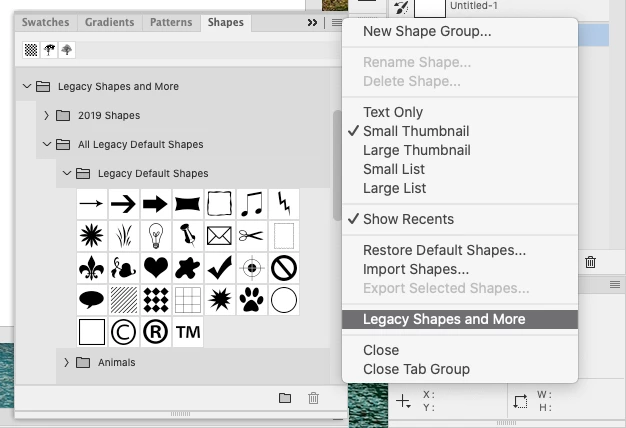
If you go Window>Shapes you can load the Legacy Shapes and More.


3 replies

Participant
October 8, 2020

Adobe has taken a perfectly fine piece of software that many of us have used for years, and screwed it up completely with these nonsense updates. Moving tools, changing settings, ridiculous. Many of us are on time frames and deadlines, and having to spend hours trying to find  tools, and spending hours on forums trying to find answers, ridiculous. Adobe has turned their own product into trash. A frustrating overworked platform that used to work just fine the way it was. I cant tell you how much time I have wasted trying to readjust, or flat out yelling at my screen because of one of these updates. STOP MESSING WITH PEOPLES SETTINGS WITH STUFF WE DON'T NEED! I have wasted  HOURS trying to figure out where my shapes went. I followed the instructions and got the legacy shapes back, but now, the only shape it will make is one of the dang trees. No matter what other shape I pick. If this were an actual physical disc, I would have removed it from my computer and stomped on it. Instead, we have this online nonsense that takes forever to respond, and is just an absolute MESS! I hate their product now. I just hate what they have done to it.

Participant
November 13, 2020

I am facing the same problem. Please, please, does anyone have a solution to this?

Participant
November 13, 2019

Thanks very much for that question and your distinct words about those updates who just get rid of the "good ol´" tools that we got used to over so many years! You spoke from my heart with this. Said to myself "have i gone mad?" when i saw those silly trees and animals stuff!!!

Jeff Arola
Community Expert
Jeff ArolaCommunity ExpertCorrect answer
Community Expert
November 8, 2019

If you go Window>Shapes you can load the Legacy Shapes and More.


nickypAuthor
Participant
November 8, 2019

Thanks Jeff.  After a few hours, I stumbled across the File - Preferences - General and resetting Legacy shapes. thank you for the reply, your solution also goes to the Legacy shape solution.  It would be easier to retain Legacy and have the updates as options to add.  Adobe please.