TheodorVulpe
Participant
January 10, 2020
Answered

Cutting/Moving selection leaves semi-transparent pixels behind

  • January 10, 2020
  • 3 replies
  • 6883 views

Hello,


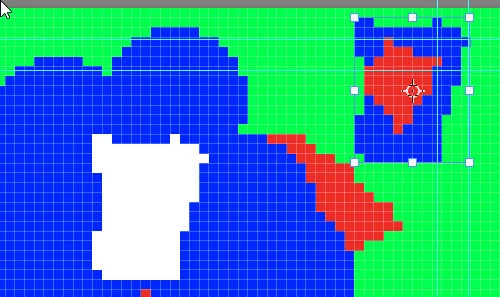
I've been struggling with an issue for some time. When cutting or moving a selection, some semi-transparent (low opacity) pixels remain on the edges of the selection that I deleted. Also when moving a selection it auto-selects other pixels on the edges and makes them transparent. Basically it's just a more natural cutting overall, but that's not what I want in my situation (I am working with a 64x64 image). I hope I was clear with my explanation.


Thank you!

This topic has been closed for replies.
Correct answer davescm

Use the lasso tool and turn off Anti Alias in the options bar and make sure feather is zero before making your selection


Dave


3 replies

Participating Frequently
December 13, 2021

I am having this exact issue, but my feather is set to 0 and anti-alias is off. Any thoughts? I've just been going in and cleaning it up after I remove the background, but today I finally have the time to dig into the problem. I'd love to get it figured out!


Participant
June 12, 2024

Was going through the exact same issue, but I realized my problem; what I had done was that I had used the magic wand to make a selection (background to be removed) and then switched to lasso to fine-tune deselect some pixels that got selected in the process. I had anti-aliasing switched off for the lasso screen and I still got the fuzzy edges when I pressed delete... didn't make any sense until I realized that it was because I had forgotten that anti-aliasing was still checked on the magic wand screen, the tool I had used to make the entire selection in the first place. Make sure to disable anti-aliasing on all tool-windows you are using. 🙂

jane-e
Community Expert
Community Expert
June 12, 2024
quoteI had used the magic wand to make a selection ... and then switched to lasso to fine-tune 
By @magnetic_wonder08981


Another option is to select with the Object Selection tool.


Jane


davescm
Community Expert
davescmCommunity ExpertCorrect answer
Community Expert
January 10, 2020

Use the lasso tool and turn off Anti Alias in the options bar and make sure feather is zero before making your selection


Dave


Leslie Moak Murray
Community Expert
Community Expert
January 10, 2020

What are you using to make the selection? And can you post a screenshot of this, with the layers showing?

TheodorVulpe
Participant
January 10, 2020

I am using Quick Selection Tool because I couldn't find a better one that I could use for this. Here is a screenshot:

Leslie Moak Murray
Community Expert
Community Expert
January 10, 2020

Agree with Dave. It looks like you have a few pixels of feathering selected. Put it to 0.