
Participant
January 23, 2018
Answered

DAMN!!! Saving Brush Groups

  • January 23, 2018
  • 2 replies
  • 805 views

I am getting so sick of every time I close out of Photoshop, I lose styles, brushes, patterns it all goes back to default settings.  WHAT HAPPENED to the save option on brushes???  What good does it do to create a new group if you can't save it????  ENOUGH OF THIS GARBAGE!  I pay for this every month and at least 4 x a month if I dare shut the program down I have to rebuild or recreate.....good grief!!

NOT A HAPPY CAMPER!!
    This topic has been closed for replies.
    Correct answer davescm

    Hi

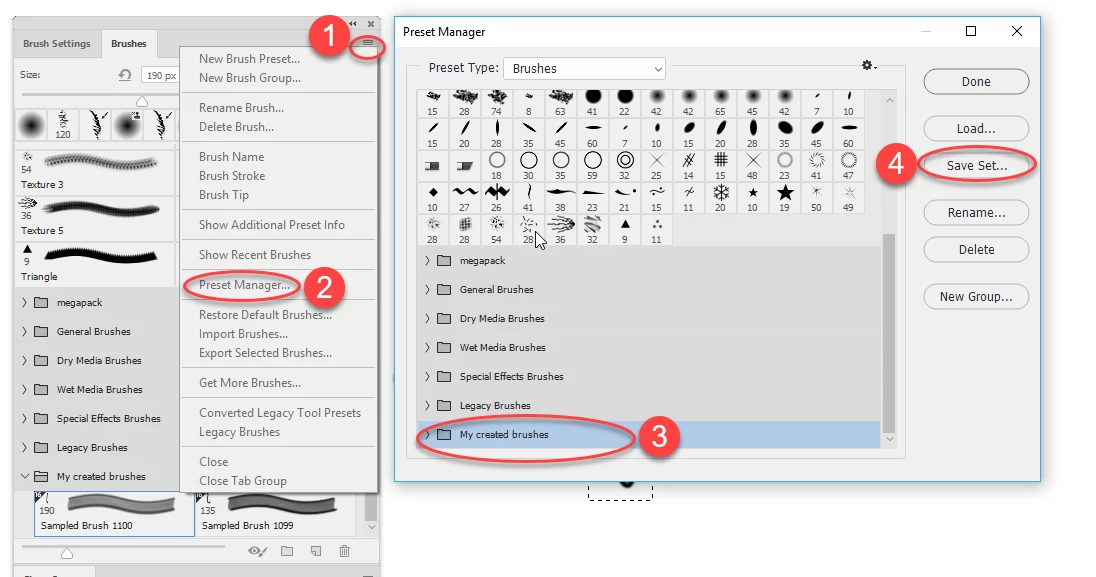
    To save a brush group to disk:

    Dave

    2 replies

    davescm
    Community Expert
    davescmCommunity ExpertCorrect answer
    Community Expert
    January 23, 2018

    Hi

    To save a brush group to disk:

    Dave

    Adobe Employee
    January 23, 2018

    Alternatively to going through preset manger you can use Export Selected Brushes from the Brushes panel flyout menu.

    Exported brushes when imported will import as a folder with the abr file name and will contain the brushes and groups that were selected.

    Participant
    January 23, 2020

    I've had similar issues.

    I organized my brushes into "brush groups", and when I close and then open photoshop, it all reverts to how it was before I organised it. There is no longer a preset manager in the brushes menu in Photoshop 2020. It's so frustrating! Any ideas?

    Thanks


    Adobe Employee
    January 23, 2018

    What OS are you running?