If you are on a pixel layer and not on a shape layer as pointed out by Barbara in post 3, if you still can't get the option try resetting Select & Mask. With Select and Mask open go to the top right and click the down arrow then choose Reset Select & Mask.
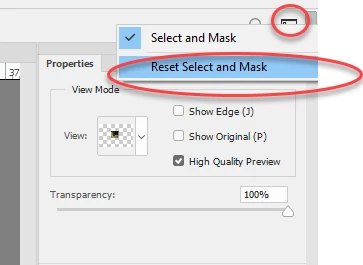
Hopefully that will allow you to choose the option.
However - Decontaminate colors is not good, it is destructive, and rarely works well.
A better, non destructive, and much more controllable method is :
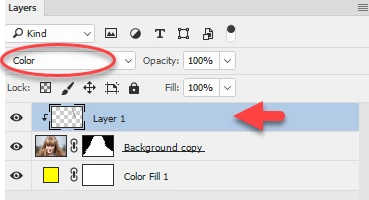
Add an empty layer above your masked layer and Alt click on the border, in the layers panel, to clip this new layer to the masked layer.
Set the new layer blending mode to color
Now get a soft brush and using color from the image (Alt click to pick up color) brush round the contaminated edges. The clipping mask will ensure it only paints on the edge of the image and does not overflow
Dave

 AdChoices