
Participant
September 8, 2017
Answered

Define Brush Preset Creates an non-centred (out of alignment) Brush

  • September 8, 2017
  • 2 replies
  • 1069 views

I started with an Illustrator file of mandala-esque shapes. The files were then saved as .pngs. (Around 2-3 layers per a single shape(some dotted lines, some straight lines)) What I would like to do is to have brushes of each individual layer of the shape but each time I attempt this and test the layers by clicking the same central spot or even looking at the brush preview (pressing caps lock) it is clear that the brushes are not aligned to the centre. At first I thought it might of been because their anchors weren't central prior to defining the brush preset but that didn't affect it at all.

As a backup I thought about making a brush from the whole shape and not from layers but that won't work if the centre of the shape isn't the centre point of the brush.


Any help assisting with fixing this problem would be greatly appreciated.
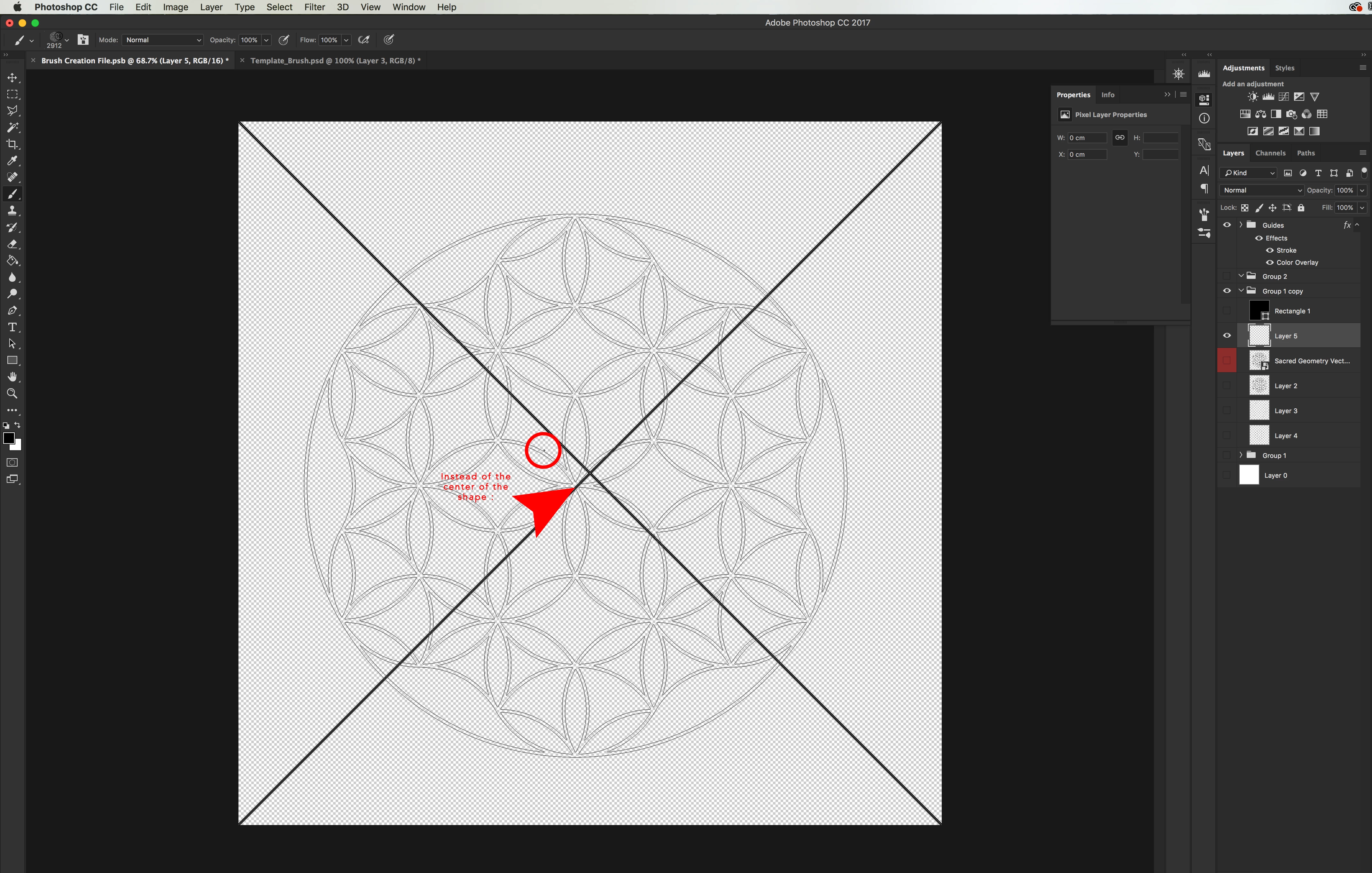

The image shows the brush preview before applying it to the canvas and as you can see, the centre point is not the centre of the brush.

The anchor point was central prior to defining the brush preset so I'm not sure why the alignment isn't correct.

This topic has been closed for replies.
Correct answer c.pfaffenbichler

Thanks.

Well, I am surprised – when I convert the image to 8bit »Define Brush Preset« apparently produces the expectedly centred brush tips, when done in 16bit they seem to be off-kilter for me, too.

If you need them in 16bit you could load the individual layer’s transparency as a selection, expand it by a few pixels and then define the Brush Preset.

2 replies

c.pfaffenbichler
Community Expert
Community Expert
September 9, 2017

And may I ask what your intentions are for the Brush Presets?

If your goal is creating instances of a color image (the »mandala« shapes in different colors) you could also look into Smart Objects.

That may bloat the file-size and therefore affect performance but offer better edibility in the long run.

Distributing Smart Object instances along a Path can be automated with a Script for example, but that may be »overkill« if the task is not a frequent one for you.

script for distributing smart object instances along path for testing

c.pfaffenbichler
Community Expert
Community Expert
September 8, 2017

Please provide the file you used to Define the Brush Presets for testing.

How exactly did you define the presets? Did you make a Selection, were the elements pure black on pure white, could there be stray pixels, …?

Participant
September 9, 2017

I appreciate the quick response, thanks a lot.

File attached below,

No I didn't make a selection, after aligning the 3 layers, I turned two off and defined brush preset to one, turned that off and then turned the second layer on then defined brush preset etc..

It was a solid black shape on transparent BG.

I made sure there were no stray pixels.

PSD: Define Brush preset.psb - Google Drive

Thanks again,

Regards,

Nicholas. M

c.pfaffenbichler
Community Expert
c.pfaffenbichlerCommunity ExpertCorrect answer
Community Expert
September 9, 2017

Thanks.

Well, I am surprised – when I convert the image to 8bit »Define Brush Preset« apparently produces the expectedly centred brush tips, when done in 16bit they seem to be off-kilter for me, too.

If you need them in 16bit you could load the individual layer’s transparency as a selection, expand it by a few pixels and then define the Brush Preset.