
Known Participant
August 2, 2023
Question

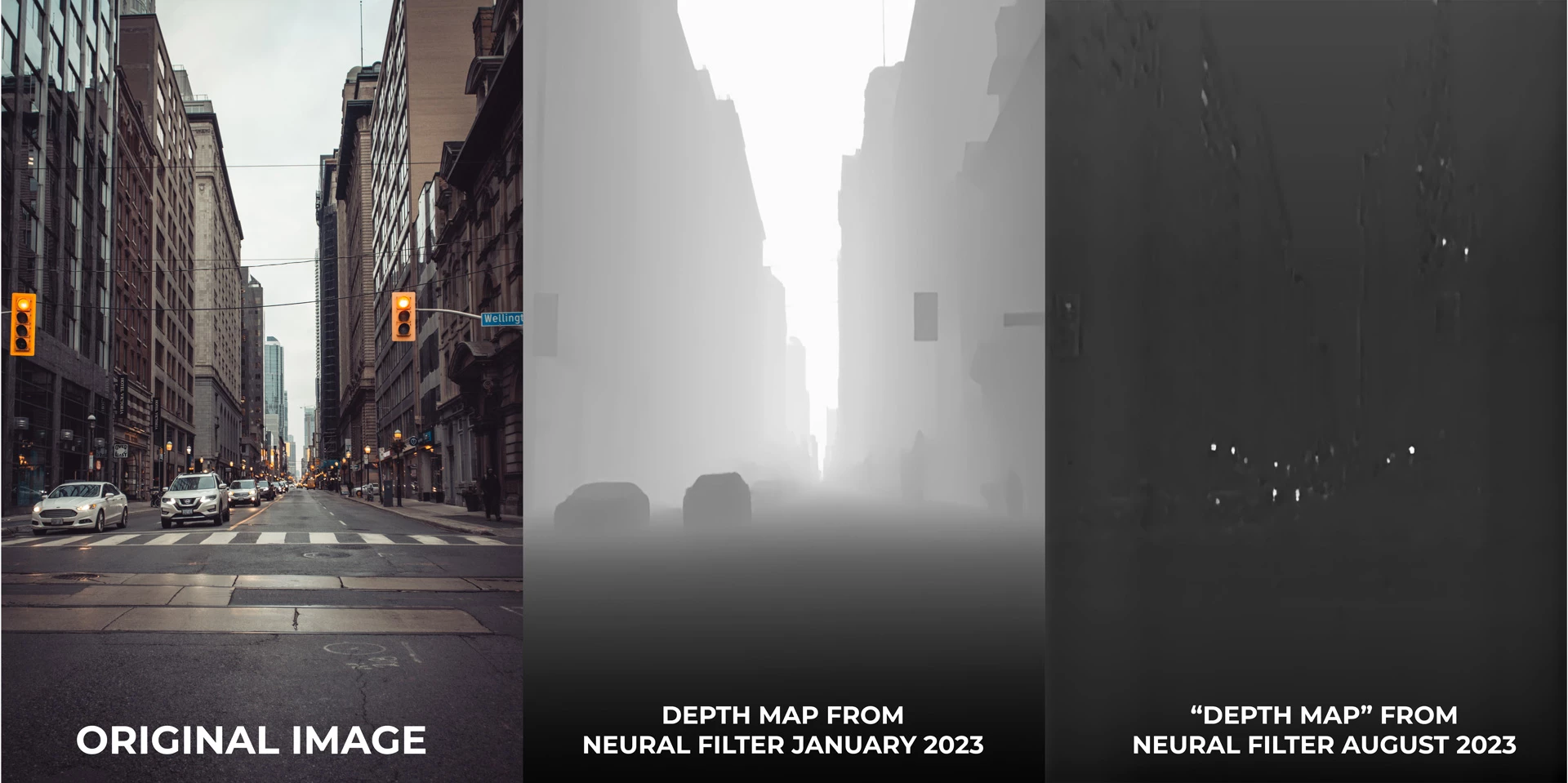
Depth Map Neural filter is broken

  • August 2, 2023
  • 4 replies
  • 1902 views

At the beginning of this year, I recorded a tutorial on to use the Depth Map  created by the Depth Blur neural filter. When Adobe updated to Photoshop 2023, the Depth Map filter was changed and now no longer creates any kind of usuable depth map.  Not sure if Adobe is aware of this problem and/or when it will be fixed? I've attached a file showing the Depth Map results in January of this year compared to today. It shows the problem quite clearly.


4 replies

Trevor.Dennis
Community Expert
Community Expert
June 16, 2025

Seeing as this thread has been bumped, I'll mention that Colin Smith recently uploaded a useful video on using the Depth Map filter to control background blur.  It won't fix broken plugins, but it will at least show the correct workflow.


@jkscsu  Neural and Parametric filters tend to be hard on systems, and likely to either not work, or completely crash older systems.  If you are using a fairly old computer, then maybe try setting Older GPU in Preferences.  You should also make sure that your video card driver is up to date, and from the maker's website.  After that it's a Preference reset, and if it still doesn't work, maybe your system is not fully compatible.

Known Participant
October 21, 2023

I've just updated again to the latest version of Photoshop 25.0.0 and the depth map neural filter is still broken for me.

jkscsu
Participant
June 16, 2025

Broken for me too

AxelMatt
Community Expert
Community Expert
June 16, 2025

@jkscsu 

You’ve reactivated an approx. two years old thread. And you wrote only "I am having the same issue". It may seem like it's the same problem, but it may not be. Also, you're not giving us any information about your system and what you've tried so far.


Rather than reactivating an old thread that is seemingly similar, you are posting to a new thread with fresh, complete information.

Please include system information, a detailed description of the problem and if it's possible a step-by-step instructions for reproduction. Also includes the steps that you've done by your own to solve the issue.


If the issue is really the same, we will merge you back into the appropriate location.

This thread will be locked. 

Thank you!

My System: Intel i7-8700K - 64GB RAM - NVidia Geforce RTX 3060 - Windows 11 Pro 25H2 -- LR-Classic 15 - Photoshop 27 - Nik Collection 8 - PureRAW 5 - Topaz Photo
Known Participant
August 24, 2023

Hey @CShubert , thanks for the response. I'm on the latest version of Photoshop as of today. Please find attached the output I get from your image. And screenshots showing my photoshop version and my imac/OS specs. 


CShubert
Community Manager
Community Manager
August 4, 2023

Hi @zevendesign18164115 testing here and we see a depth map as before...


Are you on the latest Ps version: Adobe Photoshop Version: 24.7.0 20230719.r.643 efe3886 x64


It may help if we could see your Photoshop System Info. Launch Photoshop, and select Help >System Info...and copy/paste the text in a reply.