diggdug39
Known Participant
February 23, 2017
Question

Design best practices: Moving type around and vector design tips

  • February 23, 2017
  • 5 replies
  • 2476 views

  Hello everyone,

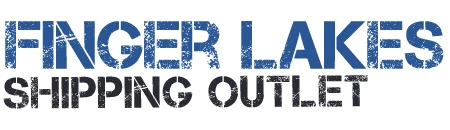
          I am trying to make a sheet of stickers out of this graphic below and I wonder if there is a way to make the bottom word centered instead of shifting to the left side? How could I remake this with a more cut out look from the white background and using what program? On another note I wonder how I am supposed to save an Illustrator file as a jpeg or gif? When I have tried to save it the only file extensions it gives are ai, svg etc.Thanks for any help

This topic has been closed for replies.

5 replies

Sebastian Bleak
Community Expert
Community Expert
February 28, 2017

Looks like you've got some great info on how to do this in Ps. If you'd like to recreate this in Ai, I'd look for a Stencil font that matches your design, use an Opacity Mask to add the distressing (holes) Adobe Illustrator CS6 "Opacity Mask" NSL Week 96 - YouTube

When I was producing stickers, I preferred to work in Ai because I had to add CutContours for our VersaCam.

February 26, 2017

good question I have it's problem too and i get my answer now
Thank you

Inspiring
February 23, 2017

Let me try to help...

"I am trying to make a sheet of stickers out of this graphic below and I wonder if there is a way to make the bottom word centered instead of shifting to the left side?...

In Photoshop, you'd select the text, copy & paste, then move the element to the center.  Then, delete the original text element.

...How could I remake this with a more cut out look from the white background and using what program?...

You could create the artwork in either Photoshop or Illustrator, save it to the format a cutter could interpret ( this would be an actual cutout, if you want to do it visually, you'd create it the same way, just not cut it out of the media.

...On another note I wonder how I am supposed to save an Illustrator file as a jpeg or gif? When I have tried to save it the only file extensions it gives are ai, svg etc.Thanks for any help"

Like already suggested, use Export in Illustrator, select JPEG ( why GIF? ).

diggdug39
diggdug39Author
Known Participant
February 23, 2017

Does it make a difference and can I still change the text more center if this image is one that was pre-made? There are no layers and I didn't make this I found it on a website. Also what do you mean save it to the format a cutter could interpret? I want to cut the text our of the white background and place the text ( each word ) on a different background I am using.

Inspiring
February 23, 2017

Also, disregard what I said about a cutter. I thought you wanted to cut the file using a digital cutting machine.

Sent from my iPhone

Participating Frequently
February 23, 2017

Select both text layers and with the move tool, use the align to center option.

Derek Cross
Community Expert
Community Expert
February 23, 2017

Try (from Illustrator)  File > Export – select the format from the drop-down menu.