wckdtall
Inspiring
January 9, 2024
Answered

Determine Smart Object Attributes - Linked - Embedded - Missing - Path

  • January 9, 2024
  • 3 replies
  • 1043 views

I've found a few older threads on Smart Objects, but none with a direct solution in this forum for getting smart object attributes.

Some of the older threads reference a try catch around placing a layer to determine if it's embedded:


        executeAction( stringIDToTypeID( "placedLayerConvertToEmbedded" ), undefined, DialogModes.NO );


I did find this thread on Stack Overflow, and am wondering if there are any other direct methods of getting info from a smart object.

https://stackoverflow.com/questions/63010107/get-a-smart-objects-layers-files-directory-source-in-jsx

I've compiled a few separate scripts to determine the extension of the smart object, to evaluate if it's vector or raster.

Is there a more direct way to evaluate smart objects? I use script listener, but not well enough to understand how I can generate a true false value etc.
This topic has been closed for replies.
Correct answer c.pfaffenbichler

// 2024, use it at your own risk;
if (app.documents.length > 0) {
var theThings = collectSmartObjectsWithLayerComps();
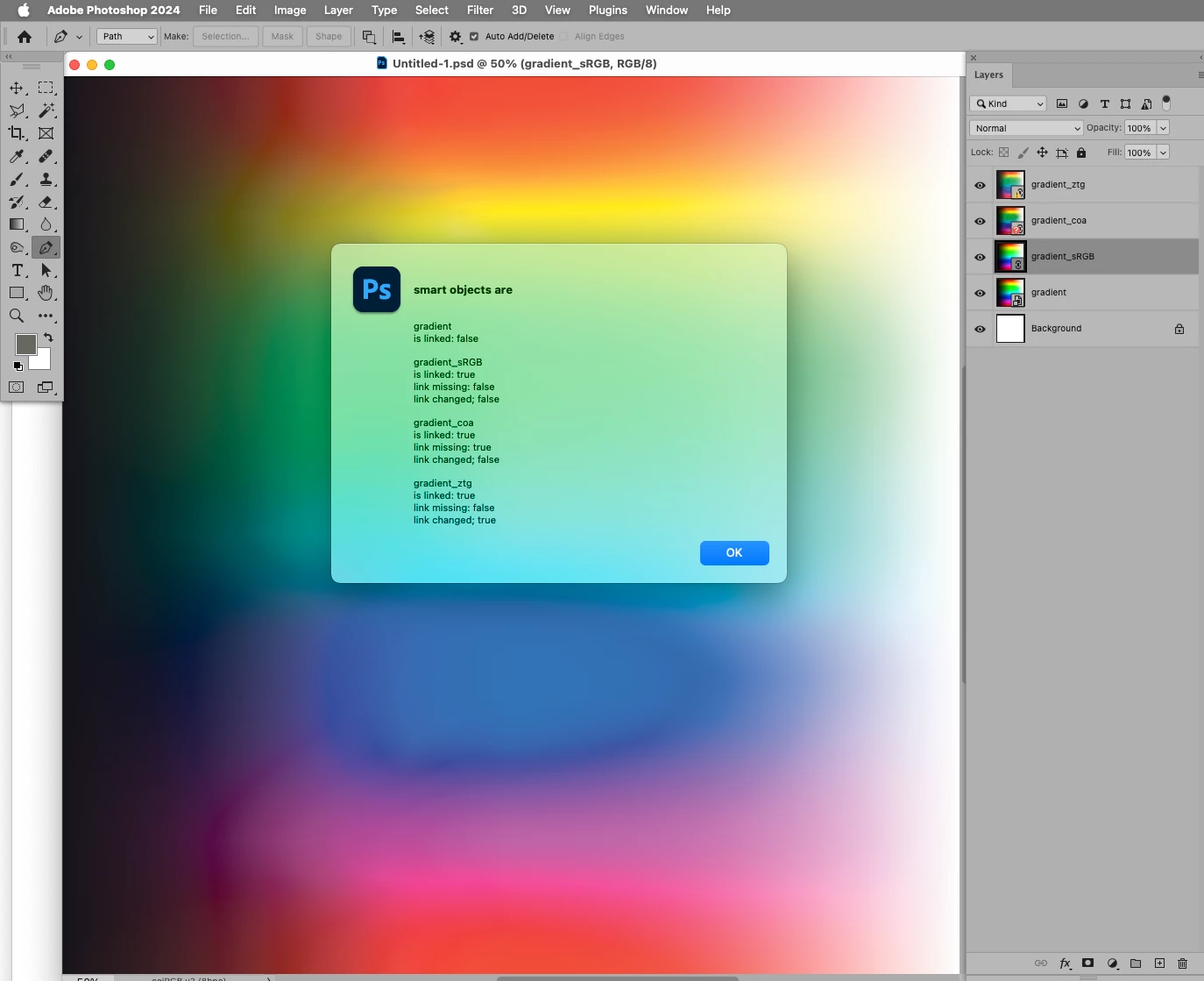
var theString = "smart objects are";
for (var m = 0; m < theThings.length; m++) {
    var thisOne = theThings[m];
    theString = theString + "\n\n" + thisOne[0] + "\nis linked: " + thisOne[1]; 
    if (thisOne[1] == true) {theString = theString + "\nlink missing: " + thisOne[2] + "\nlink changed; " + thisOne[3]}
};
alert (theString);
};
////////////////////////////////////
////// collect smart objects, probably based on code by paul, mike or x //////
function collectSmartObjectsWithLayerComps () {
// the file;
var myDocument = app.activeDocument;
// get number of layers;
var ref = new ActionReference();
ref.putEnumerated( charIDToTypeID("Dcmn"), charIDToTypeID("Ordn"), charIDToTypeID("Trgt") ); 
var applicationDesc = executeActionGet(ref);
var theNumber = applicationDesc.getInteger(stringIDToTypeID("numberOfLayers"));
// process the layers;
var theLayers = new Array;
for (var m = 0; m <= theNumber; m++) {
try {
var ref = new ActionReference();
ref.putIndex( charIDToTypeID( "Lyr " ), m);
var layerDesc = executeActionGet(ref);
var layerSet = typeIDToStringID(layerDesc.getEnumerationValue(stringIDToTypeID("layerSection")));
var isBackground = layerDesc.getBoolean(stringIDToTypeID("background"));
// if not layer group collect values;
if (layerSet != "layerSectionEnd" && layerSet != "layerSectionStart" && isBackground != true) {
var theName = layerDesc.getString(stringIDToTypeID('name'));
var theID = layerDesc.getInteger(stringIDToTypeID('layerID'));
if(layerDesc.hasKey(stringIDToTypeID('smartObject'))) {
    var soDesc = layerDesc.getObjectValue(stringIDToTypeID('smartObject'));
    var theFileRef = soDesc.getString(stringIDToTypeID('fileReference'));
    var theDocID = soDesc.getString(stringIDToTypeID('documentID'));
    var isLinked = soDesc.getBoolean(stringIDToTypeID('linked'));
    if (isLinked == true) {
    var isMissing = soDesc.getBoolean(stringIDToTypeID('linkMissing'));
    var isChanged = soDesc.getBoolean(stringIDToTypeID('linkChanged'));
    } else {
    var isMissing = undefined;
    var isChanged = undefined;
    };
    /*var x = soDesc.getList(stringIDToTypeID("compsList"));
    var theCompsList = soDesc.getObjectValue(stringIDToTypeID("compsList"));
    if (theCompsList.count > 2) {
        var theCompsList = theCompsList.getList(stringIDToTypeID("compList"));
        var theSOComps = new Array;
        for (var n = 0; n < theCompsList.count; n++) {
        var thisOne = theCompsList.getObjectValue(n);
        var compName = thisOne.getString(stringIDToTypeID("name"));
        var compID = thisOne.getInteger(stringIDToTypeID("ID"));
        var theComment = thisOne.getString(stringIDToTypeID("comment"));
        theSOComps.push([compName, compID, theComment]);
        };
        theLayers.push([theName, theID, theFileRef, theDocID])
        theLayers.push([theName, theID, theFileRef, theDocID, theSOComps])
    };*/
    theLayers.push([theName, isLinked, isMissing, isChanged, theID, theFileRef, theDocID])
}
}
}
catch (e) {};
};
return theLayers
};


3 replies

c.pfaffenbichler
Community Expert
c.pfaffenbichlerCommunity ExpertCorrect answer
Community Expert
January 10, 2024

// 2024, use it at your own risk;
if (app.documents.length > 0) {
var theThings = collectSmartObjectsWithLayerComps();
var theString = "smart objects are";
for (var m = 0; m < theThings.length; m++) {
    var thisOne = theThings[m];
    theString = theString + "\n\n" + thisOne[0] + "\nis linked: " + thisOne[1]; 
    if (thisOne[1] == true) {theString = theString + "\nlink missing: " + thisOne[2] + "\nlink changed; " + thisOne[3]}
};
alert (theString);
};
////////////////////////////////////
////// collect smart objects, probably based on code by paul, mike or x //////
function collectSmartObjectsWithLayerComps () {
// the file;
var myDocument = app.activeDocument;
// get number of layers;
var ref = new ActionReference();
ref.putEnumerated( charIDToTypeID("Dcmn"), charIDToTypeID("Ordn"), charIDToTypeID("Trgt") ); 
var applicationDesc = executeActionGet(ref);
var theNumber = applicationDesc.getInteger(stringIDToTypeID("numberOfLayers"));
// process the layers;
var theLayers = new Array;
for (var m = 0; m <= theNumber; m++) {
try {
var ref = new ActionReference();
ref.putIndex( charIDToTypeID( "Lyr " ), m);
var layerDesc = executeActionGet(ref);
var layerSet = typeIDToStringID(layerDesc.getEnumerationValue(stringIDToTypeID("layerSection")));
var isBackground = layerDesc.getBoolean(stringIDToTypeID("background"));
// if not layer group collect values;
if (layerSet != "layerSectionEnd" && layerSet != "layerSectionStart" && isBackground != true) {
var theName = layerDesc.getString(stringIDToTypeID('name'));
var theID = layerDesc.getInteger(stringIDToTypeID('layerID'));
if(layerDesc.hasKey(stringIDToTypeID('smartObject'))) {
    var soDesc = layerDesc.getObjectValue(stringIDToTypeID('smartObject'));
    var theFileRef = soDesc.getString(stringIDToTypeID('fileReference'));
    var theDocID = soDesc.getString(stringIDToTypeID('documentID'));
    var isLinked = soDesc.getBoolean(stringIDToTypeID('linked'));
    if (isLinked == true) {
    var isMissing = soDesc.getBoolean(stringIDToTypeID('linkMissing'));
    var isChanged = soDesc.getBoolean(stringIDToTypeID('linkChanged'));
    } else {
    var isMissing = undefined;
    var isChanged = undefined;
    };
    /*var x = soDesc.getList(stringIDToTypeID("compsList"));
    var theCompsList = soDesc.getObjectValue(stringIDToTypeID("compsList"));
    if (theCompsList.count > 2) {
        var theCompsList = theCompsList.getList(stringIDToTypeID("compList"));
        var theSOComps = new Array;
        for (var n = 0; n < theCompsList.count; n++) {
        var thisOne = theCompsList.getObjectValue(n);
        var compName = thisOne.getString(stringIDToTypeID("name"));
        var compID = thisOne.getInteger(stringIDToTypeID("ID"));
        var theComment = thisOne.getString(stringIDToTypeID("comment"));
        theSOComps.push([compName, compID, theComment]);
        };
        theLayers.push([theName, theID, theFileRef, theDocID])
        theLayers.push([theName, theID, theFileRef, theDocID, theSOComps])
    };*/
    theLayers.push([theName, isLinked, isMissing, isChanged, theID, theFileRef, theDocID])
}
}
}
catch (e) {};
};
return theLayers
};
Stephen Marsh
Community Expert
Community Expert
January 9, 2024

Another one:


/*
https://stackoverflow.com/questions/63010107/get-a-smart-objects-layers-files-directory-source-in-jsx
*/

var mySO = getSmartObjectReference();

if (mySO.found) {
  alert('Is linked: ' + mySO.linked + '\nFile Name: ' + mySO.fileRef + '\nFile Path: ' + mySO.filePath);
}

function getSmartObjectReference()
{
  try
  {
    var smartObject = {
      found: false,
      fileRef: '',
      filePath: '',
      linked: false,
    };
    var ref, so;
    ref = new ActionReference();
    ref.putProperty(charIDToTypeID("Prpr"), stringIDToTypeID("smartObject"));
    ref.putEnumerated(charIDToTypeID("Lyr "), charIDToTypeID("Ordn"), charIDToTypeID("Trgt"));
    so = executeActionGet(ref).getObjectValue(stringIDToTypeID("smartObject"));
    smartObject.found = true;
    smartObject.linked = so.getBoolean(stringIDToTypeID("linked"));
    smartObject.fileRef = so.getString(stringIDToTypeID("fileReference"));
    if (smartObject.linked) {
      smartObject.filePath = so.getPath(stringIDToTypeID("link"));
    } else {
      smartObject.filePath = Folder.temp + '/' + smartObject.fileRef;
    }
    return smartObject;
  }
  catch (e)
  {
    alert(e);
    return smartObject;
  }
}
wckdtall
wckdtallAuthor
Inspiring
January 9, 2024

I've been using getSmartObjectReference(), wrapped in a loop that cycles through layers.

lyrSOInfo = getSmartObjectReference();
if(lyrSOInfo.filePath == '') alert("Linked File Is Missing")
if (lyrSOInfo.linked == true && lyrSOInfo.filePath != '') {
//Embed linked file
executeAction( stringIDToTypeID( "placedLayerConvertToEmbedded" ), undefined, DialogModes.NO );
}


By default it throws an error so I commented out alert(e), and I guess I could use found rather than testing the filePath directly.

c.pfaffenbichler
Community Expert
Community Expert
January 9, 2024

I'm evaluating each smart object in a file, and looking for something similar to InDesign's LinkStatus. When searching adobe forums, the tops hits that popped up were similar to the link/script below: https://community.adobe.com/t5/photoshop-ecosystem-discussions/file-information-for-smart-objects/m-p/6129273

Quoted from link:

var idplacedLayerConvertToEmbedded = stringIDToTypeID( "placedLayerConvertToEmbedded" );
executeAction( idplacedLayerConvertToEmbedded, undefined, DialogModes.NO );
theDoc.activeHistoryState = theDoc.historyStates[theDoc.historyStates.length-2];
alert ("linked")

 
getSmartObjectReference() works, but I wanted to ask on this forum as a recent answer also doesn't seem to be captured, at least the way I'm asking.

I'm using the link status/if statements to then trigger PS to embed linked Smart Objects.


quote

I'm evaluating each smart object in a file, and looking for something similar to InDesign's LinkStatus.

What do you actually mean? Please elaborate, post a meaningful screenshot/sketch … 

Stephen Marsh
Community Expert
Community Expert
January 9, 2024

From the same link:


// Check Test Get Property for Linked Smart Object.jsx

/* Based on:
https://stackoverflow.com/questions/63010107/get-a-smart-objects-layers-files-directory-source-in-jsx
*/

var ref = new ActionReference();
ref.putProperty(charIDToTypeID("Prpr"), stringIDToTypeID("smartObject"));
ref.putEnumerated(charIDToTypeID("Lyr "), charIDToTypeID("Ordn"), charIDToTypeID("Trgt"));
var so = executeActionGet(ref).getObjectValue(stringIDToTypeID("smartObject"));

if (so.getBoolean(stringIDToTypeID("linked"))) {
  alert("Linked");
} else {
  alert("Embedded");
}