
Different name for copied layer in an action causes action to fail
Hi,
I am trying to debug why some of the actions in an old set of acton I once purchased are not working.
I believed cuase is the way a copied layer is named.
I found out that if I have a layer called e.g. "Extract" and after it is selected the action is using "Layr Via Copy". The copied layer may be named "Layer 1", "Layer 2", "layer 3" ...
However im may also be named "Extract Copy", "Extract Copy 2", "Extract Copy 2"... (no ""Extract Copy 1".
1 action is running fine, producing "layer N" names and the other which produces "extract layer N" is not.
E.g. this is how the layers should look after the copy operation:
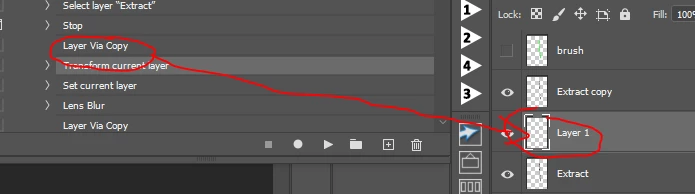
This is how it should not look:
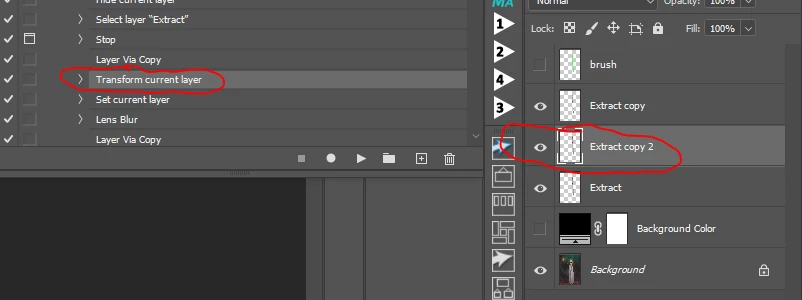
I placed a "stop" command right befor the copy command and tried to step over each command by pressing CTRL and double click the "Layer Via Copy" command when "Exctract" layer is selected.
If created "Layer 1" as the action expects.
However when I deleted "Layer 1", selected "Extract" layer and doubled clicked the "Layer Via Copy" command, it now created "Extract Copy 2" layer.
Why is it that the same "Layer Via Copy" can produce different layer names in diffrent actions?
Why is it that the same "Layer Via Copy" can produce a layer with a specific name and when that layer is deleted the "Layer Via Copy" will produce a llayer with a diffeent name.
And the most important question for this is how do I 'reset' this naming to have the copied layers named consistant?
 AdChoices