
Participant
September 24, 2025
Answered

Direct X 12

  • September 24, 2025
  • 2 replies
  • 223 views

I do not understand.


Windows 11 says directX12 is installed.

I have the latest graphics drivers for my NVIDIA GeForce GTX 770 (NVIDIA)


Warning: Driver update recommended Warning:
Driver is out of date (15 months, should be less than 6 months)
Fail: DirectX feature level 11.0 available, feature level 12.0 required
Pass: DirectX available Pass:
Above required VRAM (2007 MB of 1500 MB required) GPU Detected: NVIDIA GeForce GTX 770 (NVIDIA)What can I do?

Correct answer Ged_Traynor

@mikes40067761 the NVIDIA GeForce GTX 770 only has a feature level of 11.0, Photoshop requires a GPU with a feature level of 12.0 and above

The only thing you can do is upgrade your GPU

https://helpx.adobe.com/ie/photoshop/system-requirements.html

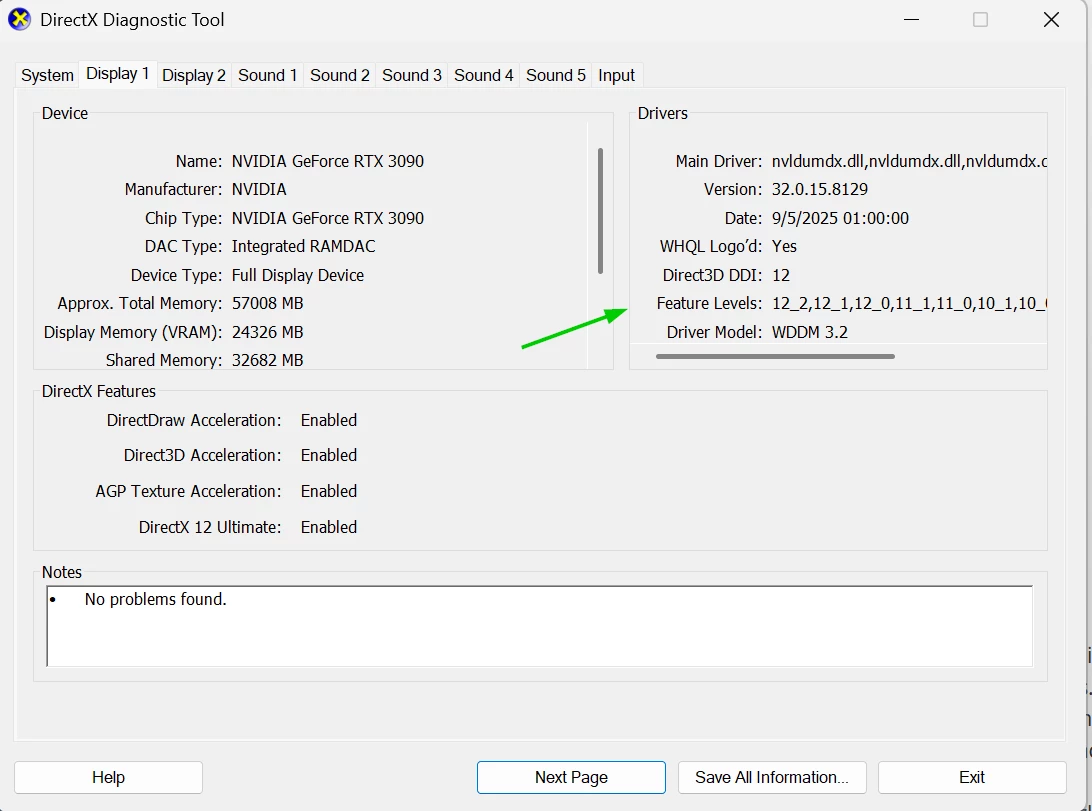
You can confirm the feature level by typing dxdiag in the Windows start menu, click on the display tab in the dialog that opens up

2 replies

Participant
September 24, 2025

Bit anoying, I can't keepup with these seemingly daily requirements. I'll go back to Photoshop 2024.


Ged_Traynor
Community Expert
Ged_TraynorCommunity ExpertCorrect answer
Community Expert
September 24, 2025

@mikes40067761 the NVIDIA GeForce GTX 770 only has a feature level of 11.0, Photoshop requires a GPU with a feature level of 12.0 and above

The only thing you can do is upgrade your GPU

https://helpx.adobe.com/ie/photoshop/system-requirements.html

You can confirm the feature level by typing dxdiag in the Windows start menu, click on the display tab in the dialog that opens up