
Participant
September 28, 2017
Answered

Disabling libraries in Photoshop CC

  • September 28, 2017
  • 2 replies
  • 33730 views

Hello.

Please can you tell me a fool-proof way of turning the library feature off in Photoshop CC?

Many thanks.

Anthony

[Here is the list of all Adobe forums... https://forums.adobe.com/welcome]

[Moved from CS6 and earlier Creative Suite to Photoshop forum... Mod]
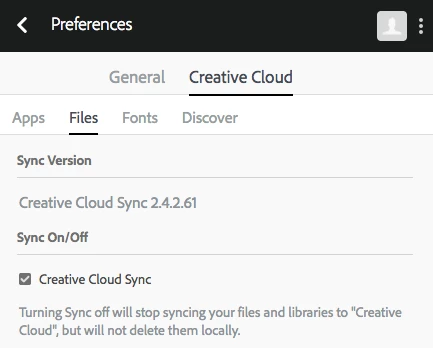
Correct answer gener7

Turn syncing off.

2 replies

JJMack
Community Expert
Community Expert
September 28, 2017

I do not know if it is possible.  I do not create then or use then however at time Photoshop seem to want to copy thing from the web I open in  Photoshop into  libraries.  I do not  give it the OK to do it.

JJMack
Participant
December 7, 2020

Just had this happen, spinning fan etc, had to force quite. Tried again, pasted a graphic into PSD, but while in the PASTE window, notice at the bottom a check box for "Add to my current library", unchecked box, file was saved like normal.

Participating Frequently
August 11, 2021

Thanks so much! Had the same trouble. What a stupid function if it doesn’t work!


gener7
Community Expert
gener7Community ExpertCorrect answer
Community Expert
September 28, 2017

Turn syncing off.

Participant
September 23, 2022

Very useful. thank you for not explaining where to find this. I'll just waste more time going around in circles looking for it. 

kevinb67000742
Participant
September 23, 2022

LOL