
Participant
February 17, 2025
Answered

Discrepancies with RAW image when exporting

  • February 17, 2025
  • 1 reply
  • 560 views

Hope this is the right place to post this, apologies if its not. This is my first time posting to the forum. I am seeing some discrepancies when bringing raw images into Photoshop and then exporting. I am shooting in raw format, then importing into camera raw in Photoshop. I make my necessary edits, etc. then when bringing into Photoshop, I remove any dust or scratches that are on the photo itself. When attempting to select and automatic fill, I am noticing that it is filling with the incorrect color, and the selection appears pixelated. Furthermore, when exporting as a JPEG, the image is drastically different than what I see in Photoshop itself. I have tried exporting in different qualities, as JPEG, as PNG, etc. not quite sure what is causing this. I have the correct lens profile selected in camera raw as well.
Correct answer D Fosse

There are two icc profiles you need to have in order for accurate display. There's the embedded document profile, which is a standard profile, and then there's the custom monitor profile at system level, which is unique to your display. Photoshop uses both to display the file correctly.


Your two screenshots are identical, except one has some black clipping. That's often indicative of an inaccurate monitor profile.


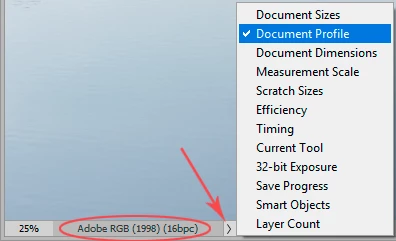
What is the embedded document profile in Photoshop? This is the color space Camera Raw has encoded the RGB file into when sending to Photoshop:


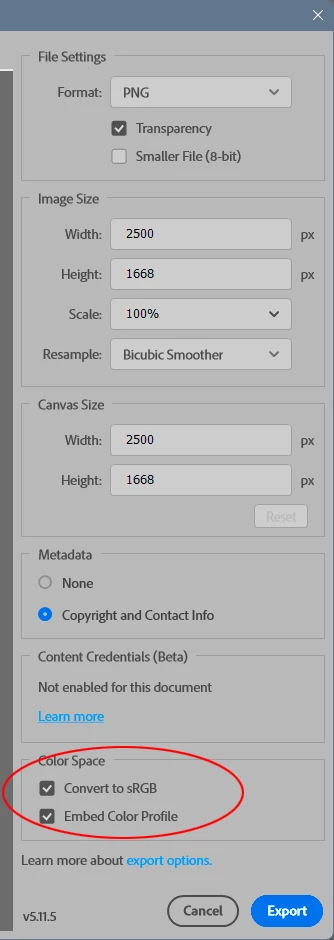
When you Export, are you embedding the profile there? The checkbox to embed the profile is unchecked by default. Once you check it, it sticks. You can, and most often should, convert to sRGB in Export - but the profile still needs to be embedded:

1 reply

PECourtejoie
Community Expert
Community Expert
February 17, 2025

Hello, what is the bit depth of the image, its color profile of input and output? 

Participant
February 17, 2025

In Camera RAW:

Bit Depth 16

Color Profile: Camera Standard (This is set with the user preset I use)

Color profile output : I am assuming it is also camera standard (As this is the one I choose )

PECourtejoie
Community Expert
Community Expert
February 18, 2025

There are two icc profiles you need to have in order for accurate display. There's the embedded document profile, which is a standard profile, and then there's the custom monitor profile at system level, which is unique to your display. Photoshop uses both to display the file correctly.


Your two screenshots are identical, except one has some black clipping. That's often indicative of an inaccurate monitor profile.


What is the embedded document profile in Photoshop? This is the color space Camera Raw has encoded the RGB file into when sending to Photoshop:


When you Export, are you embedding the profile there? The checkbox to embed the profile is unchecked by default. Once you check it, it sticks. You can, and most often should, convert to sRGB in Export - but the profile still needs to be embedded:


Yes, I meant the color profiles, not the camera profiles, thanks, DAG!