Participating Frequently
September 25, 2023
Answered

Dismiss "Time To Update" banner

  • September 25, 2023
  • 4 replies
  • 1640 views

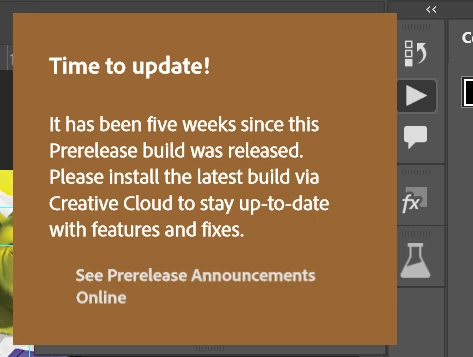
I'm getting the banner:


And it is literally hovering over the Actions panel that I need to get to.
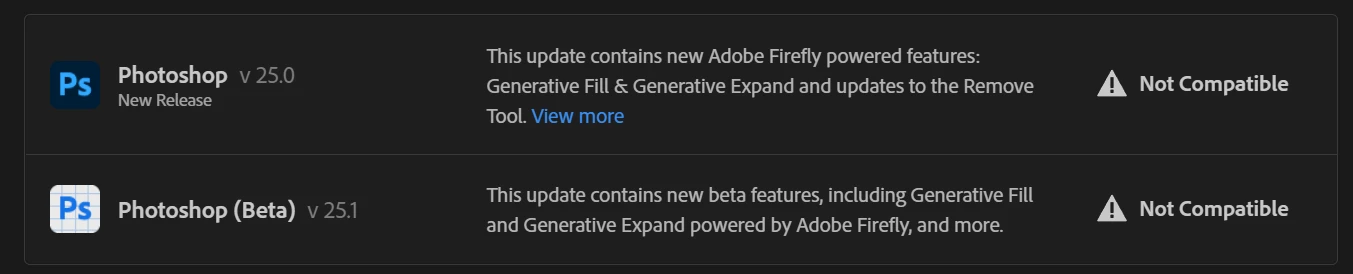


I would love to update, but the update is "Not Compatible" with my system according to the creative cloud installer. Regular Photoshop (non beta) is also not compatible, and I can't go back to a version without generative fill because I already used it in many of my active projects (you lose the ability to switch between generations if you open your psd in an older version), and I use generative fill so often that I just can't go backwards.

How do I dismiss or hide this banner?

This topic has been closed for replies.
Correct answer davescm

As this thread deteriorated to posting advice (now removed) on how to violate licence terms - the thread is now locked

Dave

4 replies

davescm
Community Expert
davescmCommunity ExpertCorrect answer
Community Expert
September 26, 2023

As this thread deteriorated to posting advice (now removed) on how to violate licence terms - the thread is now locked

Dave

Legend
September 25, 2023

You do realize that you are violating the license terms now?

Participating Frequently
September 26, 2023

If making a silly popup disappear on my computer (an action which neither hurts or affects ANYONE btw) causes Adobe to stop taking my $700 a year then I guess you'll have the last laugh.

Legend
September 26, 2023

Maybe you are missing the point. Using a beta past the time when its licensed isn't just making a "silly popup" disappear. But you do you, bro. Just don't complain when your computer gets pwned by hackers because you didn't install security fixes.

Participating Frequently
September 25, 2023

Again, thanks to those who took the time to reply but "you need to be on a different version" is not the question I asked. I asked how to get rid of the popup.
[Advice on how to bypass parts of the application removed by moderator]

Participating Frequently
September 25, 2023

As a side note, this new Windows version requirement seems awfully arbitrary given that the beta of v25 works just fine on older Windows builds but the release version does not.

AxelMatt
Community Expert
Community Expert
September 25, 2023

Unfortunately you haven't given us any information about your system. Therefore, all proposed solutions are a look into the crystal ball.


Please give us more informations about your system including the following:

  • Operating system and version number
  • Computer hardware, such as CPU; GPU; the amount of RAM; etc


Is your system up-to-date? Do you have installed all recent updates and patches for the operating system and the device drivers, especially the graphic driver. If you have a NVidia graphic card installed, make sure that you are using the recent Studio version of the driver, not the Game Ready version.


My System: Intel i7-8700K - 64GB RAM - NVidia Geforce RTX 3060 - Windows 11 Pro 25H2 -- LR-Classic 15 - Photoshop 27 - Nik Collection 8 - PureRAW 6 - Topaz Photo AI
Participating Frequently
September 25, 2023

Everything is up to date except for Windows, I'm on Windows 10.0.19042, which is below the minimum requirements for Photoshop 25. Any version above this breaks compatibility with the drivers for my legacy large-format-vinyl printer. 

I don't need to install a new version, I just need to know how to get rid of that banner so I can get my work done today.

D Fosse
Community Expert
Community Expert
September 25, 2023

Then uninstall the beta. Having an out of date beta installed makes no sense. The whole purpose of a beta is so that users can report on the latest features.