

Susie_Bert
Participating Frequently
July 7, 2022
Question

Display error when using Photoshop (blue screen)

  • July 7, 2022
  • 1 reply
  • 429 views

Hello all,

I've had persistent blue screening on opening photoshop on my Dell laptop for a couple of weeks now for which the IT department can't find the cause and has recommended I get in touch with Adobe directly. 

I have Windows 10 Pro. I use a dock for a large display beside the laptop.

Processor is Intel(R) Core(TM) i7-8565U CPU @ 1.80GHz 1.99 GHz

I believe I have two graphics components, the in-built chip set and an AMD Radeo pro WX 2100 Graphics card. 

Sometime I get the below bug report:
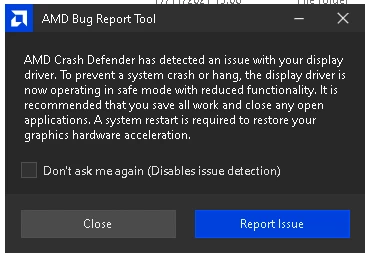
Most of the time however, the laptop blue screens striaght off when I open PS. 

IT have updated drivers and we have also tried disabling something to do with the acceleration but unless I start PS now and check I can't remember (and that's going to blue screen). 

I need PS for work regularly and it is really holding me up having this issue which has only occured in the last couple weeks, presumably after the last update.

Any ideas? 


This topic has been closed for replies.

1 reply

Ged_Traynor
Community Expert
Community Expert
July 7, 2022

Hi

Do you have the same issue when working on the laptop without the docking station, blue screens are usually caused by buggy drivers and or failing hardware, the fact that the AMD software is reporting an issue with the driver would rule out Photoshop as a cause, applications don't cause blue screens, as I mentioned it's either a driver issue or failing hardware.

https://helpx.adobe.com/ie/photoshop/kb/troubleshoot-gpu-graphics-card.html

Susie_Bert
Participating Frequently
July 7, 2022

Thanks for taking the time to reply. I actually haven't tried without the dock although now you mention, I previously had issues with Sketchup which I could only get to start up when unplugging the laptop from the dock... So I shall give that a go.

I have also just run the GPU compatibility checker in PS and that says the GPU is compatible so would indicate it's fine on that end.

Ged_Traynor
Community Expert
Community Expert
July 7, 2022

Did your IT department check the Windows event viewer for errors relating to Photoshop.exe in the application log, this can give you some indication of what might be causing the issue, also have they updated the software/firmware for the docking station.

The GPU compatibility checker only checks to see if the GPU is compatible to run Photoshop, the fact that it says it's compatible doesn't necessarily mean there's no issue with the GPU driver/hardware.