
Known Participant
July 9, 2020
Question

Do I need to flatten my psd, or delete all other layers when placing it in InDesign to go to repro?

  • July 9, 2020
  • 1 reply
  • 1598 views

Keeping images as PSD's for repro is all a bit new to me as I've always saved my images for repro as 300ppi CMYK jpgs but I want to learn more about keeping my images as PSD's in my InDesign documents.


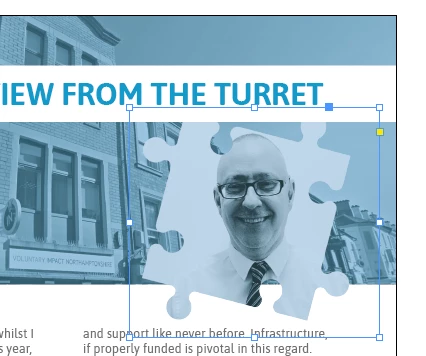
I have an image with a transparent background (the jigsaw piece shown in my image below) and have a few questions:


1) As I write this I realise I cannot flatten the psd as I have asked in my heading because I will lose the transparent background, but should I delete all the other layers in my psd that aren't in use before I pdf my document from InDesign (e.g. tidy up my psd layers in Photoshop so no unused layers get printed from my PSD by mistake)?


2) By dropping an unflattened PSD (the jigsaw piece) into InDesign with a transparent background, will this stay transparent when printed, it won't flatten with a white box around when it is made into a PDF will it? 


3) I think I have read that I can keep the PSD's as RGB and they will get converted to CMYK in the PDF-ing process, is this true, can this be done? I have never done this before as I always change my images from RGB to CMYK manually in Photoshop. If it is something that happens in the PDF-ing process do I need to select something specific when choosing my PDF specs / options?


4) One last thing, I am keeping my images as PSD's as I am concerned that JPG's are lossy and therefore PSD's will print better quality images, is this the case or would flattened TIFF's with a transparent background be a better bet?
 

This topic has been closed for replies.

1 reply

jane-e
Community Expert
Community Expert
July 9, 2020

Hi


It is a "best practice" to place your layered PSD into InDesign.


After you place it, you can go to Object > Layer Options and change the visibility of the layers or choose a different Layer Comp. You can right-click the image in InDesign > edit in PS, then when you save and close InDesign displays the updated file.


Read this article from InDesign Secrets on why you should keep your images in RGB:

https://indesignsecrets.com/import-rgb-images-indesign-convert-cmyk-export.php

Yes, you can convert to CMYK when you make a PDF, but be sure to select which CMYK to convert to and don't accept the defaults. The Press joboptions does a conversion and High Quality does not, but all joboptions files can be modified to best suit your needs. Talk to the printer about what to choose.


~ Jane

Known Participant
July 10, 2020

Thanks Jane. And when my psd has a transparent background (no background layer, just canvas) this will stay transparent when saving my whole doc to a PDF will it?

jane-e
Community Expert
Community Expert
July 10, 2020

Yes, just make sure you're exporting to a PDF/X standard that supports transparency.


In any case, you can always open the exported PDF and check.


The only PDF/X Standard that supports transparency is PDF/X-4:2008, which is compatible with Acrobat 7.

The other two PDF/X Standards from 2001 and 2002 use Acrobat 4, which does not support transparency. Transparency is supported in Acrobat 5 and later.

~ Jane