Inspiring
January 24, 2023
Answered

Do not append "copy" to file name - NOT working

  • January 24, 2023
  • 2 replies
  • 1327 views

Hi All,

Do not append “copy” … NOT working!


- Do not add “copy” checked – still one copy added to file name every time.

- Do not add “copy”  unchecked – copy copy (twice) added to file name.


I tried it with "Legacy Save As" on and off – no difference.


All that only when using an action I made: save as > PNG > save > close

When saving as manually / without action it works.

I made sure the action reflects exactly the manual process


Any ideas? (PS latest version / 24.1.1)

Thanks
Correct answer Tele55

Hello Stephen and all,

I think I figured it out.

As I said before, the "copy" does not appear when doing the process manually. But when I used the action "copy"appeared

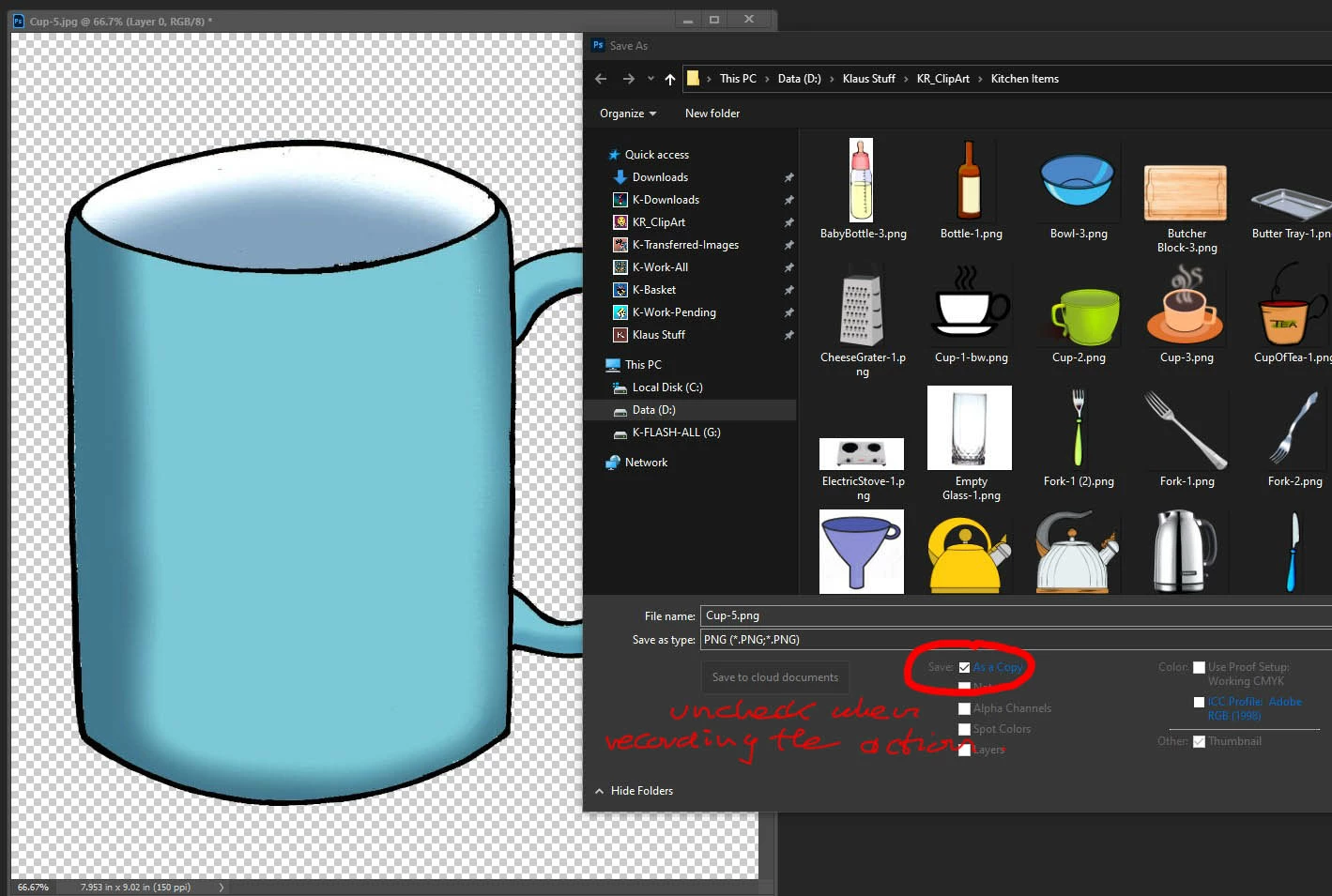
Solution: when writing/recording the action the checkmark at the tiny box "As a copy" at saving window must be unchecked ... and when later applying the action ... NO "copy" in the file name. (see snapshot)

... even though when running the action it is always checked again, but it doesn't matter ... no "copy"

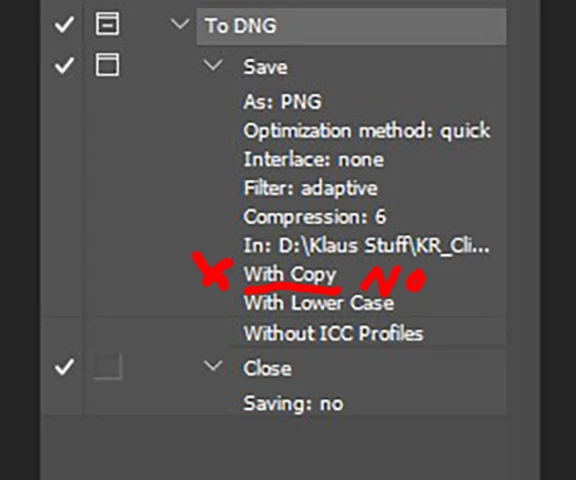
Another confirmation is to look at the step by step / opened action ... no "with copy" should be there. (see snapshot)

And to confirm again - I have both checked in preferences: File Handling > "Legacy Save As" and "Do not append "copy" ..."

So - uncheck the tiny "As a Copy" when writing the action ... and all is good ... I checked a dozen times

Hope this helps anyone with the same issue.

Cheers

2 replies

Stephen Marsh
Community Expert
Community Expert
January 24, 2023

Providing a screenshot of the action with the steps expanded and fully visible would help. Also if using the batch command a screenshot of the settings would also help others to troubleshoot your issue.

Tele55
Tele55Correct answer
Inspiring
January 24, 2023

Hello Stephen and all,

I think I figured it out.

As I said before, the "copy" does not appear when doing the process manually. But when I used the action "copy"appeared

Solution: when writing/recording the action the checkmark at the tiny box "As a copy" at saving window must be unchecked ... and when later applying the action ... NO "copy" in the file name. (see snapshot)

... even though when running the action it is always checked again, but it doesn't matter ... no "copy"

Another confirmation is to look at the step by step / opened action ... no "with copy" should be there. (see snapshot)

And to confirm again - I have both checked in preferences: File Handling > "Legacy Save As" and "Do not append "copy" ..."

So - uncheck the tiny "As a Copy" when writing the action ... and all is good ... I checked a dozen times

Hope this helps anyone with the same issue.

Cheers

nzharrier
Participant
July 13, 2023

I'm using an almost identical action to save as .jpeg. The 'As a Copy' box is greyed out so cannot be unchecked. Always end up with copy appended when running the action.

Kevin Stohlmeyer
Community Expert
Community Expert
January 24, 2023
Klaus5F8DAuthor
Inspiring
January 24, 2023

Thanks Kevin,

to explain it better: I want to convert hundreds of jpgs / background removed, into PNGs.

Right now I have to remove the "copy" everytime / time consuming 😞 .... or just live with the "copy" added.

Now, the solution you mentioned in the link is complicated and confusing and I have no experience with scripts.

Unless there is an easier way ...?

Why does an action not reflect exactly what I do manually when I record it?

Is this a bug? It shouldn't be!

Thanks

Kevin Stohlmeyer
Community Expert
Community Expert
January 24, 2023

Are you using the Automate Batch process to accomplish this?

If so you don't need to have "Save" as part of your actions.

Otherwise check your settings to make sure you have supressed and "Save As" features and try again: