
Document related issue with text color - Picker versus the foreground
Hello everyone,
So just as an intro, let me tell you that I have been through the already posted and solved issues/discussions about the color picker inverting foreground and background problem, the resetting preferences solutions, and it did not solve my problem..
So here is what happens; I think it's related to the specific document that I am using, because it does not happen with others;
When i open this document, and start texting something on it, the color that I choose on the foreground color for my text, is automatically changed and systematically as well, by the color that the Color picker chooses. But the color is never completely different. It's just that the tones change.
For example if I choose an electric green as my text color in the foreground letf panel, the color picker automatically changes it to a more pastel color, but still green.
Like i said intro, i tried different things, but maybe I missed a step in the solutions...
The issue seems to be related to that document.
- Is there a way to reset the preferences for that specific document?
I reset the Photoshop preferences, but i still have the problem after doing so..
here is a print-screen of the problem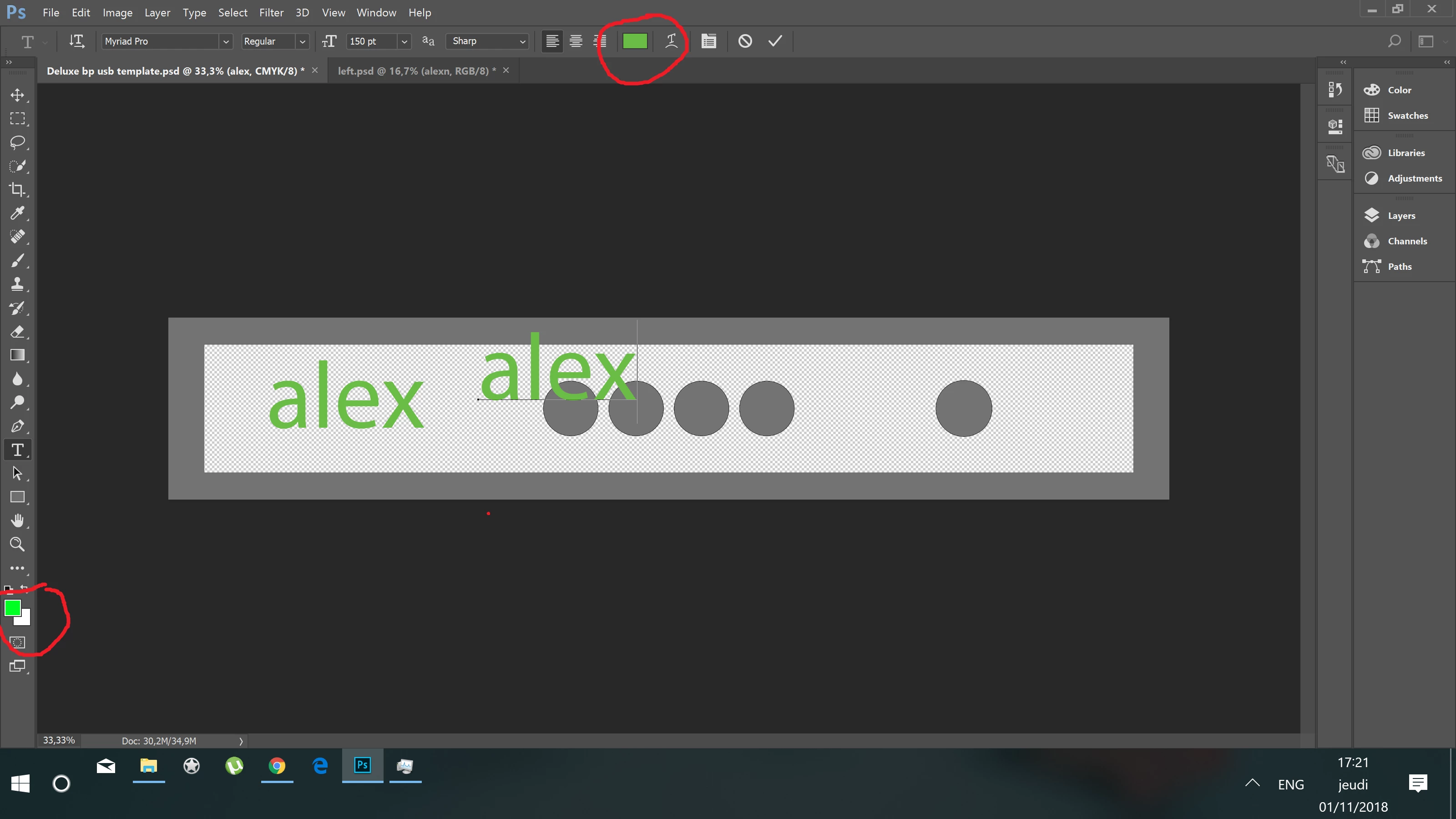
Thank you in advance for your help
 AdChoices