
Participating Frequently
September 20, 2022
Answered

Document window scrolls too far, instead of locking to the sides of the window

  • September 20, 2022
  • 1 reply
  • 826 views

Sorry if I'm using the wrong terminology, I'll try to explain... In CC versions of Photoshop, we used to be able to scroll ONLY to the edges of the document unless you entered Full Screen mode. Now, when I in any direction, I'm able to go beyond the edge of the document and it's driving me crazy. It's super annoying, and I've tried everything in the Settings, and just can't stop it. Does anyone know how to make the interface behave like the old versions?


I've tried disabling that Overscroll option, but that does absolutely nothing to prevent scrolling past the document edges. I can literally see the window background constantly, in every View mode. I've contacted 3 people at Adobe, nobody could fix it.


I'm using Photoshop 23.5.1 and mac OS 12.5


Thanks!
This topic has been closed for replies.
Correct answer Trevor.Dennis

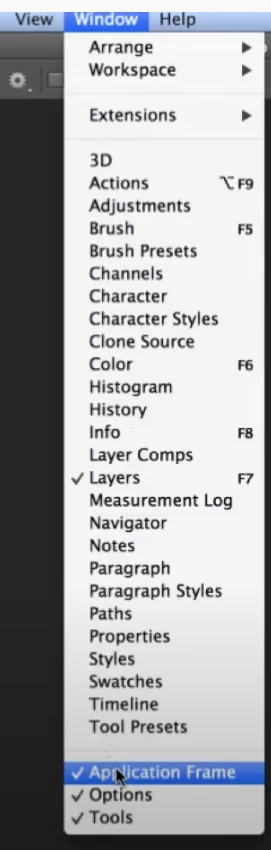
I'm a Windows user so this is my best guess, but it sounds like you have the Application Frame on or off.  Whichever way it is now, try setting it to the other.  Good luck.

1 reply

Trevor.Dennis
Community Expert
Trevor.DennisCommunity ExpertCorrect answer
Community Expert
September 20, 2022

I'm a Windows user so this is my best guess, but it sounds like you have the Application Frame on or off.  Whichever way it is now, try setting it to the other.  Good luck.

Participating Frequently
September 20, 2022

YES!!! THANK YOU !!!

so awesome, I really appreciate you!

Trevor.Dennis
Community Expert
Community Expert
September 20, 2022

That's cool. Photoshop does not have the Application Frame on Windows systems, so I am not really sure what its purpose is.  @gener7  or @jane-e  can you guys explain that to us Windows users?