
Participant
February 22, 2018
Answered

Does Photoshop secretly scan your images?

  • February 22, 2018
  • 7 replies
  • 19685 views

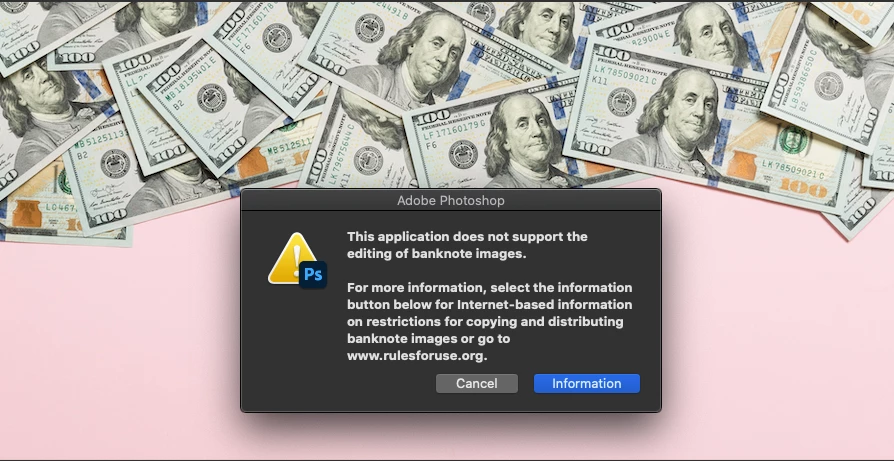
I downloaded this image from Adobe Stock ( File #:  329573176 ), now Adobe Photoshop will not let me open it. It gives me an error message:


"This application does not support the editing of banknote images. For more information, select the information button below for internet-based information on restrictions for copying and distibuting banknote images or go to www.rulesforuse.org."


This is an odd message considering this image was already manipulated and it's being distributed by Adobe. Another question that arises from this... does Adobe Photoshop secretly scan every image you open?
 

Correct answer jane-e

Hi

Adobe Photoshop includes a counterfeit deterrence system (CDS) that prevents the use of the product to illegally duplicate banknotes. Details here:

https://helpx.adobe.com/photoshop/cds.html

~ Jane

7 replies

Karl Fabian5F97
Inspiring
November 25, 2022

Then Photoshop need to seriously improve their code so that this feature makes any sense. I cannot open the below image in Photoshop because it contains bills, even though you can see at most like 25% of each bill.

Inspiring
December 15, 2021

I can tell you from experience that this doesn't always work properly.


Using this type of structure:

//nothing here except targeting photoshop & localize
try {
    // --> all code relating to loading and manipulating an image
} catch(e){
    // handle e
}
//nothing here

 I've still had money images that made photoshop crash. Things like packshots of a wallet with some currency showing.


To the OP: I don't work with currency a lot, but for me, images not showing the entire unit of currency (ie not the entire bill or coin) are usually fine. The picture below doesn't show an entire dollar bill and does open in photoshop.

Participant
November 2, 2021

I bought a stock image of money in a bucket and psd wouldn't open it due to counterfeit rules? Can this be turned off? As long as the image is turned, curved, folded, otherwise obstructed, why can't we use it? 

I worked around it but it was annoying.


Kevin Stohlmeyer
Community Expert
Community Expert
November 2, 2021

There is no getting around this. You will need to find another inaccurate image to allow Photoshop or other items to utilize this. Scanners, digital printers, etc. will all shut down and not allow any current monetary note with certain elements to be used.

Participant
November 3, 2021

So if Im making a chart of money falling, I can no longer do that? Thats nuts. That means I can't update any of my Finacial graphs. 

Chuck Uebele
Community Expert
Community Expert
September 8, 2020

I ran into a similar issue. A few engineers sent me an image of an electrical unit they made and held up half of a dollar bill for scale. I couldn't open the image. Some printers, I've heard also has the ability to detect currency and won't print.


Mike_Gondek10189183
Community Expert
Community Expert
September 8, 2020

Keep us posted on this, as seems unfair to purchase an image with a pink background, and to not be able to edit. Atleast if was posted as a .png with transparent the image might have some usefullness.

Chuck Uebele
Community Expert
Community Expert
September 8, 2020

Jane is correct, but it does seem odd that you download this from Adobe Stock, but can't use it. You would think that they would have screened for that when accepting the image. There are some work arounds, but you will have to Google them.

jane-e
Community Expert
Community Expert
September 8, 2020

I agree, Chuck, and have posted on the Adobe Stock forum.

~ Jane

jane-e
Community Expert
jane-eCommunity ExpertCorrect answer
Community Expert
September 8, 2020

Hi

Adobe Photoshop includes a counterfeit deterrence system (CDS) that prevents the use of the product to illegally duplicate banknotes. Details here:

https://helpx.adobe.com/photoshop/cds.html

~ Jane