ingerb29119935
Participant
March 9, 2021
Answered

download zip
  • March 9, 2021
  • 5 replies
  • 1123 views

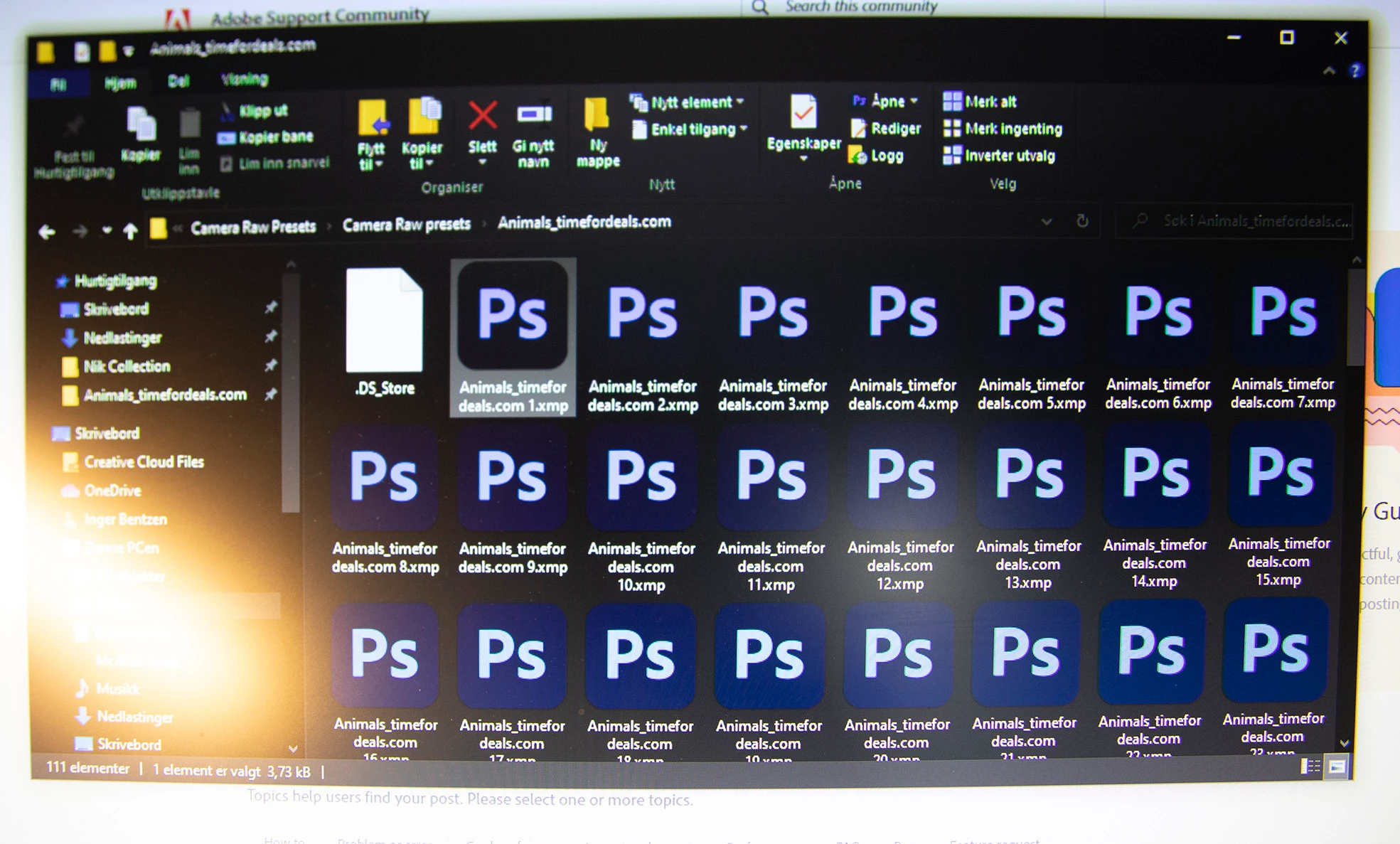
 What can I do to open these files in PS?

This topic has been closed for replies.
Correct answer davescm

If the file extension of xmp is correct, then those are not image files . The xmp files are files that sit alongside raw image files and contain details of the adjustments to be made in camera raw or Lightroom.

So to reopen the image you just need the raw file.

To re-open the image with it's previous adjustments you need both the raw file and the sidecar (xmp) file.


Dave

5 replies

Rob_Cullen
Community Expert
Community Expert
March 10, 2021

My post suggestion (Presets) came from the OPs screen-clip:

Who stores photo files in the Camera Raw Presets folders?

Waiting to hear back from @ingerb29119935 !


Presets, Presets, definitely Presets!

https://timefordeals.com/collections/mega-discount-9-collections/products/2430-lightroom-presets


Regards. My System: Windows-11, Lightroom-Classic 15.1.1, Photoshop 27.3.1, ACR 18.1.1, Lightroom 9.0, Lr-iOS 10.4.0, Bridge 16.0.2 .
davescm
Community Expert
Community Expert
March 11, 2021

@Rob_Cullen  Haha - well spotted on the folder - you could indeed be right.

At the same time it puzzles me why anyone would name their presets Animals_timefordeals.com 2, Animals_timefordeals.com 3.........Animals_timefordeals.com 23......etc. It would make it hard to work out what they did 🙂

As you rightly say - we'll have to wait for the OP to come back and tell us.


Dave

Rob_Cullen
Community Expert
Community Expert
March 12, 2021

Not really wanting to prolong this thread, but a possible answer to-

"why anyone would name their presets Animals_timefordeals.com 2" ?

Preset/Profile names that appear in Lightroom-Classic and ACR are 'internal' within the preset XMP file, and may be entirely different to the Filename of the XMP.

eg.  A file called  {ABC.XMP} may import to LrC and ACR and appear as {FANTASTIC COLORS} in Presets or Profiles.

Not common, but it can happen.


Regards. My System: Windows-11, Lightroom-Classic 15.1.1, Photoshop 27.3.1, ACR 18.1.1, Lightroom 9.0, Lr-iOS 10.4.0, Bridge 16.0.2 .
Rob_Cullen
Community Expert
Community Expert
March 10, 2021

I would suggest they, the XMP files, are CAMERA RAW PRESETS! (Nothing to do with Image files). They are NOT photos!

You would IMPORT these into ACR or LIGHTROOM-CLASSIC and they then show in the Profile Chooser of ACR or LrC. Or they could be Lightroom-Classic Develop Presets.

Where did you obtain them from?

Open one in Windows Notepad and the file may give clues in the text.


Regards. My System: Windows-11, Lightroom-Classic 15.1.1, Photoshop 27.3.1, ACR 18.1.1, Lightroom 9.0, Lr-iOS 10.4.0, Bridge 16.0.2 .
davescm
Community Expert
Community Expert
March 10, 2021

Looking at the naming they are xmp sidecar files, each associated with a specific image. They do not have to be opened or loaded separately. When the associated raw mage file is opened from the same folder, Lightroom or camera raw will automatically use the sidecar file to load adjustments for the image.

Dave

jane-e
Community Expert
Community Expert
March 9, 2021

It appears that these files were created on a Mac and you are using Windows. If they did not send the image files, you need to ask again. First, though, use the scroll bars to see if they appear lower down in the list.


~ Jane


ingerb29119935
Participant
March 9, 2021

Does that mean I can not reopen the image?

davescm
Community Expert
Community Expert
March 9, 2021

You can open the image only if you have the image file and not just the xmp file.

Dave

davescm
Community Expert
davescmCommunity ExpertCorrect answer
Community Expert
March 9, 2021

If the file extension of xmp is correct, then those are not image files . The xmp files are files that sit alongside raw image files and contain details of the adjustments to be made in camera raw or Lightroom.

So to reopen the image you just need the raw file.

To re-open the image with it's previous adjustments you need both the raw file and the sidecar (xmp) file.


Dave