eyemaze
Participating Frequently
May 29, 2017
Answered

DPI for Printing T-Shirts Question

  • May 29, 2017
  • 3 replies
  • 18669 views

Hi,

I have been designing my t-shirts in Photoshop with an image size of 7.12 x 8.59 inches. I did my artwork within the framework of a mockup shirt making the size of my design even smaller than the 7.12 x 8.59 inches. After this, I saved the file as a png to get a transparent background.

However, I want to use a site called Printful where the suggested image size in Photoshop to work on is 12 x 16 inches to work on. When I upload my png image to the website I have to stretch out my image. When I stretch it out to the size of my liking the dpi drops to about 105, which is too poor of printing quality to print.

Does anyone have any suggestions on how to get my DPI closer to 300 without having to redesign my 40+ shirt designs?!?

Thanks!!!!

PS: Printful uses Direct to Garment printing in RBG.

This topic has been closed for replies.
Correct answer barbara_a7746676

No matter what, there will be some loss of quality when you increase the size of the t-shirt design.

  1. Open the original design (jot the saved png) in Photoshop.
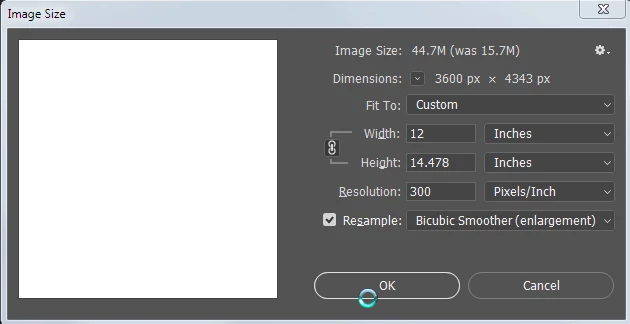
  2. Choose Image > Image Size.
  3. Choose a Resample method -- the best method to choose will depend on what the design looks like. Leave the Resolution at 300 (assuming that your original resolution is 300), and change the Width to 12 Inches. The Height will be less than 16 inches, but that's ok because you want to keep the same width/height proportions.

Choose File > Save As (do not choose Export). 

3 replies

D Fosse
Community Expert
Community Expert
May 30, 2017

I can't imagine that cotton fabric is able to resolve anything even close to 300 ppi. 100 is probably a more realistic upper limit.

Eternal Warrior
Inspiring
May 30, 2017

Whilst you make a fair point Dag... I don't see any harm that comes from aiming for 300 ppi.... The output will be adjusted to what is possible anyway...

Surely it is better to get best possible resolution than the average?

Nexahs1138
Inspiring
May 29, 2017

1. Design your stuff at 1080p and then scale down, that'll solve any loss of quality. Always work with HD sizes.

2. Don't bother with 300 dpi, 72 is fine.

davescm
Community Expert
Community Expert
May 29, 2017

Nexahs1138  wrote

1. Design your stuff at 1080p and then scale down, that'll solve any loss of quality. Always work with HD sizes.

2. Don't bother with 300 dpi, 72 is fine.

1. Sorry but that is misleading advice.  For video it is sound and works,  for photography and print - no.

1080p is a video format and isn't even in the correct aspect ratio for the the original posters requirement.

2. Again it depends. dpi is for printing (if your image is purely for screen it is irrelevant) and the requirement is based on viewing distance. If I print a wedding album at 72dpi it will look poor. If the output is a wall poster then the requirement is much less.

Design with the output in mind. If your destination is print, be it T-Shirt book or poster, talk to your printer, particularly in the case for printing on textiles. If you have and, In this case if your printer has advised 12x16 at 300dp,  then follow Barbara's advice on resampling.

Dave

Eternal Warrior
Inspiring
May 30, 2017

+1

barbara_a7746676
Community Expert
barbara_a7746676Community ExpertCorrect answer
Community Expert
May 29, 2017

No matter what, there will be some loss of quality when you increase the size of the t-shirt design.

  1. Open the original design (jot the saved png) in Photoshop.
  2. Choose Image > Image Size.
  3. Choose a Resample method -- the best method to choose will depend on what the design looks like. Leave the Resolution at 300 (assuming that your original resolution is 300), and change the Width to 12 Inches. The Height will be less than 16 inches, but that's ok because you want to keep the same width/height proportions.

Choose File > Save As (do not choose Export). 

Eternal Warrior
Inspiring
May 30, 2017

+1