dragantomas
Inspiring
January 19, 2023
Answered

Dr Brown Image Processor not showing in Bridge on MBP M1 Max

  • January 19, 2023
  • 2 replies
  • 3104 views

Hi all,


Just today I made a leap from Intel based Macbook Pro to 16 MBP M1 Max. 


I always usd Dr Brown processor on Intell Mac without any problem. But its not showing in Bridge on M1 Max. 

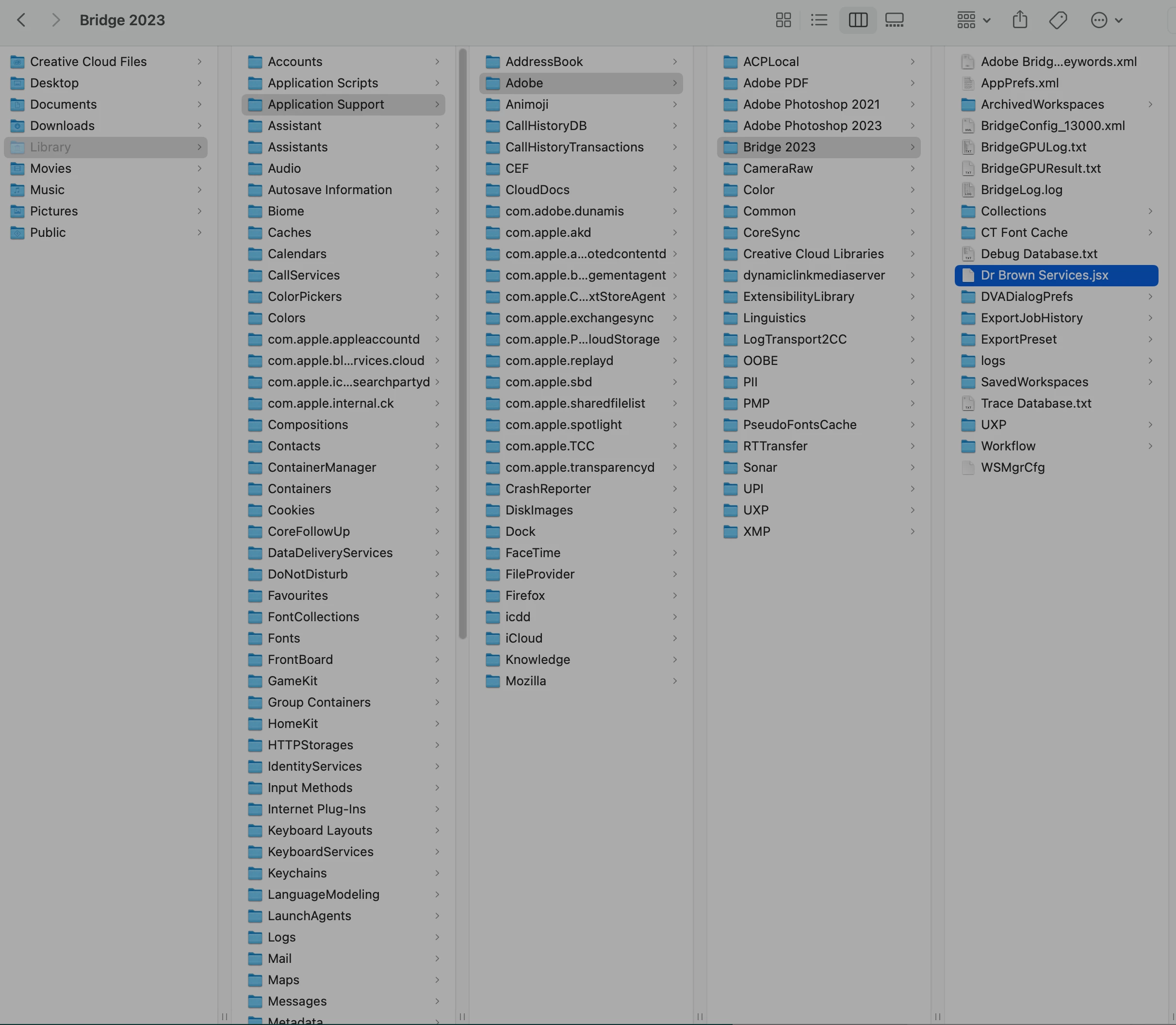
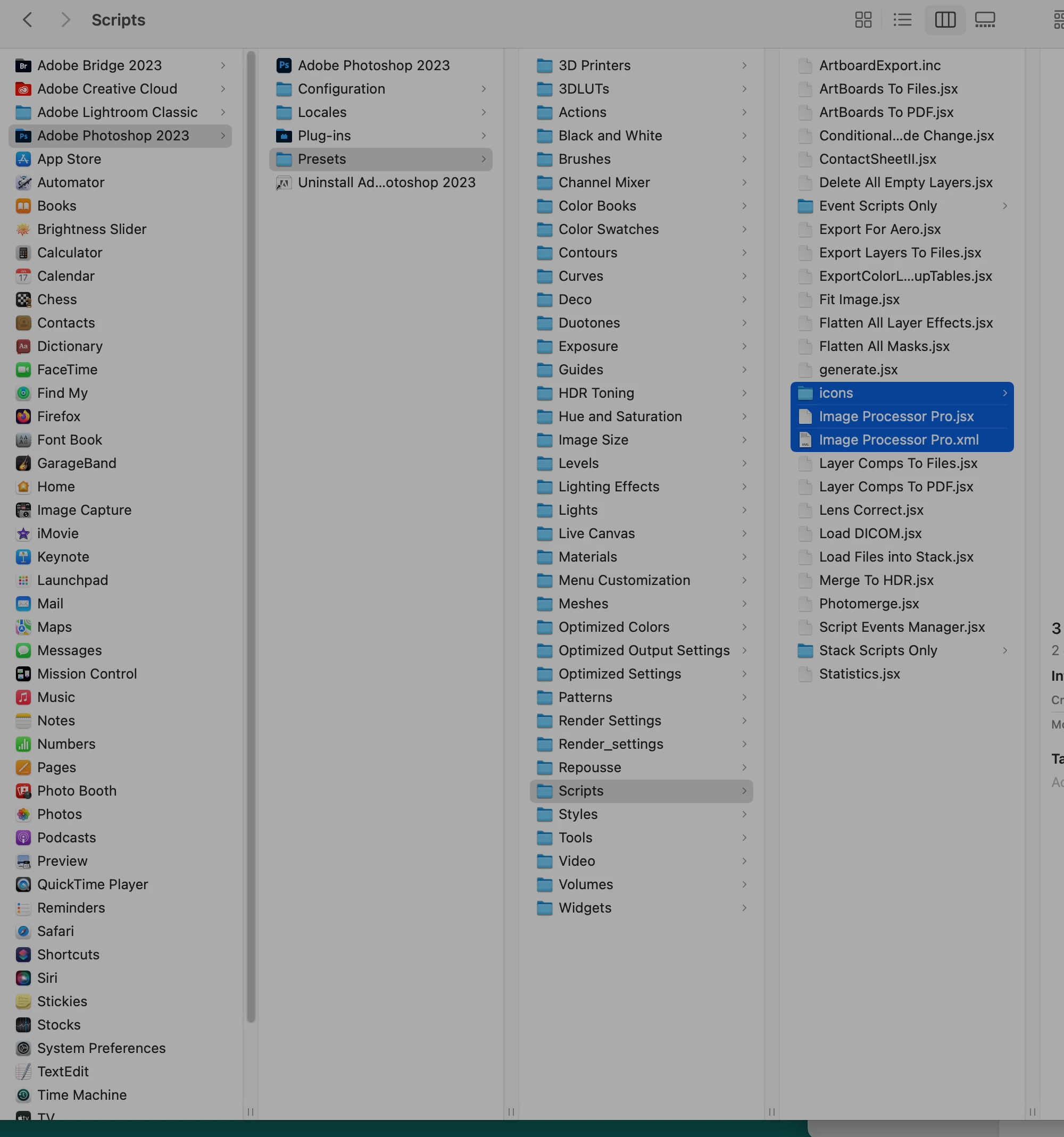
Here bellow are the 2 screenshots where you can see where I droppned Dr Brown's Processor files inside the new Mac machine.

Can someone advise the fix please? Thank you.


This topic has been closed for replies.
Correct answer dragantomas

There was a photoshop update of 24.4.1 just released


Go to your Creative Cloud Desktop Application and install the photoshop 24.4.1 update.

That will eliminate the need to try a photoshop reinstall as a fix.


Okay I also went to delete  Image Processor Pro.log out of the directory you mentioned earler and that has fixed the problem. 

2 replies

Jeff Arola
Community Expert
Community Expert
January 20, 2023

The Dr Brown Services.jsx should go in

Machintosh HD/Library/Application Support/Adobe/Startup Scripts CC/Adobe Bridge 2023


Looks like you inadvertently put it in your User Library


I don't believe there is any need to run Bridge or Photoshop under Rosetta.


dragantomas
Inspiring
April 21, 2023

Hi Jeff, something happened with Dr. Brown amd I hope you can help. Dr Brown services worked fine untill yesterday. 


Now when I select the photo in Bridge and then to to Tools - Dr Brown Services - Image processor pro.. I get this pop up dialog (see the screenshot) informing there is an error of some sort.


I have done un/reinstall, and a Bridge factory rest (shift option cmd press on Bridge app), didnt help the issue. 

When untinstalling I have choosen option to remove all the plugins as well, but after reinstall the Dr Brown plug in was automatically added to Bridge.


Would you know what this is and how to fix this problem?

Regards

dragantomas
Inspiring
April 21, 2023

Go to

Macintosh HD/Users/UserName/Library/Application Support

and trash the

Image Processor Pro.xml


Done that just now but the problem is still the same.


(There is also a 'Image Processor Pro.log' in Application Support folder, mentioning it just in case it may b of some importance..)

gener7
Community Expert
Community Expert
January 19, 2023

Russell Brown hasn't updated his softwares and likely will not due to his schedule. You may want to run Photoshop and Bridge using the Intel emulation mode aka Rosetta 2. 


Edit: Someone in the forums might know if a developer has updated it for the M1 and M2.

dragantomas
Inspiring
January 19, 2023

Is there a step by step guide how to run that Intel emulation aka Rosetta 2?


Okay I will ask in the forums as well. Thank you.

Kevin Stohlmeyer
Community Expert
Community Expert
January 19, 2023