Answered
Draw Line
How to draw a diagonal line like this one: (the blua and grey) (Photoshop CS6)


How to draw a diagonal line like this one: (the blua and grey) (Photoshop CS6)
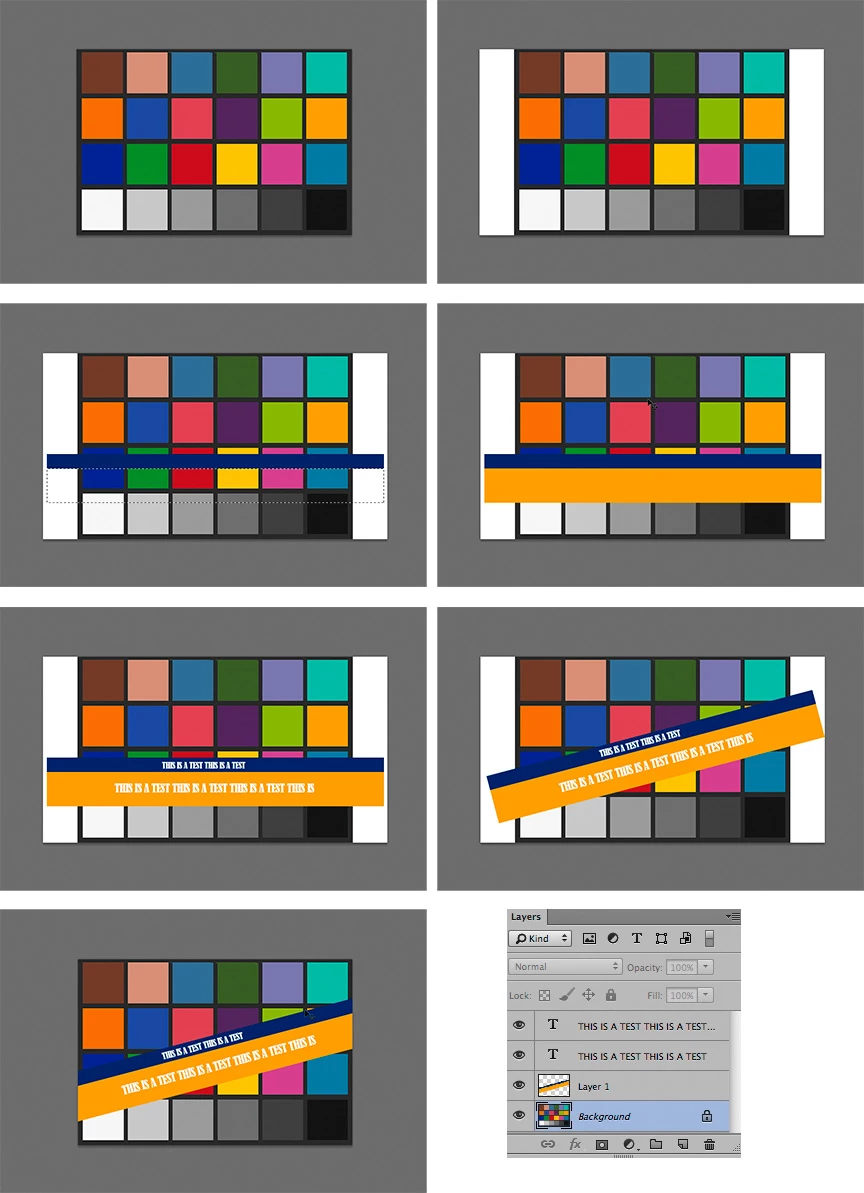
1. Original file,
2. Then image > Canvas Size (extend width as shown)
3. Add blank layer. Then Rectangular Marquee, followed by Edit > Fill with chosen color
4. Repeat Step 3 with larger selection positioned below Step 3 item.
5. Add type. Each line of type on a separate layer as shown in Layers panel
6. Choose the bar layer plus the type layers. (Hold down Shift to add each layer in Layers panel)
Then Edit >Transform> Rotate
7. Crop image to original image size
Already have an account? Login
Enter your E-mail address. We'll send you an e-mail with instructions to reset your password.
 AdChoices