Participating Frequently
February 3, 2020
Answered

Dull colors Troubleshooting

  • February 3, 2020
  • 2 replies
  • 7015 views

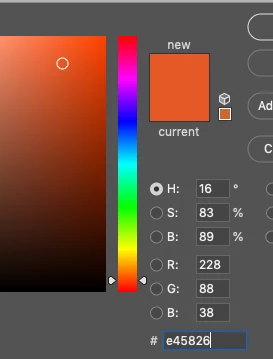
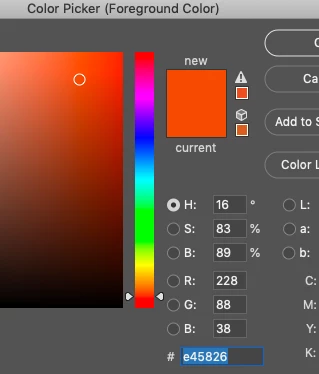
Any reason why one document has such duller colors than the other? They are the same hex code and I've confirmed that they are in the same color space: RGB > 8Bits.


Would appreciate your thoughts! Thank you Photoshop community! 
 

This topic has been closed for replies.
Correct answer D Fosse

To get them into the same color space, Edit > Convert to Profile.


I'd recommend you convert the P3 file into Adobe RGB, not the other way round. Adobe RGB is a very well established and recognized standard color space, accepted almost everywhere. DCI-P3 is new and as yet not widely supported.


When you do that, the numbers will initially change because the conversion will preserve visual appearance. But if you then input the numbers again, everything will match.

2 replies

Participating Frequently
February 3, 2020

How can I get them into the same color space? And any ideas why they got off to begin with?


Also the RGB numbers look the same so I don't know how to correct. Thanks! 

D Fosse
Community Expert
D FosseCommunity ExpertCorrect answer
Community Expert
February 3, 2020

To get them into the same color space, Edit > Convert to Profile.


I'd recommend you convert the P3 file into Adobe RGB, not the other way round. Adobe RGB is a very well established and recognized standard color space, accepted almost everywhere. DCI-P3 is new and as yet not widely supported.


When you do that, the numbers will initially change because the conversion will preserve visual appearance. But if you then input the numbers again, everything will match.

Participating Frequently
February 4, 2020

Thank you very helpful!

D Fosse
Community Expert
Community Expert
February 3, 2020

They are not in the same color space. One is sRGB and the other is Adobe RGB.


Hex is just a base 16 notation for RGB numbers. There's nothing "absolute" about hex. It all depends on the color space the numbers refer to.


Edit: back at my workstation to check the numbers. It's actually Adobe RGB and DCI-P3 - I should have guessed since it's a Mac. Of course the principle is exactly the same.