
Participant
April 4, 2025
Answered

duotone effect

  • April 4, 2025
  • 2 replies
  • 269 views

hi everyone, i am trying to apply duotone effect in photoshop with one black solid color and other self created spot color , but the issue is that i am unable to use it from the color libarary, how we can use duotone with self created spot , thanks in advance.
Correct answer c.pfaffenbichler

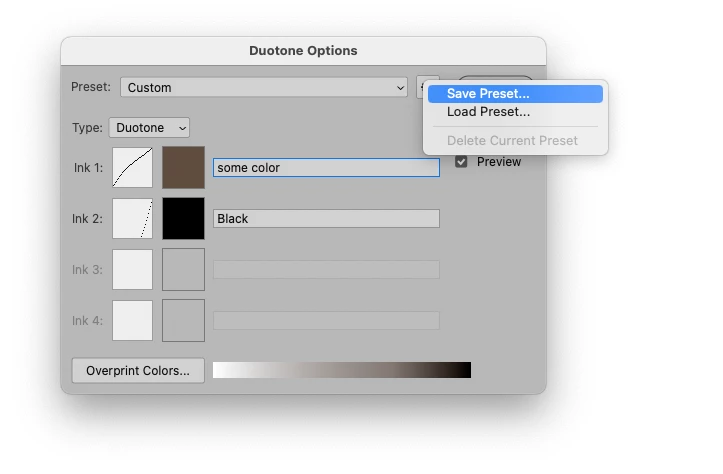
If you are indeed working with a grayscale image, using Image > Mode > Duotone and the color is not part of an actual Color Library then you probably need to set the color and the name yourself in the Duotone Options-dialog. 

This should not be a problem when placing the image/s in Indesign (or other layout applications) but output just fine (mind that the spelling matches the one in the layout application exactly). 


If you need to apply to multiple images you can save a preset. 

2 replies

c.pfaffenbichler
Community Expert
c.pfaffenbichlerCommunity ExpertCorrect answer
Community Expert
April 4, 2025

If you are indeed working with a grayscale image, using Image > Mode > Duotone and the color is not part of an actual Color Library then you probably need to set the color and the name yourself in the Duotone Options-dialog. 

This should not be a problem when placing the image/s in Indesign (or other layout applications) but output just fine (mind that the spelling matches the one in the layout application exactly). 


If you need to apply to multiple images you can save a preset. 

c.pfaffenbichler
Community Expert
Community Expert
April 4, 2025

Could you please post screenshots with the pertinent Panels (Toolbar, Layers, Channels, Options Bar, …) visible?