
Inspiring
September 30, 2022
Answered

Duplicate layer on the top of layers on all open documents

  • September 30, 2022
  • 1 reply
  • 1222 views

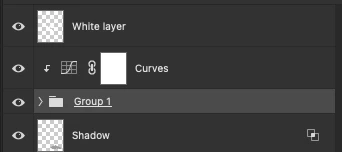
I tried to duplicate some layer with a script to all open documents and put that layer on the top (with script listed below), but problem occures when on another document, active layer have cliped layers, this script unclipe layer. Does anyone now how to improve this?
 

if( app.documents.length > 0 ){
    duplicateToAll();
}
function duplicateToAll(){
    docs = app.documents;
    curDoc = app.activeDocument;
    for(var i = 0; i < docs.length; i++){
        if(curDoc != docs[i]){
        var curLayer;
        try { curLayer = docs[i].activeLayer; } catch(e) {}
        curDoc.activeLayer.duplicate(docs[i],ElementPlacement.PLACEATBEGINNING);
        }
        app.activeDocument = curDoc;
    }
}
This topic has been closed for replies.
Correct answer Stephen Marsh


@milevic 


The following code will select the top layer on all open files without changing their original visibility. The active doc is presumed to be the file that you will dupe the layer group from. After selecting the top layer of all open docs the script will return to the original doc.


You should be able to add your code after this code.


/*
The active doc should be the source doc containing the layer or group to be duplicated to all other open docs
*/

// Set the original doc
var origDoc = activeDocument;

// Loop over all open docs
for (var i = 0; i < app.documents.length; i++) {
    app.activeDocument = app.documents[i];
    
    // Ignore the original doc
    if (activeDocument !== origDoc) {
        
        // Select the top/front layer without changing visibility
        if (activeDocument.layers[0].visible === false) {
            activeDocument.activeLayer = activeDocument.layers[0];
            activeDocument.activeLayer.visible = false;
        } else {
            activeDocument.activeLayer = activeDocument.layers[0];
        }
    }
}

// Return to the original doc
activeDocument = origDoc;


1 reply

Chuck Uebele
Community Expert
Community Expert
September 30, 2022

You would need to add a routine to check for a clipped layer, then if there is a grouped layer select both the active layer and the clipped layer and duplicate them both. 

milevicAuthor
Inspiring
September 30, 2022

Sorry for missunderstanding, this image represent destination document.  It s not problem when it is on source document,  main problem is when i have selected layer on destination doc. Is it possible to improve code for example to select top layer on each open document before i duplicate or any other idea?

Chuck Uebele
Community Expert
Community Expert
September 30, 2022

I had a script that did this. I'll have to see if I can find it.