
Kogi18
Inspiring
February 21, 2019
Answered

Duplicating a document with SmartObject causes an app.refresh() bug

  • February 21, 2019
  • 3 replies
  • 1242 views

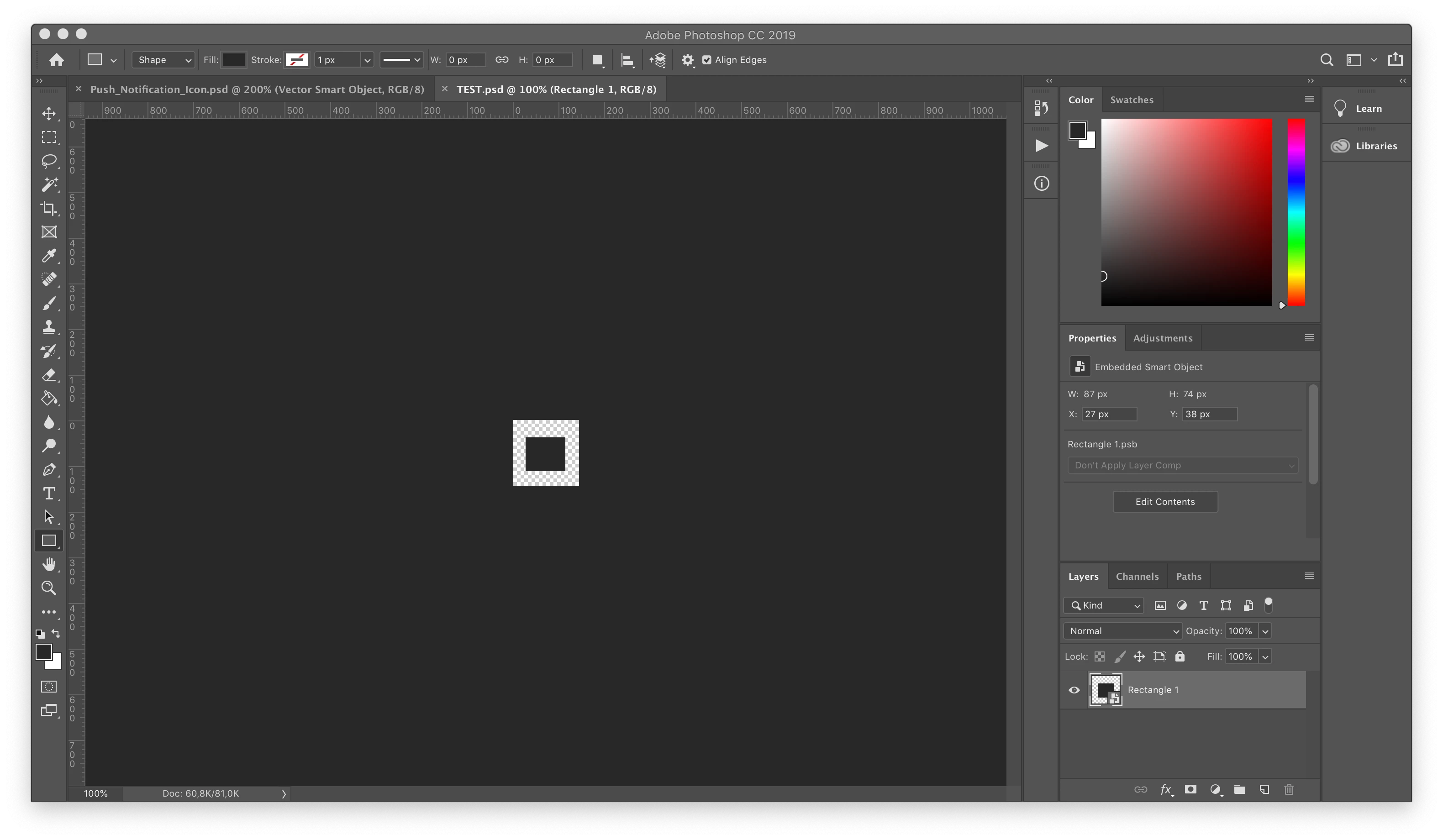
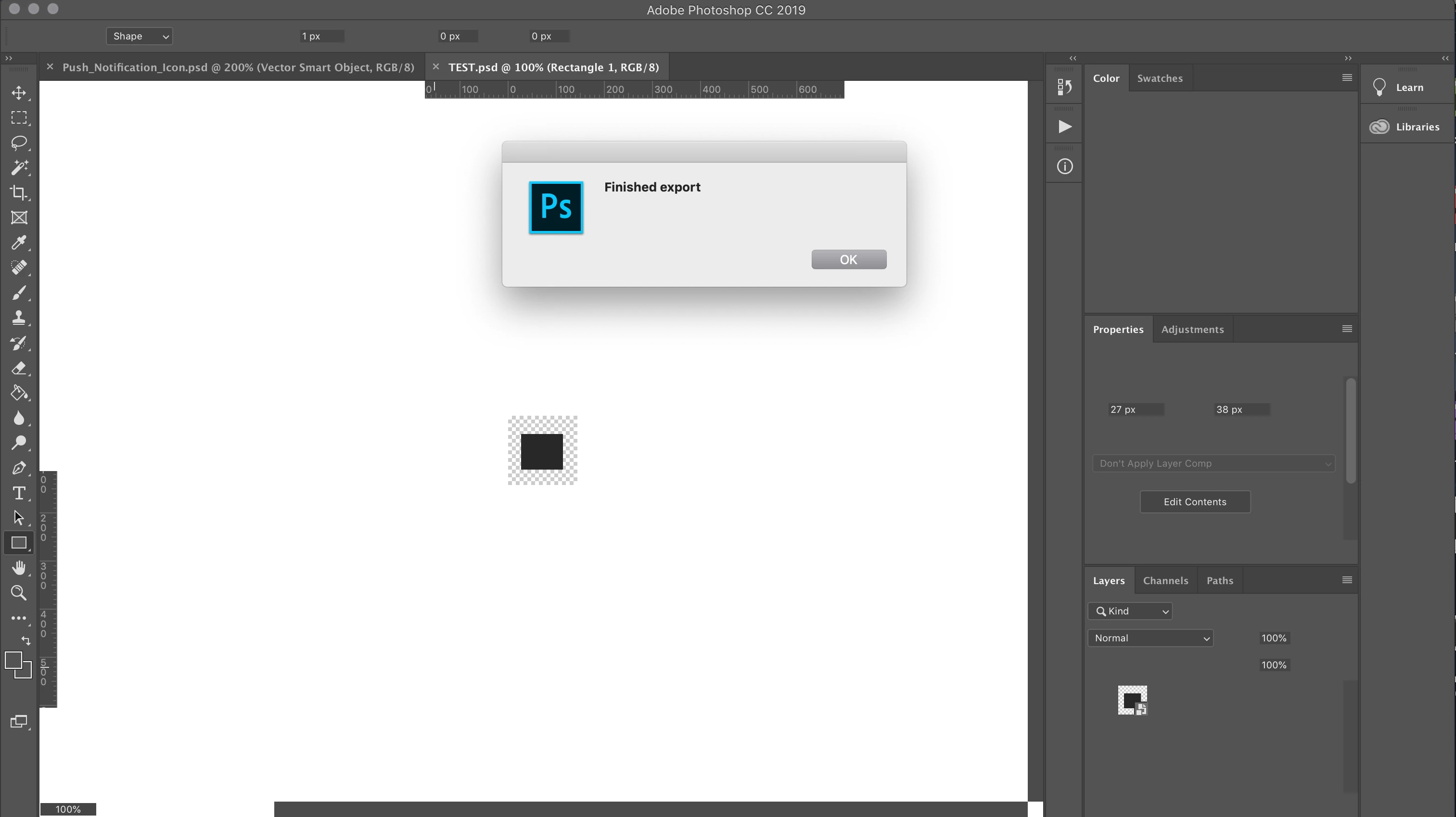
I am preparing a script, which resizes the active document into multiple different scaled versions of it and exports each version to multiple locations. I am doing it with the lazy approach of creating and modifying a duplicate of the original document as a failsafe to keep original intact.  The problem/bug appears only when I duplicate a document, which contains a smart object and report the end of script execution via an alert. As visible in the screenshots, it results in the app.refresh not refreshing the application frame correctly. Note, that after the alert is closed, the application is refreshed to normal, since the script finished execution.

Before execution:
At the end of execution on alert:
The script is meant to be used with documents, which will always have a SmartObject (taken from Illustrator), since such is the local convention for this type of documents. Since the artists use different versions of Photoshop, I cannot report the execution progress by a progress bar. I need to report the execution status, because the script also always returns back to the original state without any history with UNDOs and it looks like "nothing happened". So I need an alternative to an alert dialog that will work with most versions of photoshop or a way to force app.refresh to work correctly.

A simplified version of the script:

function main(){

     var doc_original = activeDocument;

     // imagine an actual for loop from this part on

     for(...){

          var doc_copy = doc_original.duplicate("TEMP");

          // imagine resize + export code (still TODO)

          doc_copy.close(SaveOptions.DONOTSAVECHANGES);

     }

}

var original_active = activeDocument;

original_active.suspendHistory(history_state_name, 'main()');

// removes any modification to original document (just calling duplicate marks it as changed)

executeAction(charIDToTypeID('undo'), undefined, DialogModes.NO);

activeDocument = original_active;

// refresh solves the problem of not updating the active document

refresh();

alert("Finished export");

I encountered the issue on MacOS Mojave 10.14.3 with a MacBook Pro (15-inch, 2018, 2.6 GHz Intel Core i7, 16 GB 2400 MHz DDR4).

This topic has been closed for replies.
Correct answer Kogi18

Kukurykus  wrote

suspendHistory breaks activeHistoryState 

Indeed it seems that the UNDO was too fast for the visuals of active states to be processed or sthg like that. Thank you! I got the code to work by simply moving the refresh call 5 lines up. Such a hack, LOL.

#target photoshop

function main(){ 

    var doc_original = activeDocument; 

    // imagine an actual for loop from this part on 

    var doc_copy = doc_original.duplicate("TEMP"); 

    // imagine resize + export code (still TODO) 

    doc_copy.close(SaveOptions.DONOTSAVECHANGES); 


var original_active = activeDocument; 

original_active.suspendHistory('change', 'main()');

// correct refresh position

refresh();

// removes any modification to original document (just calling duplicate marks it as changed) 

executeAction(charIDToTypeID('undo'), undefined, DialogModes.NO); 

activeDocument = original_active; 

// wrong refresh location - problem was indeed active history state not updating fast enough for UNDO

// refresh(); 

alert("Finished export"); 

3 replies

Legend
February 23, 2019

Use step-by-step play action mode.

Kogi18
Kogi18Author
Inspiring
February 25, 2019

r-bin  wrote

Use step-by-step play action mode.

Can you go more into details or refer where I should read more on this step-by-step mode? Since I checked the this 3 scripting manuals with no avail:

Kukurykus
Legend
February 25, 2019

You find step-by-step in Playback Options of Actions panel dropdown menu.

Kukurykus
Legend
February 22, 2019
Kogi18
Kogi18AuthorCorrect answer
Inspiring
February 22, 2019

Kukurykus  wrote

suspendHistory breaks activeHistoryState 

Indeed it seems that the UNDO was too fast for the visuals of active states to be processed or sthg like that. Thank you! I got the code to work by simply moving the refresh call 5 lines up. Such a hack, LOL.

#target photoshop

function main(){ 

    var doc_original = activeDocument; 

    // imagine an actual for loop from this part on 

    var doc_copy = doc_original.duplicate("TEMP"); 

    // imagine resize + export code (still TODO) 

    doc_copy.close(SaveOptions.DONOTSAVECHANGES); 


var original_active = activeDocument; 

original_active.suspendHistory('change', 'main()');

// correct refresh position

refresh();

// removes any modification to original document (just calling duplicate marks it as changed) 

executeAction(charIDToTypeID('undo'), undefined, DialogModes.NO); 

activeDocument = original_active; 

// wrong refresh location - problem was indeed active history state not updating fast enough for UNDO

// refresh(); 

alert("Finished export"); 

Kogi18
Kogi18Author
Inspiring
February 22, 2019

After re-checking the code again, it seems that the issue is not caused by the duplication but by the UNDO action before a refresh (when a SmartObject is present in document). The same problem occurs when I simplify the code to:

#target photoshop

function main(){ 

   // DO NOTHING - just executing script to modify history states

activeDocument.suspendHistory('change', 'main()'); 

// removes any modification to original document (just calling duplicate marks it as changed) 

executeAction(charIDToTypeID('undo'), undefined, DialogModes.NO);

refresh(); 

alert("Finished export");