
Participating Frequently
August 6, 2019
Question

Duplicating Shapes causes weird Extra Lines. Why?

  • August 6, 2019
  • 1 reply
  • 356 views

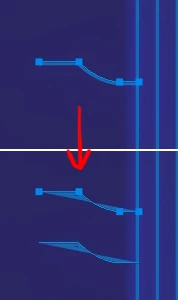
Hi, I made a shape and then turned off fill and used only stroke. When I duplicate the shape (option drag) it duplicates the shape but then adds another (connects) the start and end point of the shape. Why is this and how do I prevent this from happening?
This topic has been closed for replies.

1 reply

August 6, 2019

Hi

How are you copying the shapes, not seeing any issue using Alt + the Move Tool with Photoshop 20.0.5

Participating Frequently
August 6, 2019

I'm selecting the shape with the direct selection tool (arrow) and then holding Option key and dragging the shape. I don't think it's a bug but maybe a shape setting in the Toolbar? I tried different settings but it still happens.

Participating Frequently
August 6, 2019

I tried "duplicating" the shape layer too and then merging them but it still happens. If I have a few shapes on a layer, then I use the pen tool to add a new shape , the new shape doesn't take on the stroke of the other shapes and the existing shapes starting and end points become connected.