Answered
Edge shifting not possible in PS
I have a selection in PS and want to shift the edge closer to the object. PS 25.9.0 (under Win 10) does not react if I try to shift the edges. Is this a known issue?

I have a selection in PS and want to shift the edge closer to the object. PS 25.9.0 (under Win 10) does not react if I try to shift the edges. Is this a known issue?
The way you show here works. But I'd like to use "Select" -> "Select and modify". This way I can see better what happens when working with the sliders (the soft edge slider works, not the shift edge slider). Why is that?
Are you talking about working with layer masks? If yes, then I hadn't understood that.
When you say 'Soft Edge' then I am guessyou are talking about Feather?
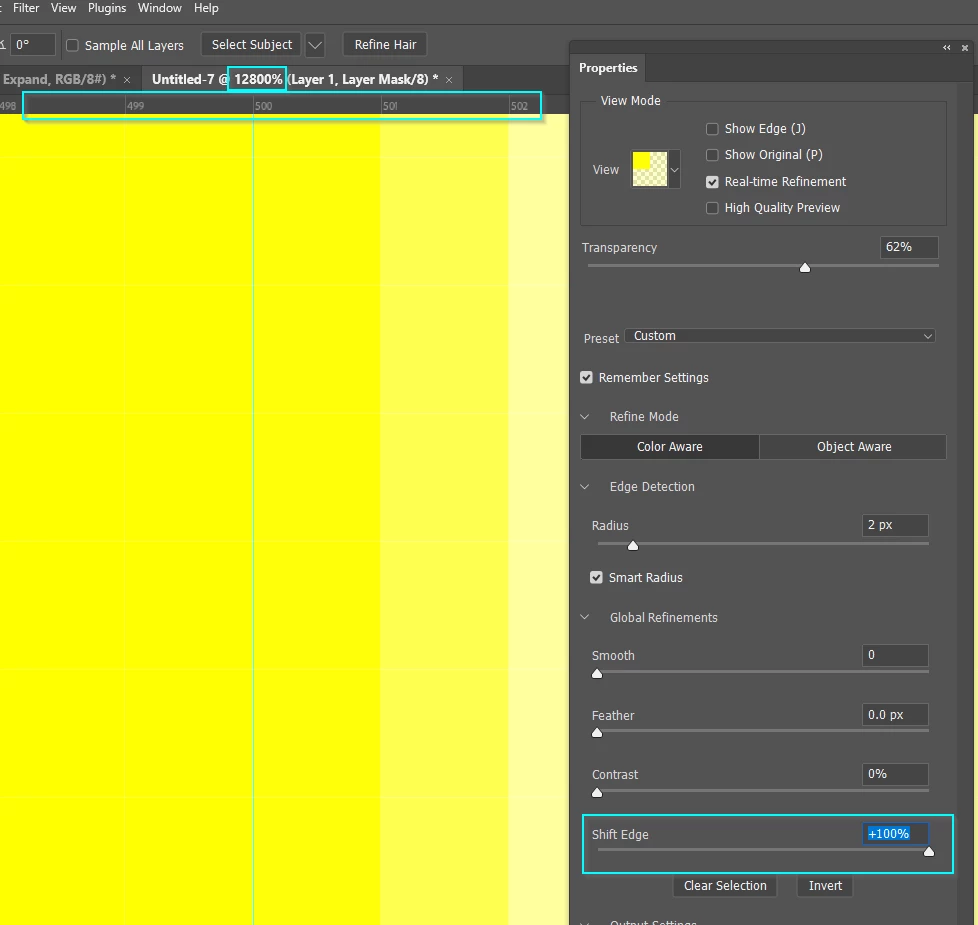
Shift Edge does work, but its subtle.
Try this wee experiment.
Drag out some guides, and snap a rectangular selection to those guides.
Add a layer mask.
Zoom in as far as it will go 12800%
Double click the layer mask and choose Select & Mask
Now drag Shift Edge and you will clearly see how far it moves. In this case it was ± 2 pixels. I don't know if that is an absolute amount regardless of image size, but my guess would that it is.
Already have an account? Login
Enter your E-mail address. We'll send you an e-mail with instructions to reset your password.
 AdChoices