
Wayno72
Participant
June 18, 2023
Answered

Edit and Action

  • June 18, 2023
  • 1 reply
  • 320 views

Hello,

I have a new laptop. I have transferred all my actions over to Photoshop, but the saving actions won't work as the file structure has changed between devices.

When I record a new action to save a photo, I just want the original name and save into a particular folder. The action records the file name then every time I run the action it always saves it to that name.

Can I edit the action and change this, or how do I record an action that uses the file name, but saves it into a particular folder?

I have attached a file that has the folder structure I need, and the file name (whic I wanrt to remove).\

Cheers,

Wayne.
This topic has been closed for replies.
Correct answer Stephen Marsh

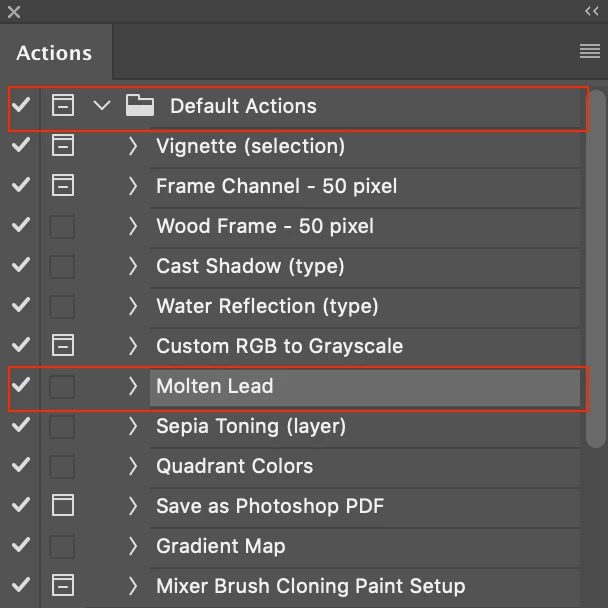
1) Click to set the interactive modal control icon in the action step (the square icon to the right of the check/tick).


2) Use the batch action to override the action save as step.

1 reply

Stephen Marsh
Community Expert
Stephen MarshCommunity ExpertCorrect answer
Community Expert
June 18, 2023

1) Click to set the interactive modal control icon in the action step (the square icon to the right of the check/tick).


2) Use the batch action to override the action save as step.

Wayno72
Wayno72Author
Participant
June 19, 2023

Many thanks for your help.

Cheers.

Stephen Marsh
Community Expert
Community Expert
June 19, 2023

You're welcome.


If one of my suggestions resolved your issue, then please mark my reply as a correct answer to let others with a similar issue know of a resolution.


If not, then what issues do you still face?