

TomaD
Inspiring
November 27, 2023
Answered

Edit vector smart object in Illustrator : error -54

  • November 27, 2023
  • 5 replies
  • 434 views

Hi,
I worked for a long time on OS 10.14 Mojave with Illustrator 24.3 and Photoshop 20.0.6. (lots of scripts, custom keyboard shortcuts, plugins and various customizations)
Recently I updated Mac OS 12.7 Monterey. Since then, it is impossible to edit a vector smart object from Photoshop in Illustrator (double clic on the layer). This error message appears
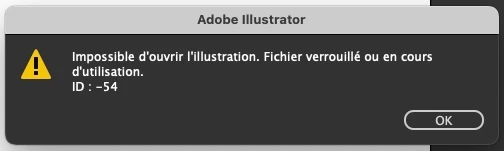
So I made updates to Photoshop 24.7 and Illustrator 24.9 (keeping the old versions installed on my Mac) The problem of editing smart objects is solved but I lost all my preferences, settings, scripts, shortcuts, my brushes...

So I want to continue using older versions, but I need to resolve this smart object issue.
Does anyone have a solution? What does a -54 error mean?

Thanks

(I post this message in  Illustrator thread, too)

This topic has been closed for replies.
Correct answer TomaD

To close the post, the (my) solution is: update Photoshop by keeping the old version on the hard drive (not necessarily Illustrator) and copy-paste the old prefs/presets folders into the finder.

5 replies

TomaD
TomaDAuthorCorrect answer
Inspiring
December 4, 2023

To close the post, the (my) solution is: update Photoshop by keeping the old version on the hard drive (not necessarily Illustrator) and copy-paste the old prefs/presets folders into the finder.

mglush
Community Expert
Community Expert
November 28, 2023

Hi! Here is some additional information regarding an error -54 in Photoshop: https://helpx.adobe.com/photoshop/kb/program-error-opening-psd.html


TomaD
TomaDAuthor
Inspiring
November 28, 2023

Hi and thanks for the quick reply

Yes, with the new version of Photoshop, I can edit vector smart objects in Illustrator (even in the old version of Illustrator).

The issue seems to come from Photoshop 20.0.6 with Monterey.

I've copied prefs, presets an scripts folders from the old versions to new ones, directly in the Finder (brutal method), and seems work...


NB : The error was -54, not 54.

Bojan Živković11378569
Community Expert
Community Expert
November 28, 2023

To avoid losing your actions and presets, always save them on your hard drive and back them up. Do not depend on the Photoshop preference file to store your actions and presets.

Migrate presets, actions, and settings (adobe.com)


mglush
Community Expert
Community Expert
November 28, 2023

Hi!

Your post is a little confusing--you mentioned that the smart object error is solved but then you said at the end that you need to resolve this smart object issue. Have you resolved it? Ir is the Smart Object issue now happening in the previous version?


If you kept your older versions of Photoshop intact (which was a really good idea!), can you go back to using it? And, you should still have all your preferences and settings, etc. in the old program--can you export them or save them out so you can import them into the new versiont? 


I looked up Error 54 and found this: https://www.solvusoft.com/en/errors/runtime-errors/adobe-systems-inc/adobe-photoshop/54-photoshop-error-54/

I am not sure if the explanation will help to fix your issue, but at least it is an explanation. 

Let us know how we can help you further?

Michelle