
December 26, 2018
Question

Editing files from photoshop to SMB share.

  • December 26, 2018
  • 3 replies
  • 2292 views

Hi everyone,

Today i'm stuck, i can't edit a file saved in my SMB share.

What i did :

- i opened an psd file saved in the smb share (this file was created by another smb user)

- i modified this file

- when i do a file > save i have this message :

" impossible to save "file.psd" because you do not have write authorization "

Screenshot (in french) :
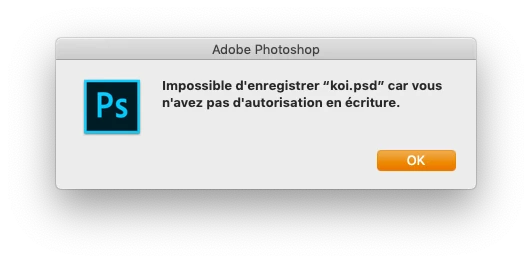
I configured this samba server and i'm sure this user have write permissions to the share. Even microsoft apps (and others) works with the same workflow.

Photoshop is up to date and server is a debian 9 vm with samba.

The workaround is to save as.. but this is not practical.

If i save modifications with the user who created this file it works.

Any leads?

Best regards, R

This topic has been closed for replies.

3 replies

D Fosse
Community Expert
Community Expert
January 16, 2019

There is also pure statistics. The larger the file, the higher the likelihood of corruption.

If an instance of corruption happens - just for the sake of argument - every 100GBs or so, that means a million Word or Excel files can pass back and forth without incident. But every 500th PSD will get hit. Ergo, "it only happens with Photoshop files".

Participant
January 16, 2019

We recently experienced this at our office. Assuming you're on OSX, there appears to be some sort of file locking going on. When we open the document on the SMB share, we had this error pop up. Through trial and error it appears that there is some sort of file locking issue between finder and Photoshop. When you select the file, Finder generates a preview thumbnail of the image. This in turn locks the file temporarily from being written to, making it impossible to save over in an SMB share.

The workarounds we came up with for this issue are as follows:

  • Connect to your server via AFP instead of SMB (seems to solve the issue, though I was told that Apple is depreciating AFP soon and that AFP has slower data transfer rates compared to SMB)
  • Turn off Show Preview in Finder. (Shift-Command-P) (This works like a charm but doesn't always work if the directory in the share is being accessed by more than one person at a time it seems.)
  • Use Save-As until Apple/Adobe come up with a solution to this bug.
  • Work locally and then upload to the server when finished.

Things we noticed:

  • The error is occurring only in Photoshop CC 2019 (we have the 20.0.2 release)
  • When downgrading to Photoshop CC 2017 we didn't experience the issue.
  • We're not the only ones with this problem, any sort of SMB share, be it Synology, or otherwise seems to be encountering this (as far as we've read on other posts)
  • This issue has occurred numerous times over the years going back all the way to CS6. With fixes occurring when a patch is released by Apple.
  • This error does not occur in Illustrator, InDesign, etc. Just Photoshop.

TL:DR - It's probably something on Apple's end rather than Adobe's. It's strange that it only happens in PS but the workarounds listed above should help until someone releases an update and the problem gets fixed. Hope this helps!

Stephen Marsh
Community Expert
Community Expert
December 26, 2018

Over the years I have seen too many corrupt files and many users reporting corrupt files, all due to saving across a network. So I always copy the file to the local drive, work on it, save locally and then move the file back to the server.