
Participating Frequently
April 14, 2021
Answered

EEEK my background is all of a sudden BLUE and not black/grey! HEEEELP BRING IT BACK PLEASE!!!

  • April 14, 2021
  • 2 replies
  • 13083 views

i've NO idea how this happened but whilst editing all of a sudden (I must have done something right? ... RIGHT???) i cannot seem to undo the appearance of a blue background photoshop screen behind my photos. I hate it. And I somehow did it.

And now i'd LOVE to REMOVE it.

Any tips on how?

Thanks in advance

Correct answer jane-e

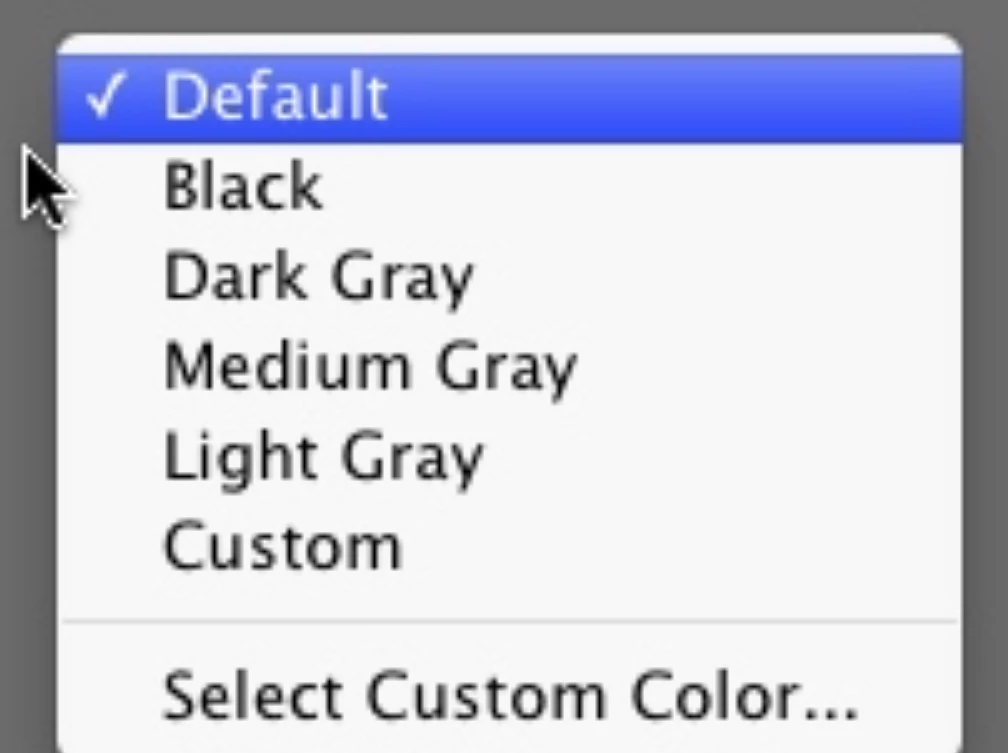
Right-click the blue part and change the color to the default.
 

~ Jane

2 replies

jane-e
Community Expert
Community Expert
April 14, 2021

@mzphoto wrote:

i cannot seem to undo


Did it happen in this session? Your History panel says all you did was open the file and assign a profile. Since you saved and closed, it's too late for Undo. You can only undo during the current session.


It's a TIF, so check the layers panel to see if there is a layer you can delete. Show a screenshot of the Layers panel if you need to.


The only other option is to use the Crop tool and crop out the blue if it's all on one layer.


If you made a copy of the original image, then go back and use that (make another copy).


Jane

mzphotoAuthor
Participating Frequently
April 14, 2021

thank you so very much but it's not the IMAGE but the SCREEN behind them... please see below! (and layer screen)


jane-e
Community Expert
jane-eCommunity ExpertCorrect answer
Community Expert
April 15, 2021

Right-click the blue part and change the color to the default.


~ Jane

Peru Bob
Community Expert
Community Expert
April 14, 2021

Please post a screenshot of the Layers panel.