Participant
December 31, 2019
Question

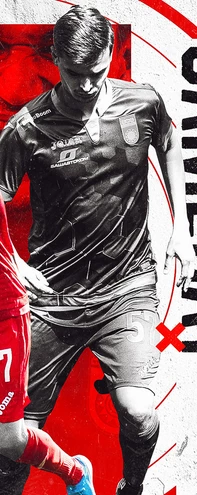
effect in a image

  • December 31, 2019
  • 1 reply
  • 327 views

Hi,

Could someone tell me what kind of effect was applied on this image?

This topic has been closed for replies.

1 reply

mglush
Community Expert
Community Expert
December 31, 2019

Hi!


Here is one way you can create the effect you've posted:

1. Use an Adjustment or an Adjustment layer to turn your photo into Black and White. (DO NOT change your file to grayscale.) for the effect below, I used the Black and White Adjustment and then used the color sliders to fine tune the effect I wanted.


2. The image has a flat, graphical look to it, and you can achieve it using the Posterize Adjustment. Dragging the slider will give you either more or less detail.


3. Add a new blank layer on top of the image in the Layer's panel. Select the color you want in the Foreground color box in the Tool panel, and either draw or paint or use one of the Marquee tools and fill with the color you chose. In the Layer's panel, set the Blending mode to Multiply. Because you are using Multiply to get the effect, you might want to go with a slightly lighter version of the color you choose, because using the Multiply blending mode will make it darker.


Here is an example:


Let us know if you have any questions!

Michelle


Participant
December 31, 2019

I need something like this

color doesn't matter

mglush
Community Expert
Community Expert
December 31, 2019

Like this? See the settings in the dialog box: