Roberto Bruce
Known Participant
November 19, 2023
Answered

Effect on test (layer style)

  • November 19, 2023
  • 3 replies
  • 1042 views

Effect on text: Good morning. Some time ago Adobe "sent" me some PSDs. I would like to imitate the effect that was applied to the font you see in the image. The fact is that there is no effect (layer style) in the text layer and I don't understand how it can be imitated.
Thank you
Roberto

Photoshop: 25.1.0

Windows 11

This topic has been closed for replies.
Correct answer Trevor.Dennis

I don't think you can completely match it with Layer Styles because we don't have enough control of the profile.  In Eye Candy 7 you can draw the profile.  You can still get fairly close though

In Bevel & Emboss Smooth works best.  You're trying not have an outer bevel, and Smooth gets you closer to that.

Altitude is important.  You need to go as high as you can get away with before you lose the inner wall.

Note the Highlight wasn't doing anything, so I set it to zero.
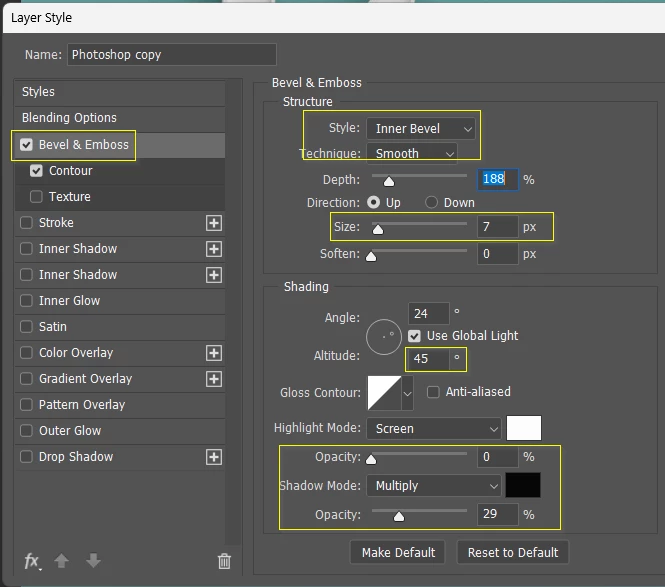
OK, the important thing here it the shape of the contor, and to a lesser extent, the range.  The settings are quite finicky.  A little difference makes a big change.
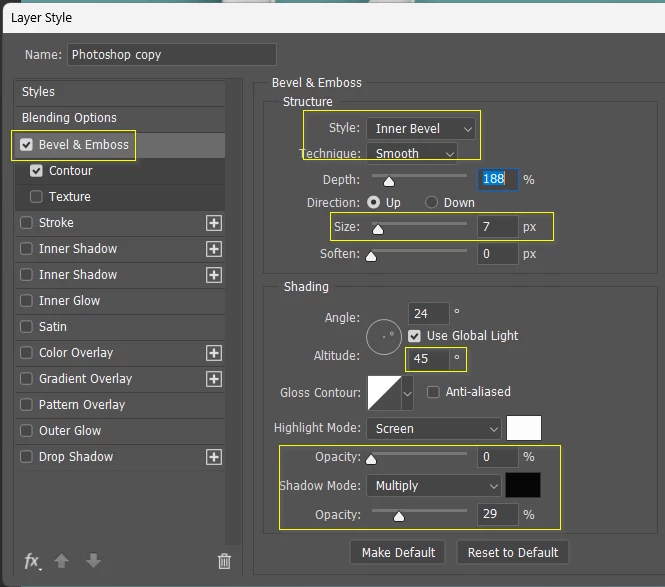
 

You can get it a bit finer with Eye Candy 7 but there's a problem with both versions, and that's the shading on the outer left edges. That is going to create a dark line when you try to extrude to give it some depth.  You could maybe fake it using a masked stroke, which wouldn't be too hard.

 

3 replies

Trevor.Dennis
Community Expert
Trevor.DennisCommunity ExpertCorrect answer
Community Expert
November 20, 2023

I don't think you can completely match it with Layer Styles because we don't have enough control of the profile.  In Eye Candy 7 you can draw the profile.  You can still get fairly close though

In Bevel & Emboss Smooth works best.  You're trying not have an outer bevel, and Smooth gets you closer to that.

Altitude is important.  You need to go as high as you can get away with before you lose the inner wall.

Note the Highlight wasn't doing anything, so I set it to zero.

OK, the important thing here it the shape of the contor, and to a lesser extent, the range.  The settings are quite finicky.  A little difference makes a big change.


You can get it a bit finer with Eye Candy 7 but there's a problem with both versions, and that's the shading on the outer left edges. That is going to create a dark line when you try to extrude to give it some depth.  You could maybe fake it using a masked stroke, which wouldn't be too hard.

 

Roberto Bruce
Known Participant
November 20, 2023

Thanks Trevor for the great advice. I worked a bit on the styles, adding a little contour and the result is better. It's not quite like the PSD, but it's close. Thanks again.
Roberto

Ares Hovhannesyan
Community Expert
Community Expert
November 19, 2023

You need to use Styles from Styles Panel or add "fx" from bottom of your Layers panel. Just open Style Panel and drop Shadow icon on your text or text layer.

Layer effects and styles in Adobe Photoshop

Myra Ferguson
Community Expert
Community Expert
November 19, 2023

The original text has been rasterized. If you look at the thumbnail in the Layers panel for the original text, it's a rasterized thumbnail as opposed to the T that appears in yours. The character details that appear in Photoshop in the original is just showing what font is currently selected to use.


You might get close to simulating the effect with Layer Styles, but it looks like it may have been 3D text--look at the difference in the perspective between the "i" on top and the "s" on the right.


Although you can try making the text 3D in Photoshop, the 3D features have been deprecated. 


Instead, you might try making the 3D text in Illustrator (Effect > 3D and Materials).

Roberto Bruce
Known Participant
November 20, 2023

(for Myra) But of course I had to think about it, it was rasterized, that's why I didn't "see" the text in the layer... As you can see from the MyText image you can see the attempts I made to get closer to the result of the text I was trying to "imitate " ". I also thought that maybe if I found a particular "action" I could get there, but it's not easy.
(for Ares) ok, see answer to Myra

Thanks anyway for your timely responses and help. I'll get over it.
Roberto

Myra Ferguson
Community Expert
Community Expert
November 21, 2023

Myra, thanks for your patience and suggestions. As mentioned, I had achieved a result that satisfied me. There he is


With your suggestions I achieved this. I tried several times but I think I did something wrong despite all the tests I did. However, this result is also beautiful, isn't it? Now I'll try again. Look here:


Roberto


It turned out great! 🙂