
Participant
May 29, 2022
Answered

Elliptical Marquee Tool

  • May 29, 2022
  • 5 replies
  • 1179 views

I am trying to refresh skills of long ago using Photoshop CS6. Having made a selection using the Elliptical Marquee Tool, my cursor turns to two cross hairs with the right hand one smaller and to the bottom right of the one on the left. I understand that it should be a broad arrow. I clearly have some setting wrong. Guidance would be verry greatly appreciated
    This topic has been closed for replies.
    Correct answer Jeff Arola

    I believe the reason your seeing the cursor with a large crosshair and small plus symbol is you have

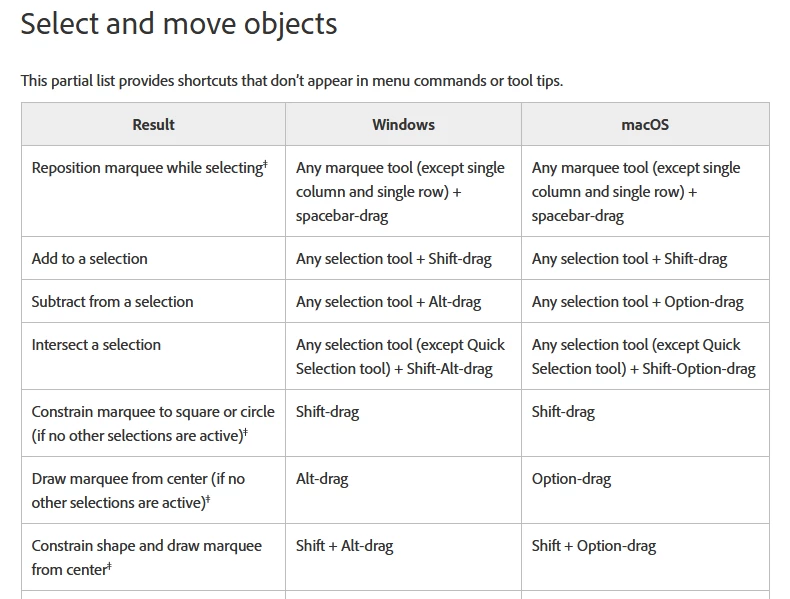
    Add Selection enabled for the Rectangular Marquee Tool. If you instead enable New selection you

    can then use various keyboard shortcuts like adding Shift to Add Selection.

    https://helpx.adobe.com/photoshop/using/selecting-marquee-tools.html

    https://helpx.adobe.com/photoshop/using/default-keyboard-shortcuts.html


    5 replies

    Jeff Arola
    Community Expert
    Jeff ArolaCommunity ExpertCorrect answer
    Community Expert
    May 31, 2022

    I believe the reason your seeing the cursor with a large crosshair and small plus symbol is you have

    Add Selection enabled for the Rectangular Marquee Tool. If you instead enable New selection you

    can then use various keyboard shortcuts like adding Shift to Add Selection.

    https://helpx.adobe.com/photoshop/using/selecting-marquee-tools.html

    https://helpx.adobe.com/photoshop/using/default-keyboard-shortcuts.html


    Participant
    June 4, 2022

    Thank you very much for that advice. Such a simple thing that wasted a lot of my time. Unfortunately, when you don't use Photoshop for a while minor aspects can get the better of you. I am extremely grateful for your guidance.

    jane-e
    Community Expert
    Community Expert
    June 4, 2022

    @denism76286596 wrote:

    Unfortunately, when you don't use Photoshop for a while minor aspects can get the better of you.


    The options for the tools are sticky, meaning that once you change them they stay that way across time and documents until changed again or reset. One thing that you might do as you are refreshing your skills is to reset all the tools so they work as they did when first installed.


    Right-click a tool in the options bar (not Tools panel) and Reset All Tools. (You can also reset just the selected tool.)

    https://photoshoptrainingchannel.com/tips/reset-tools-default-state/


    Jane


    c.pfaffenbichler
    Community Expert
    Community Expert
    May 29, 2022

    Are you pressing the shift-key or might it be stuck? 

    Participant
    May 30, 2022

    Thank you very much for your replies. I confirm that I do not have the shift key pressed or the caps lock on. I have been trying to send you a screen shot of my photoshop screen but with only limited success. Hopefully the attached will show the settings but I cannot get the cursor or the selection to show.


    I have used the Elliptical Marquee Tool to make a selection because that is lesson 101 in Classroom in a Book.


    Without wishing to bore you, the image is the logo of a charity that I recently joined (it was round until I stretched it trying to make the settings more visible). I am no graphic designer but it seems to me that there is too much sea. Maybe the dove should be opaque.


    Chuck Uebele
    Community Expert
    Community Expert
    May 29, 2022
    • You might have cap locks on.
    c.pfaffenbichler
    Community Expert
    Community Expert
    May 29, 2022

    Could you please post screenshots with the pertinent Panels (Toolbar, Layers, Options Bar, …) visible? 

    And as @Michael Bullo indicated seeing the cursor would be helpful, so maybe a screen recording instead of a screenshot. 


    Why do you use an elliptical Selection?

    Might a Path Ellipse not also be useful (as a Vector Mask for example)? 

    Michael Bullo
    Community Expert
    Community Expert
    May 29, 2022

    Any chance you can capture this with a screen grab? If so, could you please post it?