Exit
  • Global community
    • Language:
      • Deutsch
      • English
      • Español
      • Français
      • Português
  • 日本語コミュニティ
  • 한국 커뮤니티
0

Epson Printer P900 ICC Profiles Disappear after macOS updates

Participant ,
Apr 09, 2023 Apr 09, 2023

This has gone on for many years now, first with my Epson 3880 and now with my Epson P900.


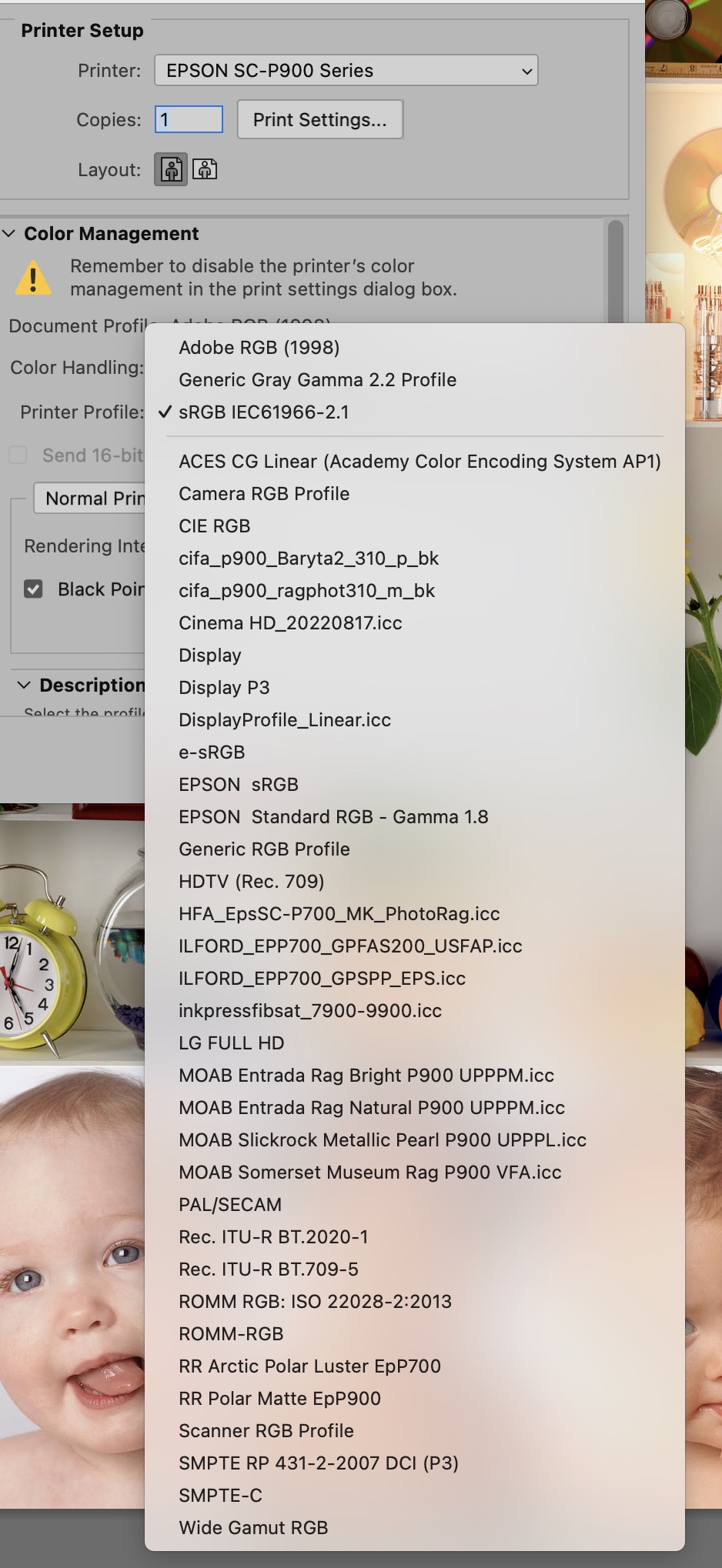
Everytime there is a macOS update or revision, I lose all the Epson ICC profiles when I go to print.  All the other profiles I use (ie. Moab, Ilford, Hahnemühle) remain, but the Epson paper profiles are gone.  They are still somewhere in the operating files, but the access has been lost.


My recovery is the same as it has been for the past years.  I follow the Epson Guide for removing the Epson printers from my computer, then reinstalling the P900 drivers from scratch.  This is not a little task as I lose ALL the Epson printer drivers and have to reinstall them.  I have 2 Epson printers.


I keep hoping one of these updates, either from Adobe or from Apple will fix this problem.  Three years ago I spent over a month's duration working with Apple to try and discover the problem.  Apple concluded it was not an Apple problem, but I was never convinced.


I have attached a screen shot of what the ICC profile selection page looks like when printing from Photoshop.  There should be a whole list of the Epson Papers above the line, but there not shown.


I am so disappointed that I have to continue to use my brute force approach to fixing this problem every time I do an update.  However, it seems to be less time that it takes to go around in circles with Apple or Adobe only to get no solution.


If I ever get a complete solution, I'll post it here.


By the way, the Epson P900 printer is terrific.  I've added the roll printer attachment and that works well.

Wee Jacky.

TOPICS
macOS
10.8K
Translate
Report
Community guidelines
Be kind and respectful, give credit to the original source of content, and search for duplicates before posting. Learn more
community guidelines
Adobe
New Here ,
Nov 05, 2024 Nov 05, 2024

there is a typo above, My printer is Epson SC (surecolor) P700/900

Translate
Report
Community guidelines
Be kind and respectful, give credit to the original source of content, and search for duplicates before posting. Learn more
community guidelines
New Here ,
Dec 07, 2024 Dec 07, 2024

This was really, really helpfl. Thank you for posting. I thought I was going crazy when I went to print today and all my Velvet Fine Art paper profiles were gone! I'll try your workaround (what a pain in the butt!). But seriously, thank you. 

Translate
Report
Community guidelines
Be kind and respectful, give credit to the original source of content, and search for duplicates before posting. Learn more
community guidelines
Explorer ,
Dec 08, 2024 Dec 08, 2024

When you set up the SC P900 Epson installs several apps under Epson Software. One of these is Epson Media Installer.

Open this slect your printer in the dropdown. Choose Media Download and then the profiles you wish to install. They will then be downloaded to Mac HD/Library/Printers/Epson/InkjetPrinter2/ICCProfiles/EP2010HK1.profile.  You need to right click and then click Show Package Contents. Click on Contents then Resources to reveal the Profiles. You can COPY  the profiles and store them in a safe place for future use. They can also be stored in Mac HD/Library/ColorSync/Profiles.

Translate
Report
Community guidelines
Be kind and respectful, give credit to the original source of content, and search for duplicates before posting. Learn more
community guidelines