
Participant
August 13, 2019
Question

Epson V600, incomplete scans

  • August 13, 2019
  • 2 replies
  • 1594 views

Working from a 21.5 iMac, OS 10.13.6 in Photoshop CC with an Epson V600 Photo scanner…

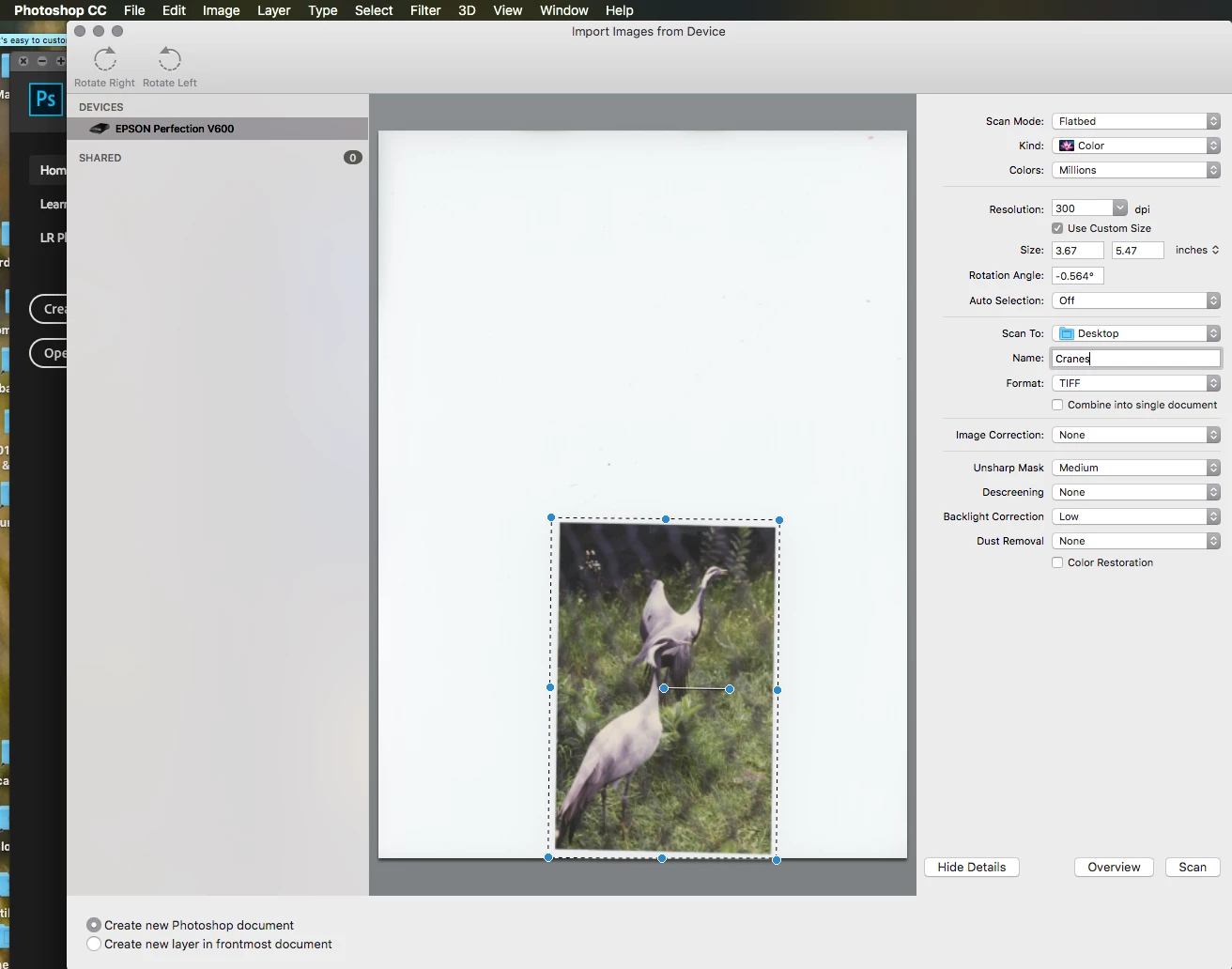
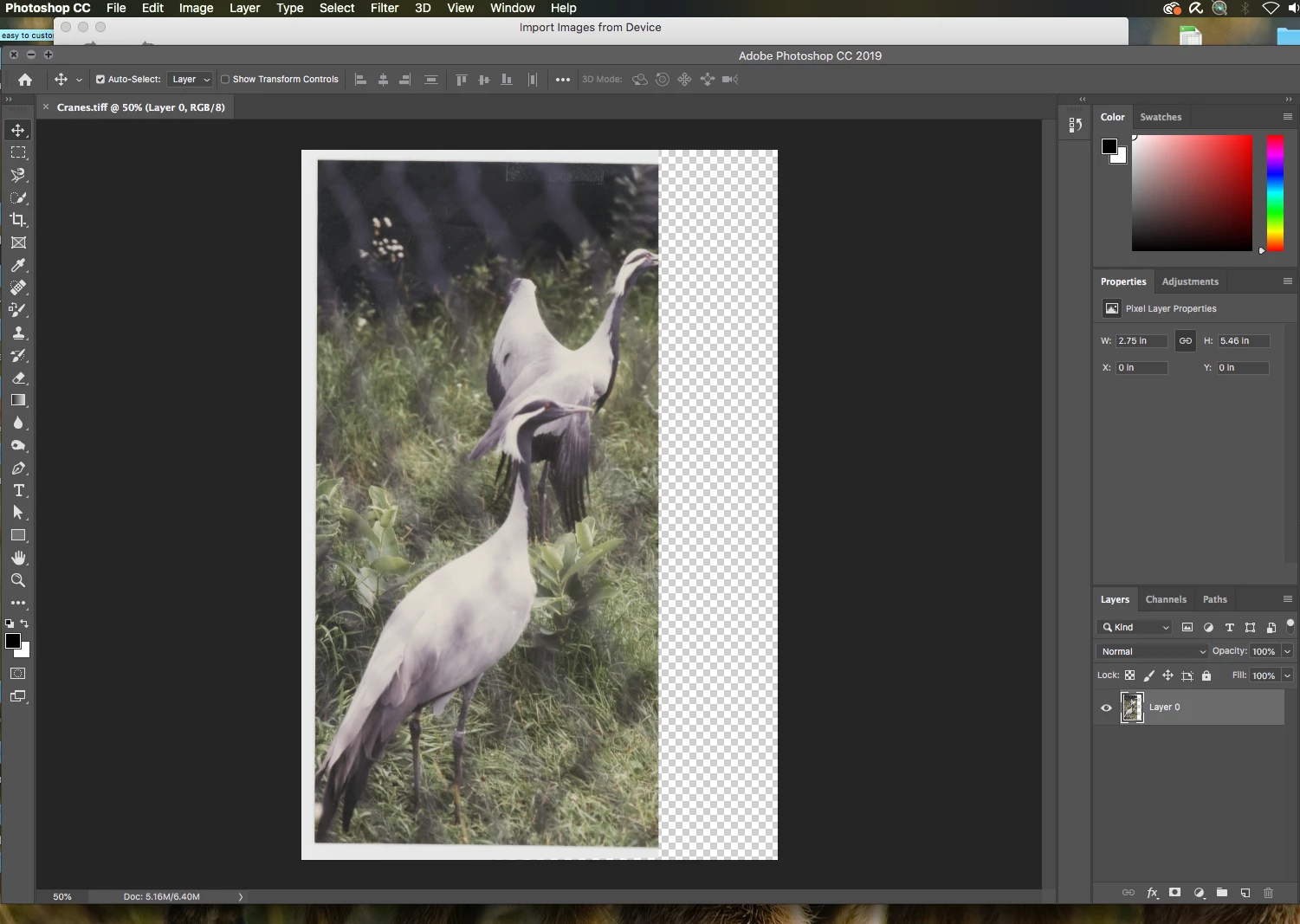
I usually get incomplete scans. For scans of opaque items, photographic prints in this case, which require no straightening as they lay on the glass of the scanner bed, once in a while they will come out OK. But any little rotational shifting of the selection area (marching ants) to get straightened images, cause the acquired image to be only 2/3rds complete. If I open the auto-saved image (as a tiff) on the desktop in Apple’s “Preview, it looks OK. But opening it in Photoshop CC only 2/3rds is complete. I updated the driver and scan utility from Epson twice (recently two days ago) but they have not had any effect in solving the problem. This problem has existed through several versions of Photoshop over the past years; never had any real need to fix problem till now.

I talked with Epson tech support yesterday. They say the problem is from within Photoshop CC, specifically …  File > import > images from Device… . Something is not working correctly for the Epson V600 Photo scanner. Has anyone else experienced this problem?

Pre-scan setup:
Opened in PS CC:
Same opened in Apple's Preview:

3. Auto-saved viewed in Apple

This topic has been closed for replies.

2 replies

gener7
Community Expert
Community Expert
August 14, 2019

I can recommend a paid solution: VueScan Scanner Software for Windows, Mac OS X and Linux

You can trial and see how it goes.

JJMack
Community Expert
Community Expert
August 13, 2019

Does Epson scanning software scan the image well.  If it does use it instead of  Adobe and Mac import.  Adobe Widows WIA import seems to worn from my network HP Pinter/scanner.

JJMack
Participant
August 13, 2019

Yes Epson Scan works, but need then to straighten crooked scan in PS, that's why I would prefer using the Photoshop "input device." 1. So will this problem be rectified in the future? and, 2. what do you mean by "seems to worn from my network HP Pinter/scanner"?

JJMack
Community Expert
Community Expert
August 13, 2019

That a typo I can not type. worn should have been work.

Adobe Photoshop does not write code to support scanners on windows and I would imagine that would also be the case on a Mac.  On Windows Adobe uses (WIA) Windows Image Acquisition Drivers.  I would think  that scanner manufacture beside supplying their own scanning application they would also supply WIA driver so applications like Photoshop can use one's scanner.

I do not use a Mac. So I do not know how scanners are supported by Photoshop on a Mac I know it would  not be via a WIA interface. However it could be by some simulate Mac interface.   So where is your problem? In Photoshop, In Mac OSx version, In some Epson driver.   In may be fixed in the future. These are user forums most here do not work for Adobe, Apple, Microsoft or Epson you most likely will not get a definitive answer here to will it be fixed.

JJMack