
Participant
December 27, 2016
Answered

Eraser tool is square, not a circle

  • December 27, 2016
  • 3 replies
  • 38103 views

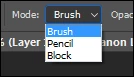
Hi I can't get the eraser tool to the shape of a circle. For years it always was in the shape of a circle, Now when I go to use it there is the shape of a square. It still erases but the circle is easier to use.
    This topic has been closed for replies.
    Correct answer Ronald Keller

    You have set it to Block instead of Brush in the Options bar.

    3 replies

    Bobasneh
    Participant
    June 22, 2018

    In Adobe Animate CC, to get the square eraser back to a circle, select the eraser tool and keep pressing the '[' key

    Ronald KellerCorrect answer
    Legend
    December 27, 2016

    You have set it to Block instead of Brush in the Options bar.

    Trevor.Dennis
    Community Expert
    Community Expert
    December 27, 2016

    You can chose to use any brush preset with the eraser, the same as with the brush tool.  Right click on the canvas to open the brush selection panel, and chose the preset you want.