
Participant
March 1, 2017
해결됨

Erroneous Straight Lines When Drawing Curves

  • March 1, 2017
  • 2 답변들
  • 16360 조회

Hey all. I'm at a loss and was wondering if I could get some insight. A few hours of searching for answers and troubleshooting on my own has yielded zero answers for me.

First off, I'm on a Windows 10 machine, brand new, I can get specs if necessary. Recently updated. I'm running Photoshop CC 2017.0.1 x64 bit. I have an XP-Pen Artist 22HD graphic tablet that, up until very recently, had no issues as far as I'm aware.

When I draw small, quick curves with the brush tool (any brushes, too, not just one) I often get strange straight lines that jump from the end of my stroke to the beginning point. I've attempted tweaking settings, restarting the computer and Photoshop, reinstalling and updating drivers, using a stroke stabilizer (Silky Shark), creating custom brushes, nothing helps. This is troublesome and causes a lot of wasted time when I am working.

I've got an example below:
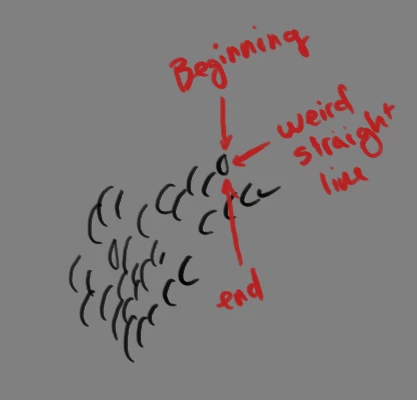
Thoughts? Also, sorry if this belongs somewhere else...

이 주제는 답변이 닫혔습니다.
최고의 답변: davescm

Hi

I have seen the effect you describe reported on a Wacom using Windows Ink and that ensuring the pen pressure is controlling at least one of Opacity or Flow (or both) stopped the issue  - turning both off and the effect you describe returned.

If your tablet is using Windows Ink, you may want to try the solution suggested in this thread, it ​may ​help :

Re: Photoshop Shape Dynamics not using my pen sensitivity

Dave

2 답변

Participant
July 11, 2017

I have the same issue but except its doing it for more than just photoshop, for flash it seems to do the same thing and the pressure option isnt even on the screen? any help?

JJMack
Community Expert
Community Expert
March 1, 2017

There have been problem like yours also reported from user using Wacom tablets.  I believe Wacom  users were able get their  Wacom tablets working well with Photoshop b turning Wacom double click distance off in Photoshop I know I do that in my Wacom Preference.   I know nothing about you tablet though.

JJMack
AlyMcCArt작성자
Participant
March 1, 2017

I found that, and unfortunately there's no setting for that with my tablet. I can turn it way down, but there's no actual "off" setting.

Edited to add: I have sent an email to XP-Pen about the issue and hopefully they can shed some light on this or provide a solution.

davescm
Community Expert
davescmCommunity Expert답변
Community Expert
March 1, 2017

Hi

I have seen the effect you describe reported on a Wacom using Windows Ink and that ensuring the pen pressure is controlling at least one of Opacity or Flow (or both) stopped the issue  - turning both off and the effect you describe returned.

If your tablet is using Windows Ink, you may want to try the solution suggested in this thread, it ​may ​help :

Re: Photoshop Shape Dynamics not using my pen sensitivity

Dave