
Inspiring
May 29, 2023
Answered

Error 21: undefined is not an object

  • May 29, 2023
  • 25 replies
  • 16127 views

Hi, I'm using PS 24.5.0 on a M1 Mac.

Everytime I like to save an image (Ctrl + S) I get this error. The image will be saved, but I get this every time. I'm not shure, maybe since I installed the beta of PS. Now the beta is uninstalled.
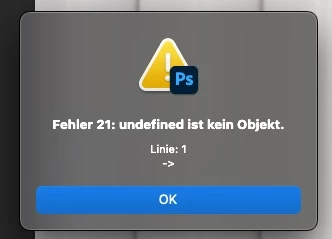
 

Does anyone have an idea?


Thanks, Stefan

Correct answer Pixel-Sallo

Problem solved!

I deinstalled PS (kept all settings) an reinstalled it 🙂

25 replies

Rick Adams
Inspiring
July 31, 2023

May I ask how we are to find where you moved this if you don't provide a link to the new location?

Beth Lily Redwood
Participant
July 31, 2023
I am sorry this happened to you. I had the reverse issue. I hope it’s fixed soon for everyone.
Known Participant
July 31, 2023

@Beth Lily Redwood no they didn't. The problem started for me AFTER upgrading to 24.7 and went away once I went back to 24.6. I had no issues in 24.6 before the upgrade. So it seems that in fixing it for people that had the issue in 24.6, they created the issue for others in 24.7. So I'm stuck on 24.6 for now.

Beth Lily Redwood
Participant
July 31, 2023

Adobe provided a fix for the problem with the latest update (24.7).

Beth Lily Redwood
Participant
July 31, 2023

I have 24.6 and am getting that error message. I cannot open LR files as layers or individually in PS 24.6. 

Known Participant
July 31, 2023

Hi, 

The same issues are with "save as" and it can't open from Lightroom to Photoshop.  Adobe should fix this issue. Downgrading is not the correct answer or solution.  

Participant
July 30, 2023

I just started getting this error as well when saving Tiff files. 

Also having issues trying to open images from lightroom into photoshop. 
So far I have found that I need to open them as smart objects to get them to open, but when saving I get the above mentioned error. 

Participant
September 10, 2023

Having the same exact problem, out of the blue. Updated a couple weeks ago, this just started.


Participant
July 30, 2023

I'm getting the same error message. I can't export any RAW files from LR into PS. I can open TIFs, but it's not working with the RAWs.

Participant
July 30, 2023

Hello all. 

Since I uploaded the most recent version of PS (24.7.0 Release) and Lr (Ver. 12.4 Camera Raw 15.4), I can't export 2 photos at the same time from LR to PS. PS opens but nothing gets imported. Nothing happens. 

Exporting 1 photo from LR to PS works. But after making adjustments I can't save the file and get this error message: Error 21: Undefined is not an object. Line: 1 -> 

Anybody encountered this issue and how to solve this? 


Known Participant
July 29, 2023

@Andreafine 


To downgrade to 24.6:


On the Creative Cloud app, go to the All Apps Tab. Find Photoshop. Click on the three dots all the way to the right. On the drop-down menu choose 'Other versions'. You'll be able to pick 24.6 from there.