Participant
March 10, 2022
Question

error, bug

  • March 10, 2022
  • 2 replies
  • 122 views

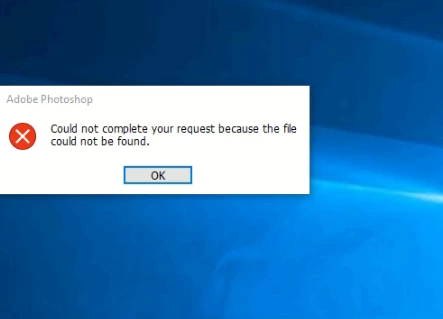
Im receiving the following error can anyone help


This topic has been closed for replies.

2 replies

Legend
March 10, 2022

Make sure the file you're opening is the right kind of file with the right file extension: https://helpx.adobe.com/photoshop/kb/error-invalid-jpeg-marker-displays.html

AxelMatt
Community Expert
Community Expert
March 10, 2022

Please Consider including the following in your question: 

  • Adobe product and version number 
  • Operating system and version number 
  • The full text of any error message (s) 
  • What you were doing when the problem occurred 
  • Screenshots of the problem 
  • Computer hardware, such as CPU; GPU; the amount of RAM; etc 


Thanks. The above info will help to solve your problem. 

My System: Intel i7-8700K - 64GB RAM - NVidia Geforce RTX 3060 - Windows 11 Pro 25H2 -- LR-Classic 15 - Photoshop 27 - Nik Collection 8 - PureRAW 5 - Topaz Photo