
peterp83168498
Inspiring
December 20, 2020
Question

error message when printing

  • December 20, 2020
  • 2 replies
  • 144 views

hi

I keepgetting this message when I go to print: –
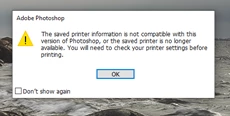
 

I am using Windows 10 and an Epson sure colour P 600 printer on a network(e.g. not Wi-Fi)the computer has a I9 Chip and 64 gig of RAM

occasionally if I ignore it (just click okay) I find some of the print controls in photoshop don't work.

sometimes it takes up to a minute from pressing print for the printer to kick into life.

many thanks for the help in in anticipation.

Peter

I have deleted the printer drivers and reinstalled from the Epperson support website.

Anyone got any ideas

This topic has been closed for replies.

2 replies

NB, colourmanagement
Community Expert
Community Expert
December 21, 2020

What Jane said,

and here's a bit more info too

Have you tried resetting Photoshop preferences? Although user preferences do not contain print settings, resetting also restores Photoshop's internal preferences which are saved when Photoshop closes. If they become corrupt then various issues can occur. [Thx DavesCM]

I suggest you try reset Photoshop’s preferences & see if it helps? 

https://t.co/ulJI7cGn1G
https://helpx.adobe.com/photoshop/using/preferences.html
You may want to backup your settings beforehand: 
https://t.co/4dX7gkr36D
https://helpx.adobe.com/in/photoshop/using/preset-migration.html

It may be time to reinstall photoshop. Use the Adobe CC cleaner tool to remove all traces first.

Uninstall photoshop BUT make sure to choose the option “Yes, remove app preference”.
 
Once that process finishes, start the installation process and look into the “Advanced Options”. Uncheck “Import previous settings and preferences” and choose to “Remove old versions”.

https://forums.adobe.com/thread/2405286


I hope this helps
neil barstow, colourmanagement net :: adobe forum volunteer
google me "neil barstow colourmanagement" for lots of free articles on colour management
[please only use the blue reply button at the top of the page, this maintains the original thread title and chronological order of posts]

jane-e
Community Expert
Community Expert
December 20, 2020

Try resetting the Print dialog box by holding down the space bar as you choose File > Print. Or try some of the other ideas here:

https://helpx.adobe.com/photoshop/kb/troubleshoot-printing-problems.html


~ Jane